Verify & Validate
Plan and link test cases to requirements and electronic designs.
Track coverage and capture evidence to ensure compliance without disrupting collaboration between engineers.
Plan & Track All V&V Activities in One Place

Centralize verification plans, test runs, and evidence collection in a single workspace accessible to everyone. Stay audit-ready and avoid the risks of scattered or missing data, even when compliance information is requested under time pressure.
Link Tests to Requirements & Designs

Ensure every requirement is implemented and verified by linking it directly to electronic designs and test runs. With open access to requirements, teams work without barriers—eliminating gaps, oversights, and late-stage rework.
Ensure Coverage with Structured V&V Plans

Build complete verification, validation, and testing plans with clear requirements traceability. Track progress in real time so multidisciplinary experts can catch issues early and resolve them without relying on formal check-ins.
Key Capabilities

Manage Requirements & Verification in One Shared Workspace
Move away from spreadsheets to manage requirements, verification activities and test cases in the cloud. Choose a secure, scalable and intuitive environment for true product co-creation with full traceability and change history.
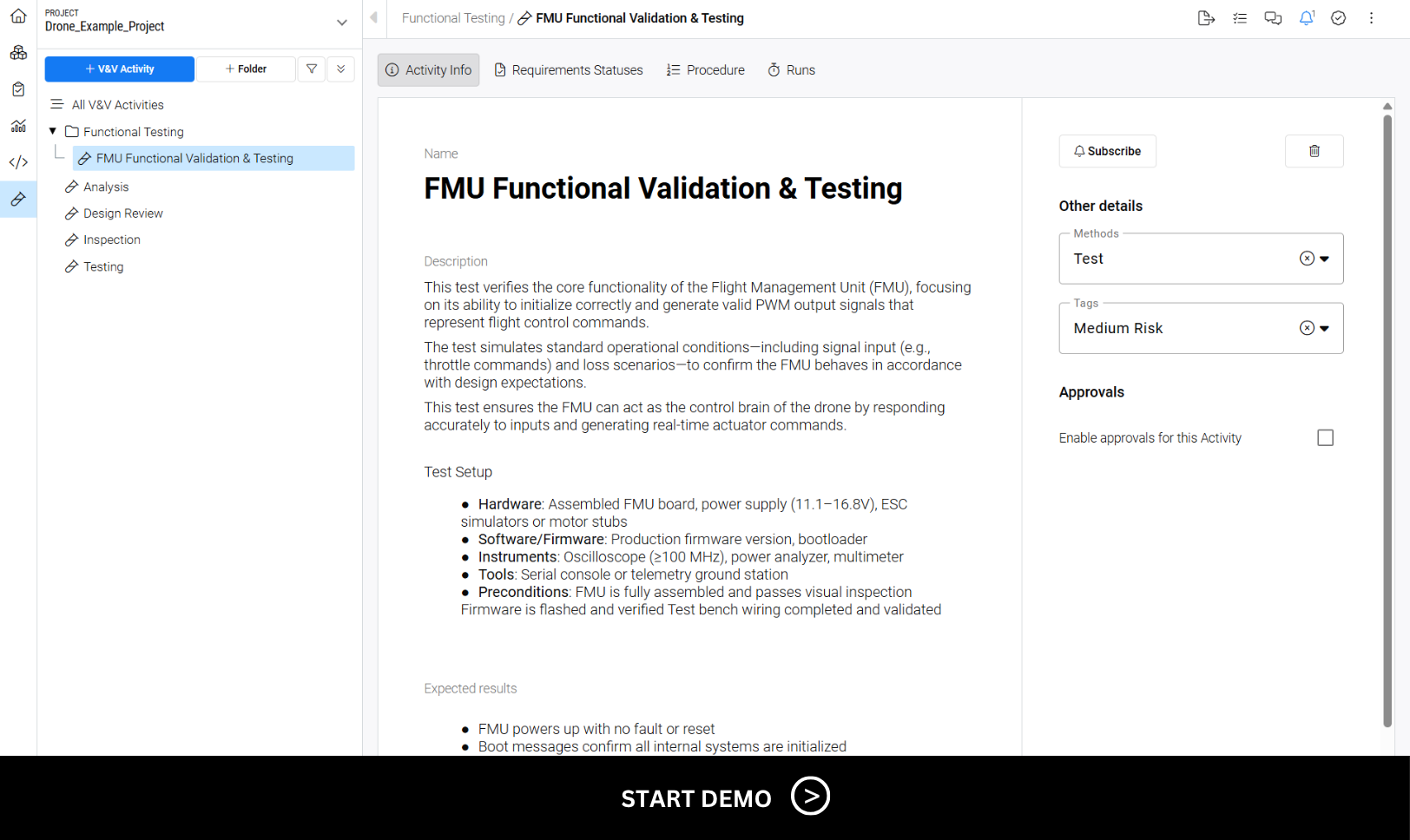
Centralize Your Verification & Validation Activities
Plan, run, and document all V&V activities for your electronics projects in a centralized tool. Maintain full traceability by linking test runs directly to requirements. Attach evidence to support reporting and simplify audits, giving all collaborators a shared view of the process.
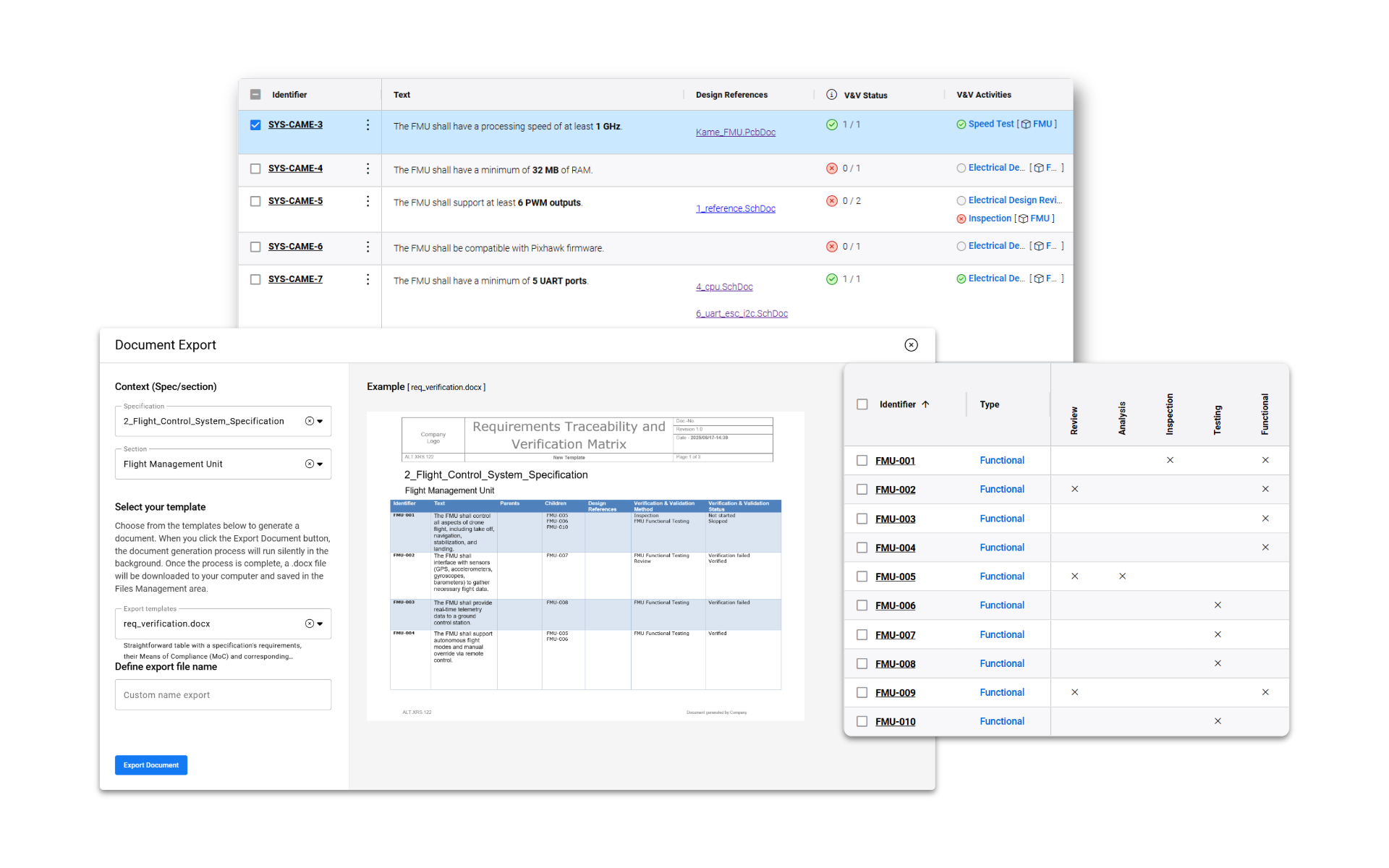
Generate Audit-Ready Documents from Live Project Data
Automatically create Traceability Matrices, Certificates of Design Conformity, and other compliance documents using customizable templates. Export directly from live requirements and test data—saving time and ensuring accurate, up-to-date documentation.
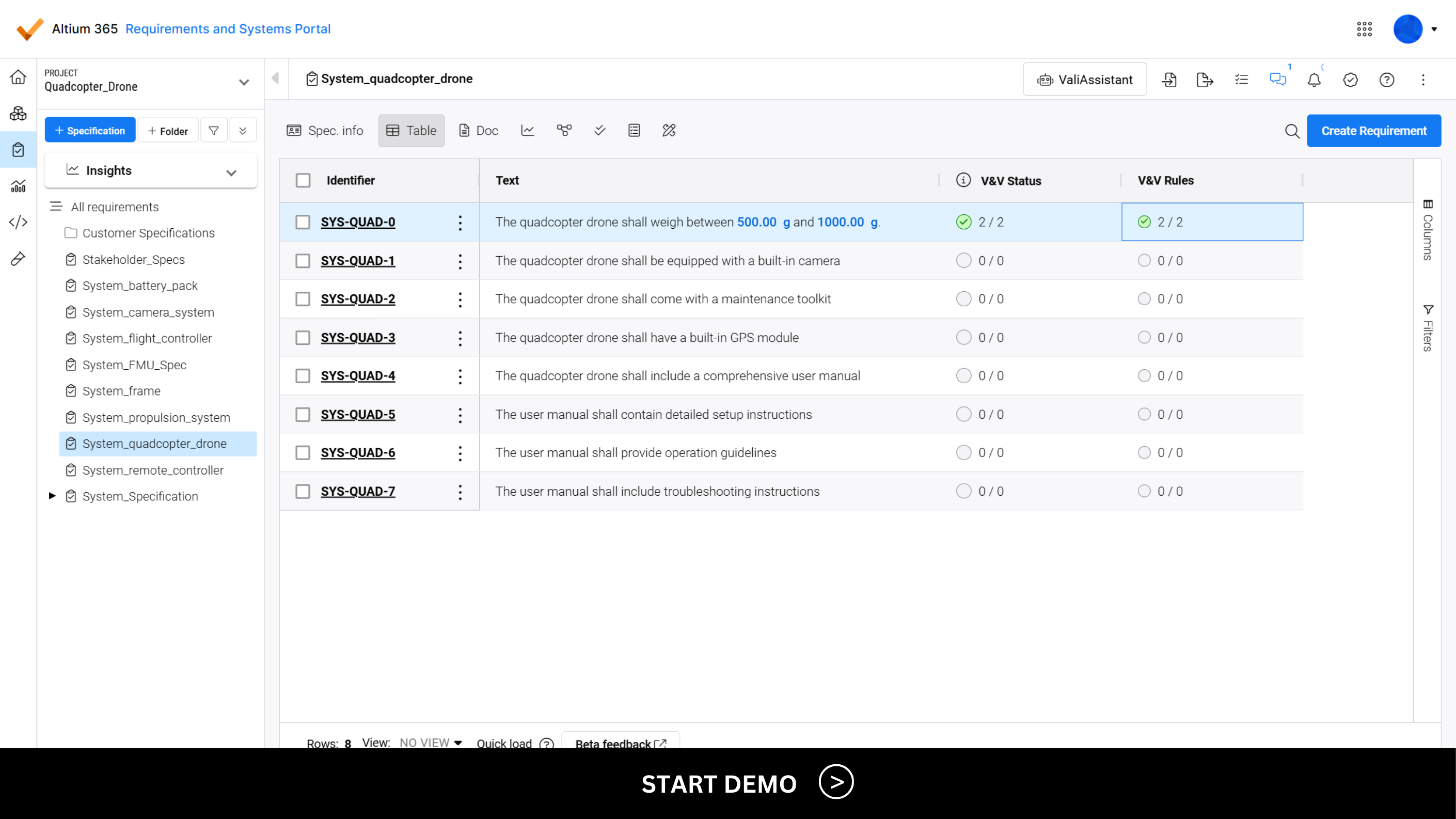
Continuously Verify System Performance with Parametric Requirements
Turn numerical requirements into parameters and create verification rules that automatically compare system performance to functional targets—facilitating co-creation between systems and electronics engineers.
FAQs
Most electronics teams still manage requirements in spreadsheets or shared documents. While flexible and free, these tools quickly become unscalable—leading to version control issues, missed requirements and costly rework. Traditional requirements management systems offer structure but are often expensive, complex and primarily used to store information rather than support engineers’ day-to-day work with requirements.
Altium’s requirements management and V&V capabilities are purpose-built for electronics teams. Available in Altium Develop, Altium Agile Teams and Altium Agile Enterprise, they replace scattered spreadsheets with a collaborative, versioned and traceable environment that integrates directly with your design and verification workflows. Unlike generic requirements tools, the software is easy to adopt and designed to support agile electronic product development—without the cost and complexity of legacy enterprise platforms.
No. Altium offers flexible requirements management and V&V tools designed to support the development of software-defined products. While the software is especially strong in electronic hardware development, it is equally capable in broader engineering contexts—including, software and firmware for embedded solutions and software-defined products. We continue to add features that benefit electronics and embedded software teams alike.
Altium’s requirements management and V&V capabilities are purpose-built for electronics teams. Available in Altium Develop, Altium Agile Teams and Altium Agile Enterprise, they replace scattered spreadsheets with a collaborative, versioned and traceable environment that integrates directly with your design and verification workflows.
Altium organizes requirements capabilities into two main modules: Requirements Management & Verification and Validation. Requirements are also natively supported in Altium Designer and all electronic design file uploaded to the Altium webviewer.
Core requirements features include:
- Requirements Traceability to PCB Designs: Give engineers constant access to clear requirements in the right context. Status changes automatically sync across your project.
- Requirements Importer: Import unstructured requirements into your Altium project from XLS, PDF or DOC files. Automatically convert them into structured data with an AI assistant.
- Templated Document Export: Automatically generate compliance documents, such as traceability matrices, from live requirements and verification and validation data using customizable templates.
- AI Requirements Assistant: Create clearer, smarter requirements in less time. Quickly break down incoming system requirements into clear electrical specifications with an AI assistant.
- Comments and Notifications: Engage your team’s experts in requirement review and implementation processes to arrive at the best possible specifications and solutions.
- Live Dashboards and Analytics: Monitor project progress and requirement verification status with live dashboards to quickly identify and resolve noncompliant design issues.
- Versioning and Change History: Automatically track requirement changes with full version history. Review past edits, keep teams aligned and ensure traceability and compliance.
- Parametric Requirements: Turn numerical values in requirements into parameters that can be reused across your project.
- Continuous Verifications: Create verification rules that automatically compare system performance to functional targets specified in the requirement.
You can import requirements from:
- Excel spreadsheets (XLS or CSV)
- Word files (DOC)
- PDF documents (PDF)
The importer uses AI to recognize and structure your data—including text, values, parameters and parent-child relationships—so you don’t have to start from scratch. This helps your team transition smoothly from informal documents to a scalable, collaborative requirements tool.
Altium’s requirements management and V&V capabilities simplify your team’s ability to coordinate hardware development to standards such as FDA 21 CFR Part 820, ISO 13485 and IEC 60601. The Altium 365 platform connects requirements, design data and verification in a traceable, audit-ready workflow.
Teams can link regulatory requirements to design outputs, track changes with version control and generate the documentation needed for FDA, EMA and ISO audits—all in one system.
Valued by Users,
Trusted by Organizations

Department Director at Sensio
We've found Altium's Requirements Portal to be a game-changer in our product development process. The structured approach to documenting requirements has streamlined our workflow, making it easier to manage and organize project specifications effectively. Working with requirements is both productive and enjoyable!


Project Manager (R&D & CI) at Memtronik Innovations
The ROI is FAST. We design three to five products a month, and reprints can easily increase our costs by 40%. Requirements Portal has saved us a lot of downtime in production. We basically got our value back in a couple of months.

Systems Engineer at ISISPACE
Requirements Portal has been an instrumental tool, allowing us to gather all-level requirements in one database and ensure full traceability throughout the project's life. Its ease of use, flexibility and scalability are features we really enjoy.


Tool Solution Architect at Ultratronik GmbH (UX-Gruppe)
The introduction of the Requirements Portal helps the UX-Group to always keep track of the fast changing requirements during the development process of our products. The integration into Altium is also a huge improvement for our review process during the hardware development and helps to shorten it noticeably.

Resources
Guide
Requirements Management for Modern Electronic Hardware Teams
Webinar
Integrating Requirements into Your PCB Design Workflow

Podcast
Automating Requirements: How Altium 365 Is Changing Engineering