
洞察
概览
- 了解如何访问 Insights,并解读需求状态、验证、活动及质量信息。
- 掌握如何运行和刷新质量评估,包括如何在评估提示词中添加指令。
- 探索用于评估需求质量的评分标准和 INCOSE 规则。
需求模块中的洞察功能以可视化方式全面汇总项目中规格/章节内需求的当前状态。这款交互式工具可从宏观层面展示不同文件夹、规格和章节中需求的各个方面,例如状态、验证状态和讨论活动。借助此功能,您可以快速了解项目进度,并识别可能需要关注的领域。
访问洞察
要访问洞察功能,请导航至项目中的需求模块,然后点击右上角的  按钮。
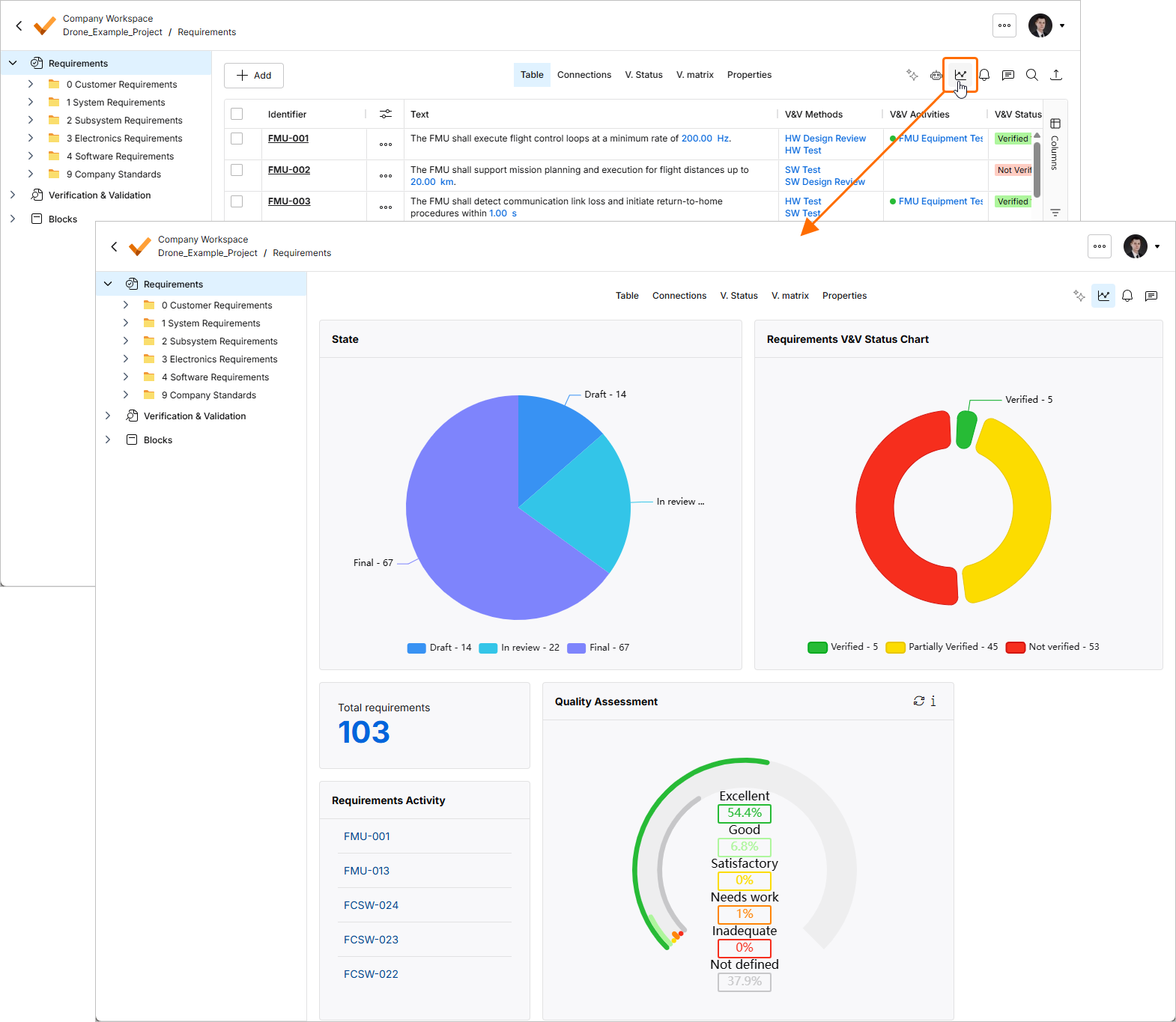
洞察界面
打开洞察功能后,您会看到多种图表。这些图表根据规格/章节或文件夹中的需求生成。目前,洞察会显示以下信息。
-
状态
-
需求验证与确认(V&V)状态图
-
规格/章节/文件夹中的需求数量
-
需求活动(显示最近修改的需求)
-
质量评估图
状态图
此饼图显示处于不同状态的需求所占的比例:
-
Not Defined:尚未明确定义的需求。
-
Draft:当前处于草稿阶段的需求。
-
In Review:正在审核的需求。
-
Final:已定稿的需求。
需求验证与确认(V&V)状态图
另一个饼图显示规格中已验证、未验证或部分验证的需求数量。
-
Not Verified:尚未验证的需求。
-
Partial Verified:已部分验证的需求。
-
Verified:已完全验证的需求。
质量评估
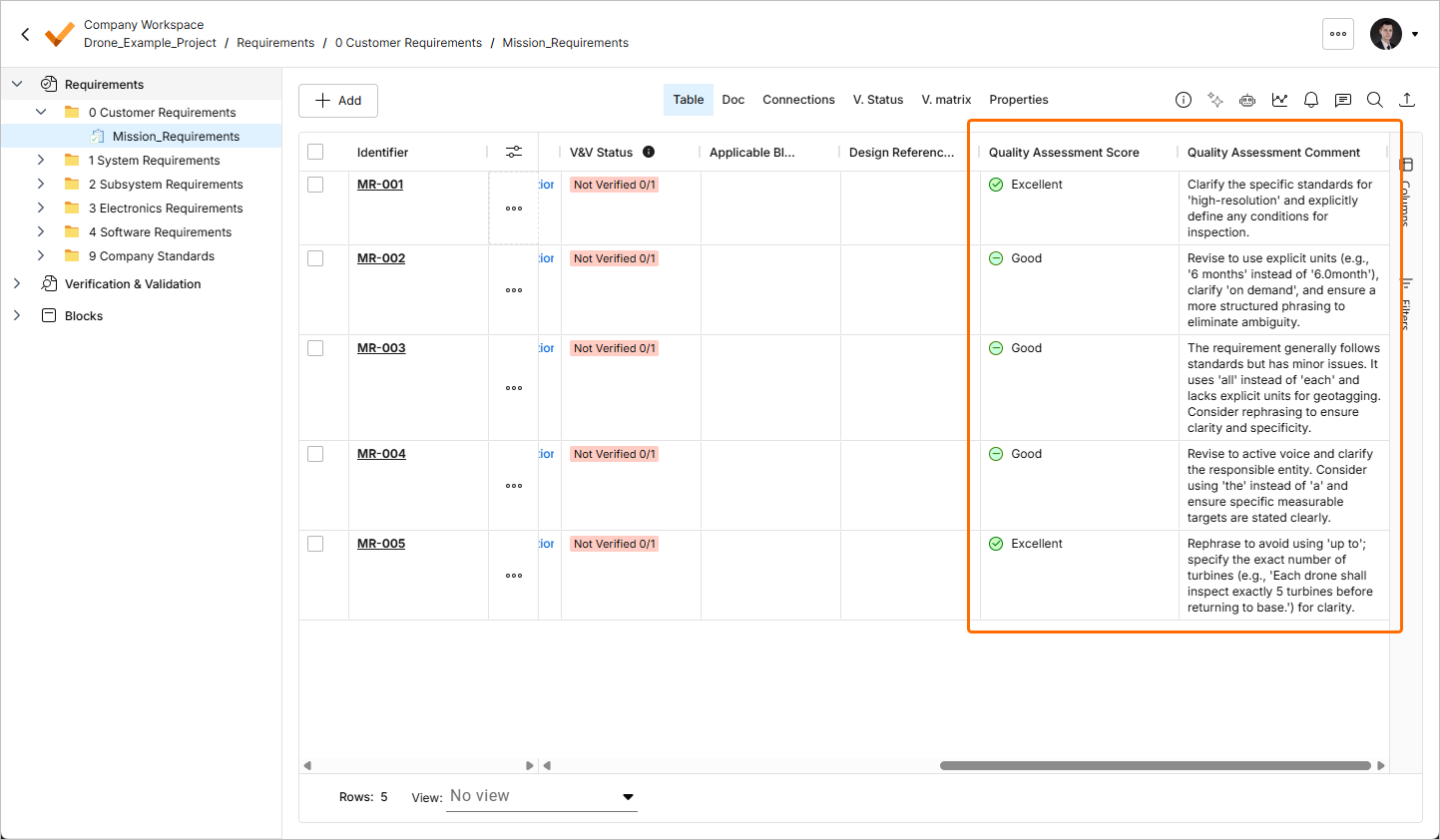
Quality Assessment 功能是一款 AI 驱动的工具,旨在帮助您保持高质量的需求。此功能根据多个质量参数评估文本,为每项需求提供 Quality Assessment Score 和 Quality Assessment Comment,并显示在需求模块的相应列中。这样,您就可以快速识别可能需要进一步完善的需求。
访问质量评估
要使用质量评估功能,请选择需求,点击  按钮,然后选择 Assistant » Quality Assessment 命令。此时将打开 Quality Assessment 窗口,告知您将要分析的需求数量。您可以在 Prompt Extension 区域的文本字段中提供其他指示。
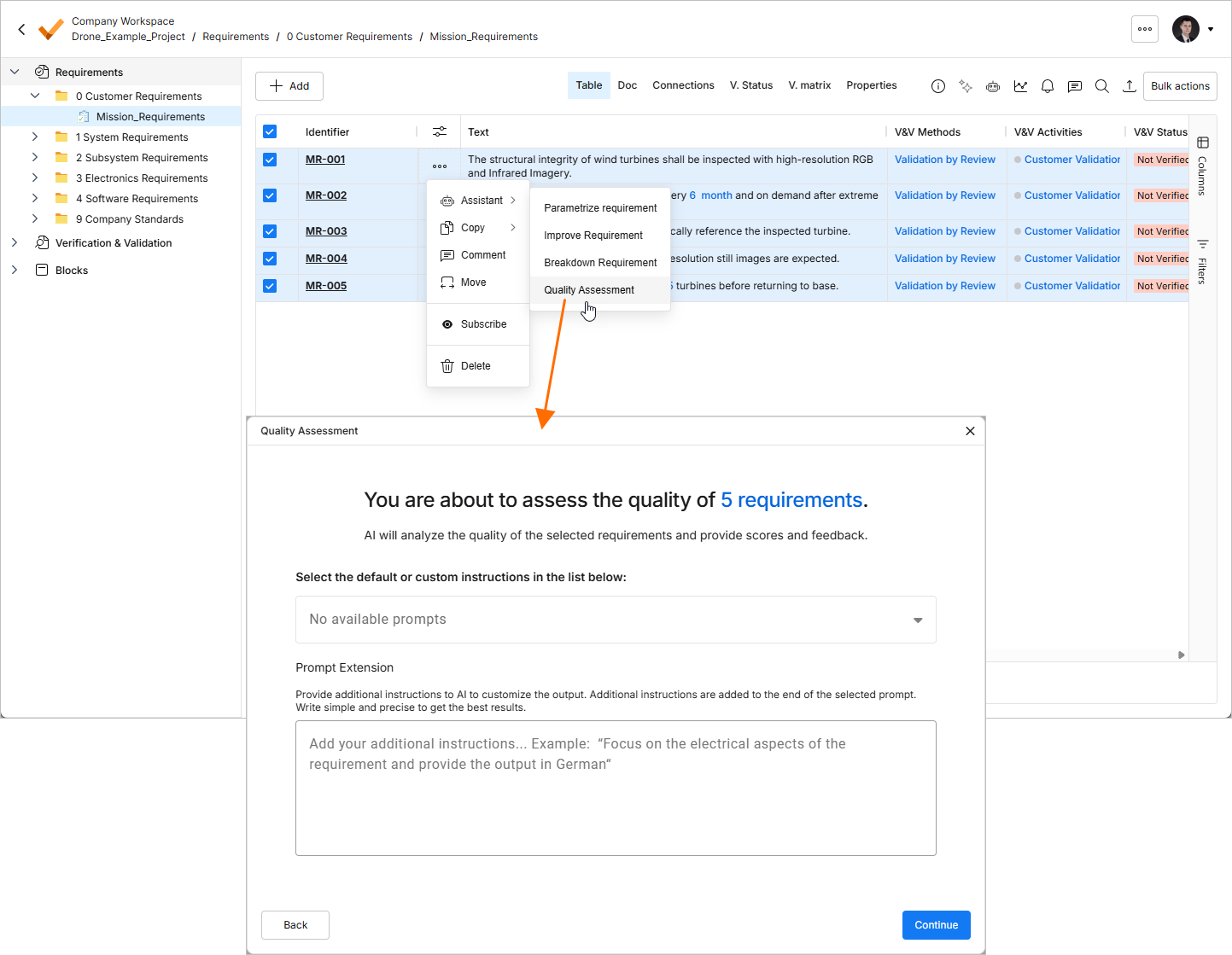
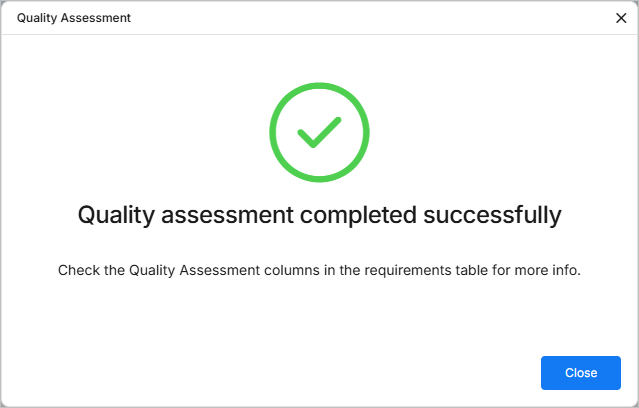
点击  以继续。处理完成后,下一个窗口将提示您质量评估已成功完成。
规格表中的 Quality Assessment Score 和 Quality Assessment Comment 列将提供有关需求文本质量的更多信息。
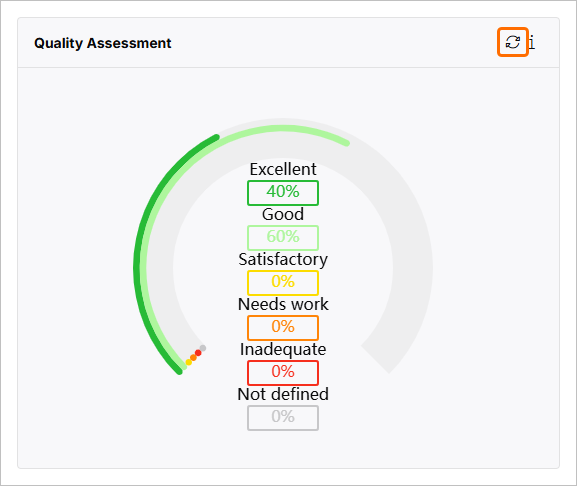
Insights 视图上的 Quality Assessment 图将显示更新后的结果。 如果您希望重新评估,也可以点击图表右上角的  按钮进行刷新。
评分标准
-
Score: 0-20 / 1(第 1 级 - 不合格)
-
标准:需求文本违反多项 INCOSE 标准。缺乏结构,使用被动语态,含有模糊措辞,且语法和标点使用不当。未明确责任主体、表述含糊或不可执行。
-
-
Score: 21-40 / 2(第 2 级 - 需要改进)
-
标准:需求遵循部分标准,但存在明显问题。可能具有一定结构,但仍使用被动语态、包含规避性条款,或缺乏具体且可衡量的目标。
-
-
Score: 41-60 / 3(第 3 级 - 合格)
-
标准:需求总体上遵循标准,但存在一些小问题。可能基本具备清晰的结构,但包含轻微语法错误或缺乏具体的计量单位。
-
-
Score: 61-80 / 4(第 4 级 - 良好)
-
标准:需求遵循大多数标准。结构清晰,使用主动语态,且具有具体、可衡量的目标,但可能存在一两个小问题。
-
-
Score: 81-100 / 5(第 5 级 - 优秀)
-
标准:需求完全遵循标准。结构清晰,使用主动语态,具有具体、可衡量的目标,无语法错误,且表述明确、可执行。
-
评估时考虑的 INCOSE 规则
R1 - Use a structured, complete sentence: subject, verb, object.
R2 - Use the active voice in the main sentence structure of the need or requirement statement with the responsible entity clearly identified as the subject of the sentence.
R3 - Ensure the subject and verb of the need or requirement statement are appropriate to the entity to which the need or requirement refers.
R5 - Use definite article “the” rather than the indefinite article “a”.
R6 - Use appropriate units when stating quantities. All numbers should have units of measure explicitly stated.
R7 - Avoid the use of vague terms such as “some”, “any”, “allowable”, “several”, “many”, “a lot of”, “a few”, “almost always”, “very nearly”, “nearly”, “about”, “close to”, “almost”, and “approximate”.
R8 - Avoid escape clauses such as “so far as is possible”, “as little as possible”, “where possible”, “as much as possible”, “if it should prove necessary”, “if necessary”, “to the extent necessary”, “as appropriate”, “as required”, “to the extent practical”, and “if practicable”.
R9- Avoid open-ended clauses such as “including but not limited to”, “etc.” and “and so on”.
R10 - Avoid superfluous infinitives such as “be designed to”, “be able to”, “be capable of”.
R12, 13, 14 - Use correct grammar, spelling, punctuation.
R15 - Use a defined convention to express logical expressions such as “[X AND Y]”, “[X OR Y]”, [X XOR Y]”, “NOT[X OR Y]”.
R16 - Avoid the use of “not”
R17 - Avoid the use of the oblique ("/") symbol except in units, i.e. km/hr
R18 - Write a single sentence that contains a single thought conditioned and qualified by relevant sub-clauses.
R19 - Avoid combinators that join clauses, such as “and”, “or”, ”then”, ”unless”, ”but”, ”as well as”, ”but also”, ”however”, ”whether”, ”meanwhile”, ”whereas”, ”on the other hand”, or ”otherwise”.
R20 - Avoid phrases that indicate the purpose of the need or requirement.
R21 - Avoid parentheses and brackets containing subordinate text.
R22 - Enumerate sets explicitly instead of using a group noun to name the set.
R24 - Avoid the use of pronouns and indefinite pronouns.
R26 - Avoid using unachievable absolutes such as 100'%' reliability, 100'%' availability, all, every, always, never, etc.
R28 - Express the propositional nature of a condition explicitly for a single action instead of giving lists of actions for a specific condition.
R29 - Classify the needs and requirements according to the aspects of the problem or system it addresses.
R31 - When defining design inputs avoid stating a solution unless there is rationale for constraining the design. Focus on the problem “what” rather than the solution “how”.
R32 - Use “each” instead of “all”, “any" or “both” when universal quantification is intended.
R33 - Define quantities with a range of values appropriate to the entity to which they apply and to which the entity will be verified or validated against.
R34 - Provide specific measurable performance targets appropriate to the entity to which the need or requirement is stated and against which the entity will be verified to meet.
R35 - Define temporal dependencies explicitly instead of using indefinite temporal keywords such as “eventually”, “until”, “before”, “after”, “as”, “once”, “earliest”, “latest”, “instantaneous”, “simultaneous”, “at last”.
R38 - Avoid the use of abbreviations.
质量评估图
此环形图显示需求的质量等级:
-
High:表示质量优秀的需求。
-
Medium:表示定义较为充分但可能需要改进的需求。
-
Low:表示可能需要大幅完善的需求。
-
Not Defined:表示尚未评估或缺乏足够信息的需求。
 AI 翻译