
Einheiten und automatische Einheitenumrechnungen
Die Einheitenumrechnung ermöglicht es Ihnen, eine physikalische Einheit mit einem Vali zu verknüpfen. Bei jeder Berechnung mit diesem Vali wird die erforderliche Umrechnung automatisch im Backend durchgeführt. Die Pint library dient dabei als Grundlage.
Das folgende Beispiel zeigt, wie 50 kg automatisch in 110,23 Pfund (lbs) umgerechnet werden, da das Formula and unit Feld 50kg enthält, das Display unit jedoch lbs ist.
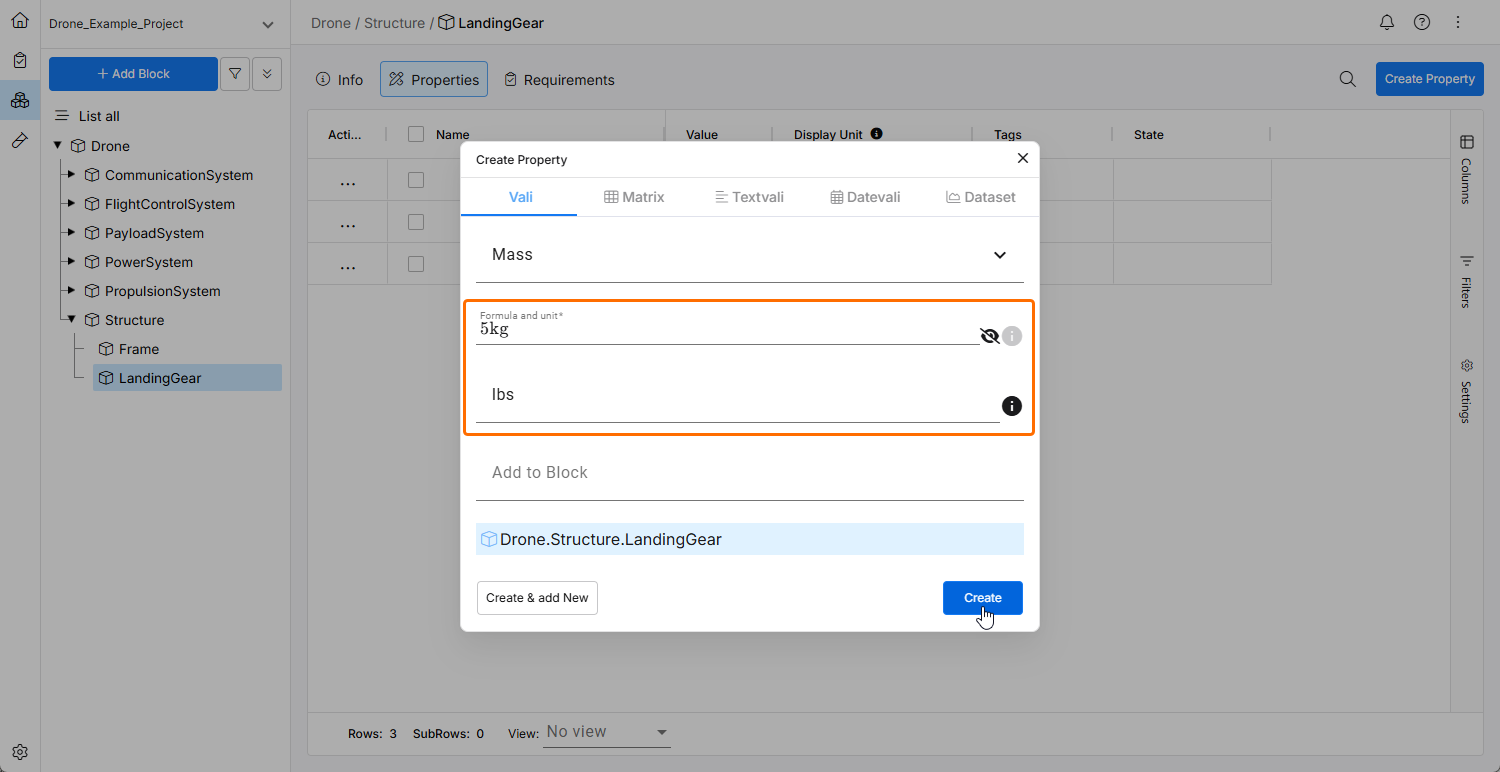
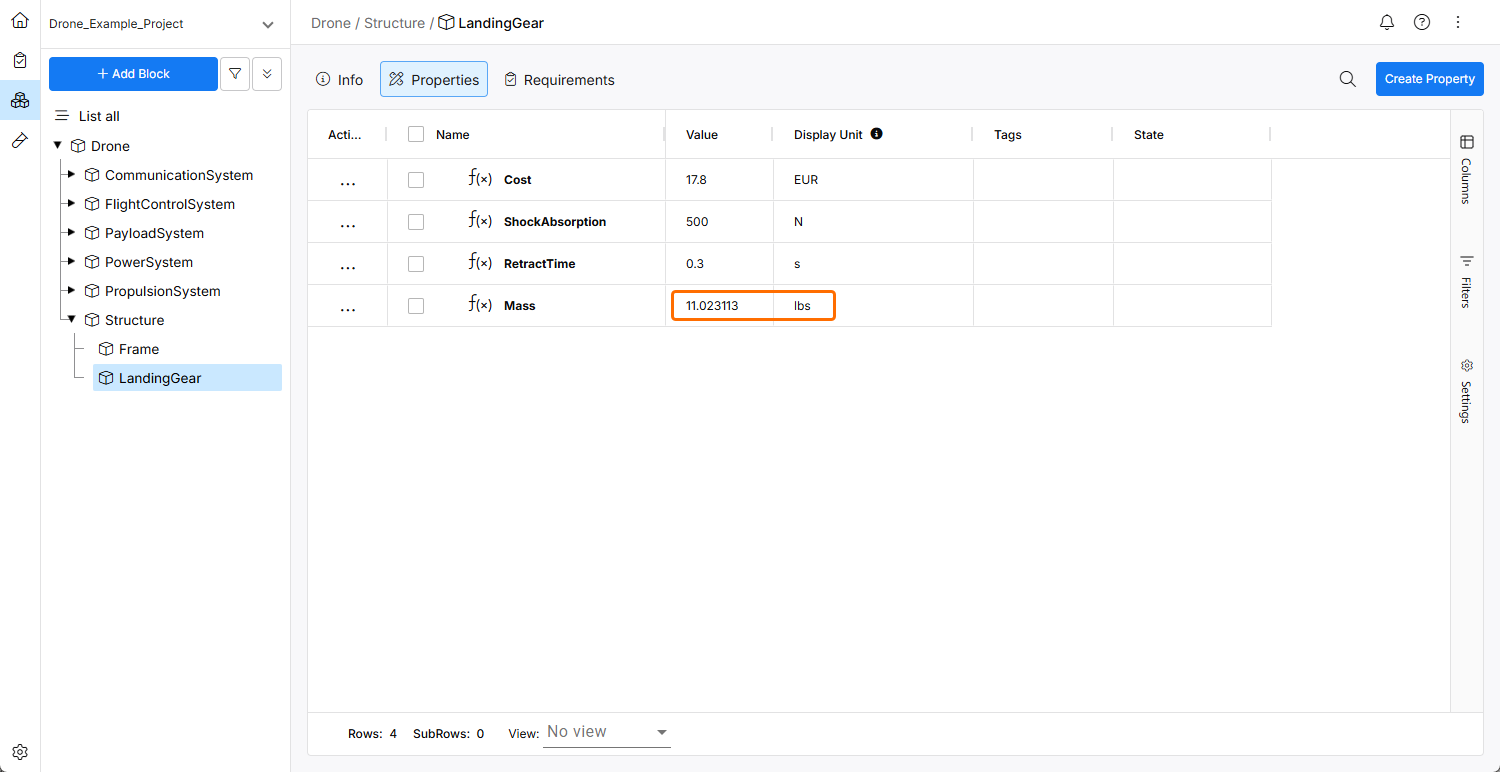
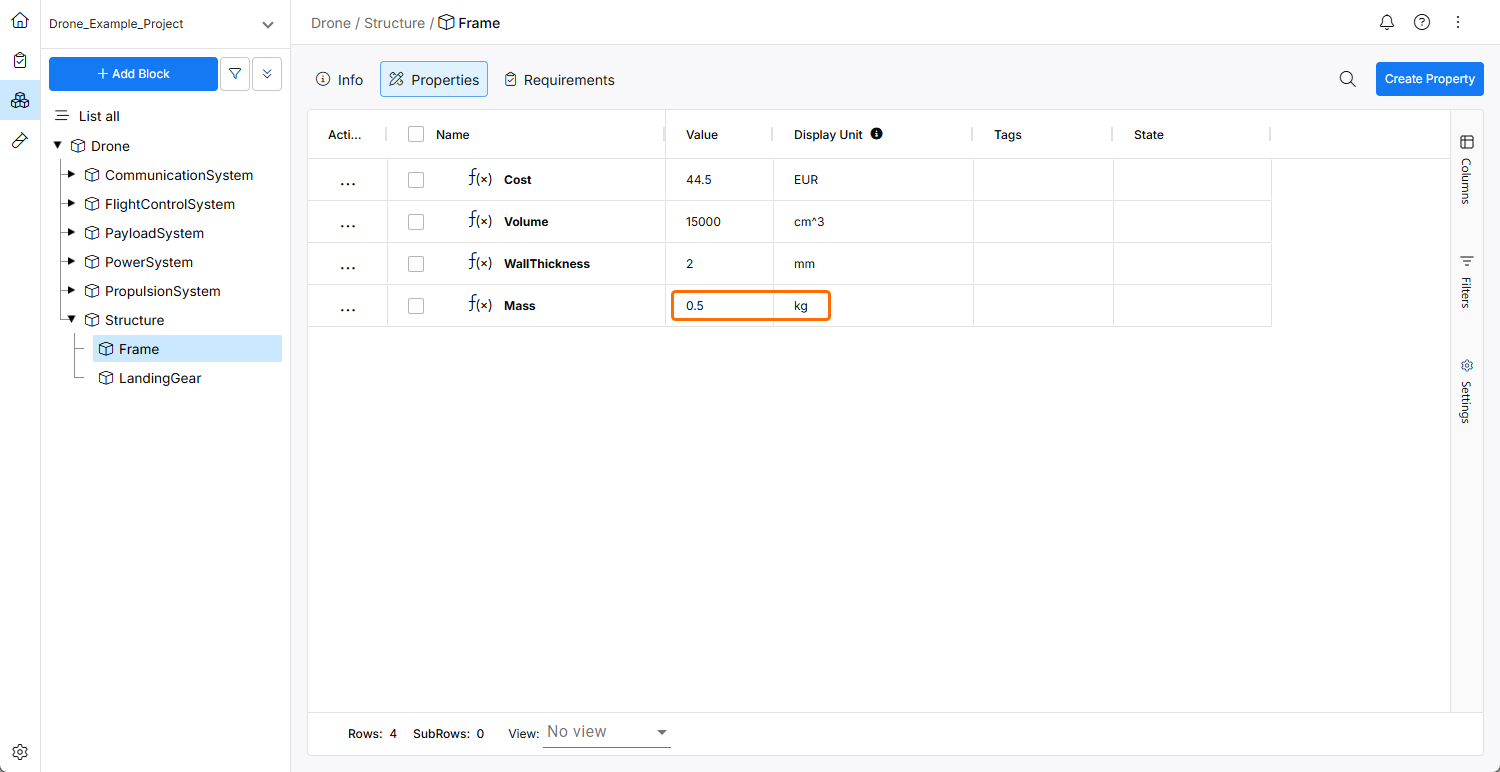
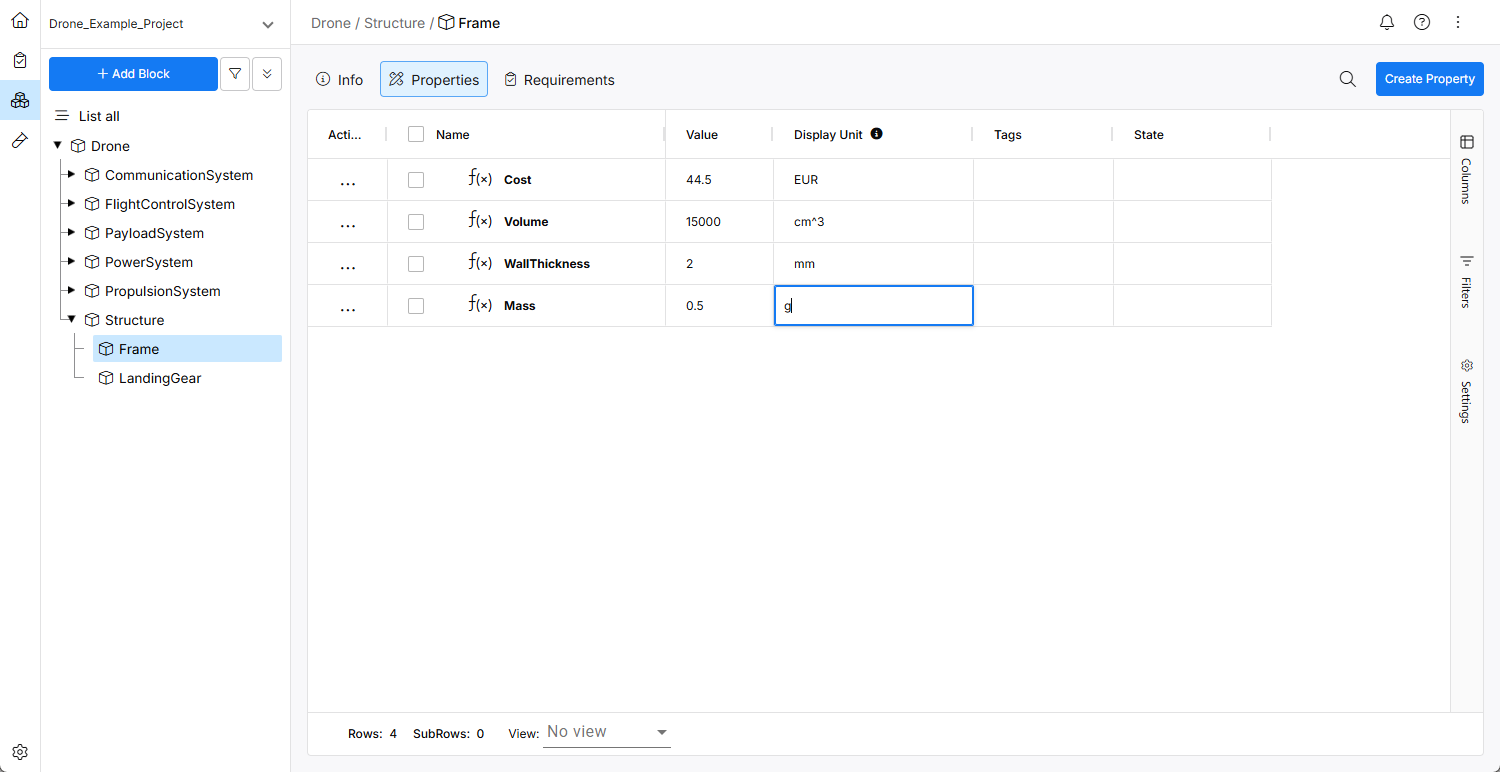
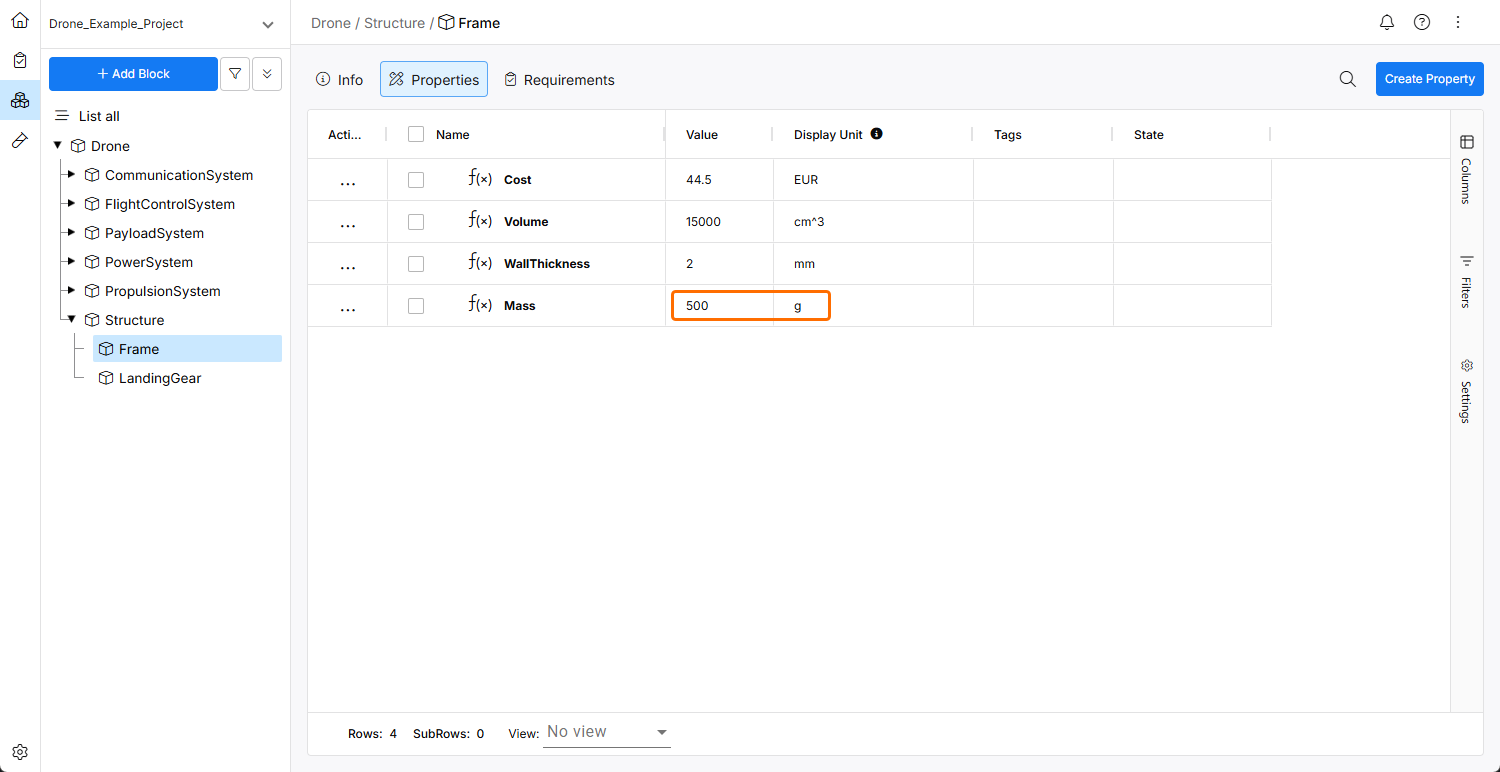
Auch Präfixe und Suffixe werden automatisch angewendet, wie im folgenden Beispiel bei der Umrechnung des Display unit des Mass-Vali von kg nach g gezeigt wird.
Außerdem können Sie eine Formel $vali3 = $vali1 + $vali2 unter Verwendung von $vali1 = 10 meter und vali2 = 100 cm angeben. Wenn Sie die Display unit von vali3 auf yd (yard) setzen, wird dieses Ergebnis automatisch berechnet und umgerechnet: 12.030 yd. Wenn Sie für vali3 keine Display unit angeben, wird automatisch eine Einheit berechnet (in diesem Fall wäre es Meter oder Zentimeter).
Umgang mit Einheiten bei Valis und Formeln
Erstellen eines Vali
Beim Erstellen eines neuen Vali (numerischer Wert oder Formel) gibt es zwei wichtige Eigenschaftsfelder:
-
Formula and unit (obligatorisch)
-
Bei numerischen Werten (z. B. 50 kg) muss dieses Feld den Wert und die Einheit enthalten.
-
Bei Formeln (z. B. $wheel1.mass+$wheel2.mass) ergibt sich die Einheit aus der Berechnung.
-
-
Display unit (optional – wenn leer, basiert die Anzeigeeinheit auf den Einheiten aus dem Feld Formula and unit).
Die folgende Tabelle zeigt eine Zusammenfassung des erwarteten Verhaltens bei der Erstellung eines Vali, abhängig von den verschiedenen Erstellungsoptionen.
| Formel- und Einheitenfeld | Anzeigeeinheitenfeld | Erwartetes Verhalten |
|---|---|---|
| numerischer Wert und keine Einheit | keine Einheit | Es wird ein dimensionsloser Wert erstellt. |
| numerischer Wert und keine Einheit | Einheit | Warnung zur Einheitsdimension beim Vali. |
| numerischer Wert und eine angegebene Einheit | keine Einheit | Es wird ein Wert mit der angegebenen Einheit erstellt und in der Einheit aus dem Feld Formula and unit angezeigt. |
| numerischer Wert und eine angegebene Einheit | Einheit | Es wird ein Wert mit der angegebenen Einheit erstellt und in der Einheit aus dem Feld Display unit angezeigt (Einheiten must stimmen überein). |
| eine Formel (keine Einheit erforderlich) | keine Einheit | Die Display unit wird automatisch aus der Formel berechnet. |
| eine Formel (keine Einheit erforderlich) | Einheit | Das Ergebnis der Formel wird in der Display unit angezeigt (Einheiten must stimmen überein). |
| eine Formel und eine benutzerdefinierte Einheit | keine Einheit |
|
| eine Formel und eine benutzerdefinierte Einheit | Einheit |
|
| Vali mit einem Typ | fest | Die Einheit wird automatisch aus der Typeinheit übernommen (sie kann später geändert werden, solange Sie innerhalb derselben Dimensionalität bleiben). |
Einheiten ändern
Anzeigeeinheitenfeld
Es ist immer möglich, das Feld Display unit zu ändern, solange die Anzeigeeinheit einer gültigen Umrechnung der verwendeten (oder durch Formeln berechneten) Einheit aus dem Feld Formula and unit entspricht. Wenn eine Dimensionsabweichung vorliegt, zeigt Requirements Portal dies mit einem Ausrufezeichen und einer Meldung am Vali an.
Wenn die Anzeigeeinheit in etwas geändert wird, das eine gültige Umrechnung ist (z. B. s zu ms oder m/s zu km/s), wird das Vali neu berechnet und nach der Umrechnung in der entsprechenden Einheit angezeigt, z. B. 100 s = 100 000 ms.
Formel- und Einheitenfeld
Wenn ein Vali nur ein numerischer Wert ist (keine Formel), können Sie die Einheit ändern, zum Beispiel von m zu s. Das Vali wird dann zu 100 s anstelle von 100 m. Wenn jedoch nach der Änderung die Anzeigeeinheit dimensionsmäßig nicht übereinstimmt, zeigt Requirements Portal eine Dimensionsabweichung an, und die Anzeigeeinheit muss angepasst werden.
Formeln
Wenn ein Vali eine Formel hat, bestimmt die Formel abhängig von den verwendeten Variablen die erwartete Einheit. Sie können wählen, den Wert in einer beliebigen Einheit anzuzeigen (unter Verwendung des Feldes Display unit), sofern diese eine gültige Umrechnung der Einheit der Formel ist. Wenn die Anzeigeeinheit von m/s zu km/s geändert wird, wird der Wert entsprechend angezeigt. Es ist möglich, die Anzeigeeinheit von m/s zu m zu ändern, aber Requirements Portal wird auf ein Problem mit der Einheitsdimension hinweisen.
Dimensionslose Werte
Dimensionslose Werte können in Multiplikationen und Divisionen verwendet werden, jedoch nicht in Additionen und Subtraktionen mit Werten, die eine Einheit haben, da die Einheiten nicht kompatibel sind. Alle Valis, die eine Einheit haben, sollten als Werte mit Einheit (im Feld Formula and unit) gespeichert und als Parameter in Formeln verwendet werden (das bedeutet, dass keine „magischen“ Zahlen verwendet werden sollten).
Einheiten, die nicht erkannt werden („undefinierte Einheiten“), werden ebenfalls als dimensionslos betrachtet.
Undefinierte Einheiten
Es gibt eine separate Einstellung, um die Verwendung undefinierter Einheiten zu erlauben. Wenn diese aktiviert ist (Standardeinstellung), können nicht unterstützte Einheiten hinzugefügt werden, es wird jedoch eine Warnung erzeugt. Wenn diese deaktiviert ist, ist es nicht möglich, einem Vali eine undefinierte Einheit zuzuweisen.
Einheiten von Valitypen ändern
Eine Einheit eines Valityps kann nur in eine andere Einheit geändert werden, die dieselbe Dimensionalität wie die ursprüngliche Einheit hat. Diese Änderung wirkt sich nicht auf bestehende Valis dieses Typs aus, aber neue Valis, die mit diesem Valityp erstellt werden, erhalten die neue Einheit.
Anforderungen und Worst Cases
Anforderungen (Min-/Max-Werte) und Worst Cases werden immer in derselben Einheit wie die Vali-Einheit angezeigt. Wenn die Einheit geändert wird, werden auch die Anforderungen und Worst Cases neu berechnet, damit sie der ausgewählten Einheit entsprechen.
Unterstützte Einheiten und Konstanten
Requirements Portal unterstützt alle in der Pint library definierten Standardeinheiten und Umrechnungen sowie die Standardkonstanten.
Beachten Sie bei der Arbeit mit Einheiten in Requirements Portal Folgendes:
-
Einheiten und Präfixe unterscheiden zwischen Groß- und Kleinschreibung. Zum Beispiel sollte Kilogramm immer
kgund niemalsKgoderKGsein. Bitte beachten Sie die Einheit Pint Library, wenn Sie mit Einheiten arbeiten und sich bei der Groß-/Kleinschreibung nicht sicher sind. -
Hour wird als
hoderhrabgekürzt.hkann nicht zur Darstellung der Planck-Konstante verwendet werden; dafür sollteplanck_constantverwendet werden. -
Euro und Dollar werden als Einheiten unterstützt, und ihre Umrechnung wurde auf 1 EUR = 1,123 USD festgelegt (diese Umrechnung kann im Admin Panel geändert werden, um der aktuellen Wirtschaftslage zu entsprechen). Sie werden jeweils als
EURodereurosowieUSDunddollarabgekürzt. -
dBwird nicht wie in der Standard-Einheitenliste auf „decibarn“ abgebildet, sondern auf seine eigene dimensionslose Einheit „decibel“. Andere logarithmische Einheiten (z. B. dBW) gelten als undefinierte Einheiten und werden daher genauso behandelt wie dimensionslose Einheiten. Eine automatische Umrechnung zwischen linearen und logarithmischen Skalen (z. B. dBW zu W) ist nicht vorgesehen. -
Verwenden Sie für Temperatureinheiten
degC,degFunddegK(oder hier auch einfachK).
Die folgenden Präfixe können verwendet werden:
-
Dezimalpräfixe:
yocto- = 1e-24 = y- zepto- = 1e-21 = z- atto- = 1e-18 = a- femto- = 1e-15 = f- pico- = 1e-12 = p- nano- = 1e-9 = n- micro- = 1e-6 = u- = µ- milli- = 1e-3 = m- centi- = 1e-2 = c- deci- = 1e-1 = d- deca- = 1e+1 = da- = deka hecto- = 1e2 = h- kilo- = 1e3 = k- mega- = 1e6 = M- giga- = 1e9 = G- tera- = 1e12 = T- peta- = 1e15 = P- exa- = 1e18 = E- zetta- = 1e21 = Z- yotta- = 1e24 = Y- -
Binärpräfixe:
kibi- = 2^10 = Ki-
mebi- = 2^20 = Mi-
gibi- = 2^30 = Gi-
tebi- = 2^40 = Ti-
pebi- = 2^50 = Pi-
exbi- = 2^60 = Ei-
zebi- = 2^70 = Zi-
yobi- = 2^80 = Yi-
Jede Kombination aus Präfix und Einheit kann verwendet werden, zum Beispiel ks = kiloseconds, da sowohl das Präfix als auch die Einheit definiert sind (1 kilosecond = 1000 seconds).
Nicht unterstützte Einheiten
Die Verwendung von Operatoren als Einheiten wird nicht unterstützt. Zum Beispiel %, -, &, $, #, °. Diese Valis werden als dimensionslos behandelt. Zum Beispiel wird die Einheit % nicht als Prozentsatz (50% = 0.5), sondern als Rohwert (50) behandelt.
Benutzerdefinierte Einheiten
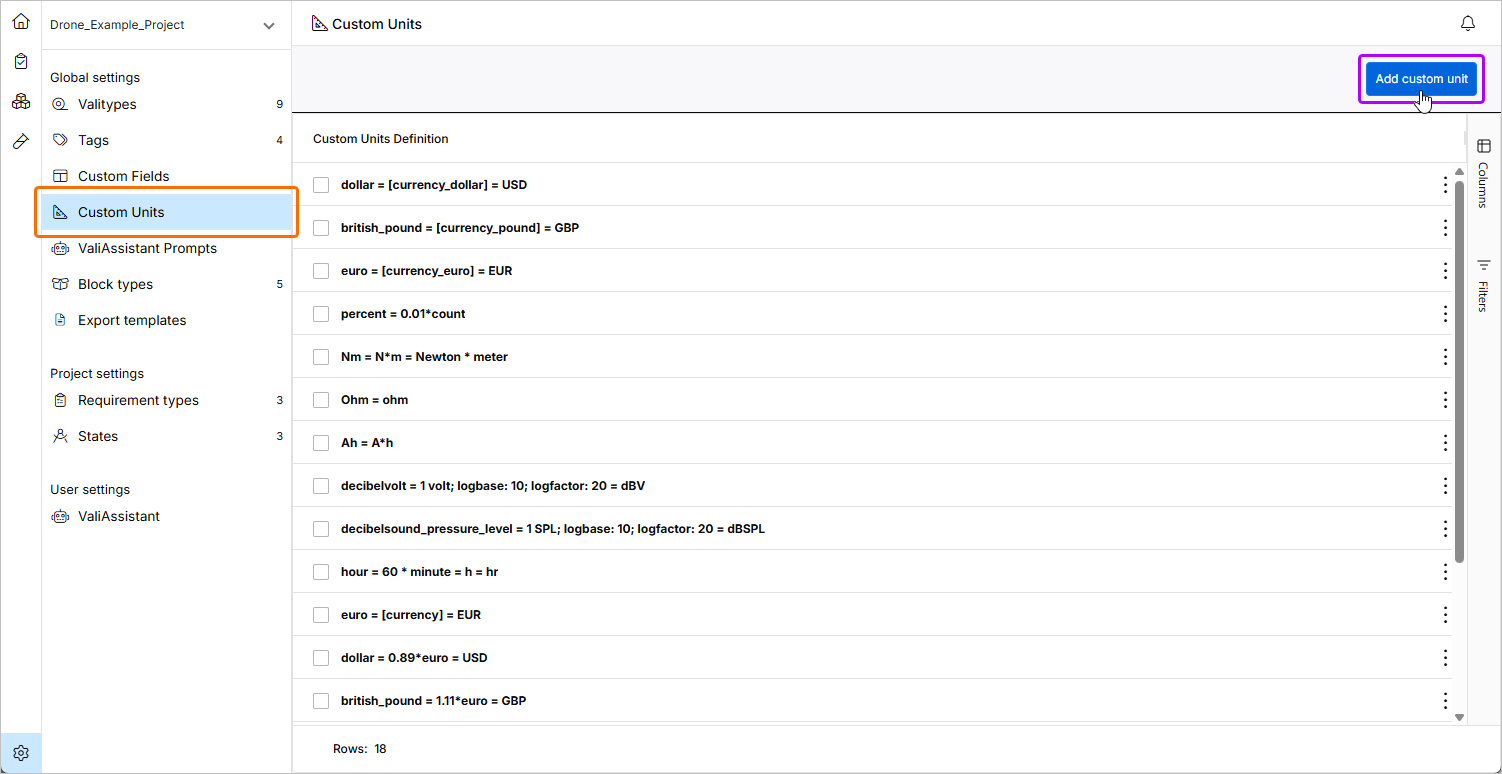
Administratoren können benutzerdefinierte Einheiten (solche, die nicht in der Pint-Bibliothek definiert sind) auf der Seite Settings – Custom Units definieren (aufrufbar durch Klicken auf das Symbol  unten links, Auswahl von Settings aus dem daraufhin angezeigten Menü und anschließende Auswahl von Custom Units aus der Liste im linken Bereich). Um eine neue benutzerdefinierte Einheit zu erstellen, klicken Sie oben rechts auf die Schaltfläche
  und definieren Sie die Einheiten auf Basis der vorhandenen Einheiten in der Pint-Bibliothek.
 KI-lokalisiert