
Setting Global Operation Permissions for a Workspace
At a Glance
- Find the permissions dialog through the Data Management - Servers page of the Preferences.
- Learn how to add or remove permission assignments and apply your changes, while Administrators retain full permissions.
- Understand the available controls for operations such as external sharing, component management, lifecycle changes, deletion, and release.
The connected Workspace used to store your design content facilitates the definition and management of global operation permissions for the Workspace. Accessible by Workspace Administrators only, permissions across the spectrum of day-to-day global-level Workspace operations can be set up for all Workspace users in one convenient location. So, while Administrators continue to enjoy full permissions for all types of operations, they can quickly configure permissions for collaborators, owners, specific groups, and specific users.
Access
Permissions are defined and managed from within Altium Designer, using the Edit Operation Permissions dialog. Access to this dialog is made from the Data Management – Servers page of the Preferences dialog. For the active Workspace whose permissions you wish to browse/modify, click the Properties control at the right-hand side, and choose the Operations command from the associated menu. Alternatively, right-click the active Workspace's entry and select the Properties » Operations command from the context menu.
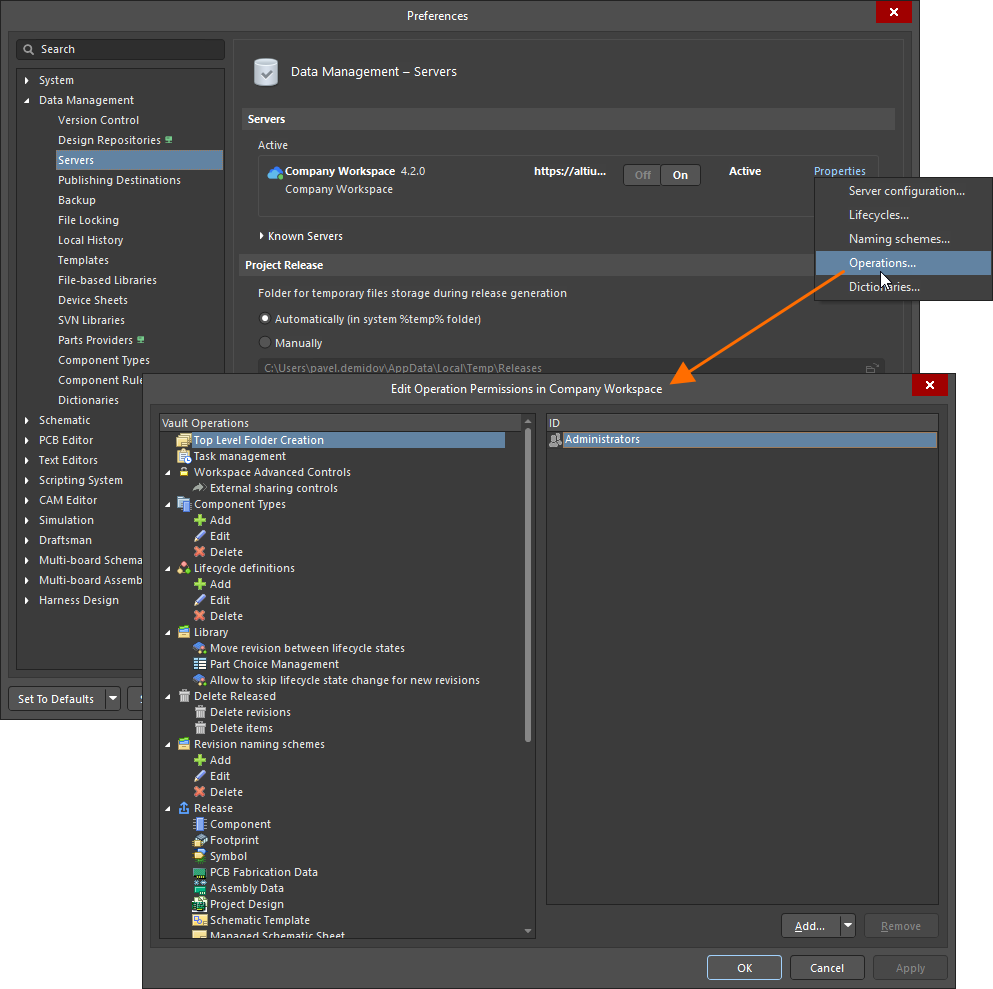
Setup global operating permissions for your connected Workspace through the Edit Operation Permissions dialog – accessed as part of your Altium Designer preferences.
Managing Operational Permissions
Permissions for Workspace operations can be assigned to the following entities (where applicable):
-
 Workspace Members (all users within your organization who have access to your Workspace and/or its associated technologies).
-
 Owner (for released data, this is the person who created the initial Item).
-
 Collaborator (this is a user who has edit rights for an Item/Revision).
-
 Specific user-defined group.
-
 Specific user.
To add a new entity (assign permissions) for a particular Workspace operation:
-
Select the operation in the left-hand region of the dialog.
-
Click the
 button and choose the required entity from the associated menu.
To remove an entity (remove permissions) for a particular Workspace operation:
-
Select the operation in the left-hand region of the dialog.
-
Select the entity in the right-hand region of the dialog.
-
Click the
 button.
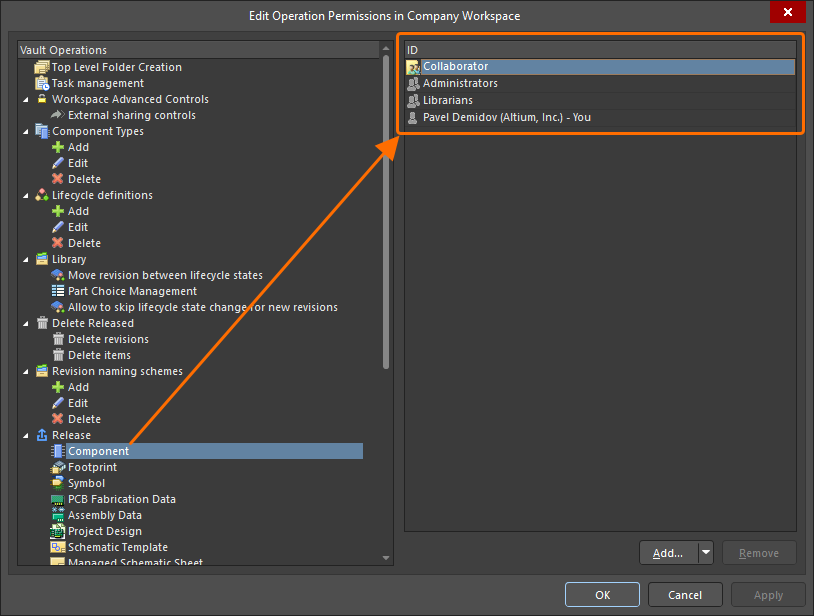
Example permissions defined for the operation involving release into a Workspace component
Available Operation Permissions
Operations available in the Edit Operation Permissions dialog are listed and described below.
-
Top Level Folder Creation – entities with this operation permission assigned can add new top-level folders into the Workspace folder structure from the Explorer panel (learn more).
-
Task Management – entities with this operation permission assigned can manage tasks based on workflow processes.
-
Workspace Advanced Controls – this group of operation permissions determines which entities can perform advanced operation with the Workspace content.
-
External sharing controls – entities with this operation permission assigned can share design projects with external users (those who are not members of the Workspace) from the Share dialog within Altium Designer and from the Workspace's browser-based interface.
-
-
Component Types – this group of operation permissions determines which entities can perform various actions on the list of component types.
-
Add – entities with this operation permission assigned can add new component types.
-
Edit – entities with this operation permission assigned can edit existing component types.
-
Delete – entities with this operation permission assigned can remove existing component types.
-
-
Lifecycle definitions – this group of operation permissions determines which entities can perform various actions on lifecycle definitions.
-
Add – entities with this operation permission assigned can add new lifecycle definitions.
-
Edit – entities with this operation permission assigned can edit existing lifecycle definitions.
-
Delete – entities with this operation permission assigned can remove existing lifecycle definitions.
-
-
Library – this group of operation permissions determines which entities can perform various actions on the Workspace library components.
-
Move revision between lifecycle states – entities with this operation permission assigned can perform state transitions, for the entire range of defined transitions across all defined lifecycle definitions (learn more).
-
Part Choice Management – entities with this operation permission assigned can manage part choices of Workspace library components (learn more).
-
Allow to skip lifecycle state change for new revisions – entities with this operation permission assigned can preserve the current lifecycle state of a component when saving the edited component or a domain model linked to it (learn more).
-
Paid Part Info – this operation permission is only available when the SiliconExpert or Z2Data integration functionality is available. Entities with this operation permission assigned can pull part data from the corresponding source.
-
-
Delete Released – this group of operation permissions determines which entities can perform removal of Items and Item-Revisions released to the Workspace.
-
Delete revisions – entities with this operation permission assigned can remove existing Item-Revisions. This can be done from the Explorer panel (when browsing an Item on the Lifecycle aspect view) or from the Item's detailed view by right-clicking a tile for a revision and selecting the Delete Revision command from the context menu.
-
Delete items – entities with this operation permission assigned can permanently remove Items from the Workspace's Trash, i.e., Items that have been soft deleted previously. An Item can be soft deleted provided by anyone who has editing rights for this item.
-
-
Revision naming schemes – this group of operation permissions determines which entities can perform various actions on revision naming schemes.
-
Add – entities with this operation permission assigned can add new revision naming schemes.
-
Edit – entities with this operation permission assigned can edit existing revision naming schemes.
-
Delete – entities with this operation permission assigned can remove existing revision naming schemes.
-
-
Release – this group of operation permissions determines which entities can release (save) new Item-Revisions to the Workspace. Configure release operation permission for each content type available in the connected Workspace.