
New in this Release
At a Glance
- Explore release-by-release improvements in Altium On-Prem Enterprise Server.
- Browse new features and functionality, as well as improvements that develop and mature existing technologies.
- Review platform upgrades and update guidance, including backups, testing, license refreshes, and Altium Designer version requirements.
This release sees further beneficial enhancements to the Altium On-Prem Enterprise Server and its related technologies. In addition, numerous fixes have been made to resolve issues raised by customers through the Altium Community.
Altium On-Prem Enterprise Server 8.2.1
Released: 25 November 2026 - Version: 8.2.1 (build 12)
Release Notes for Altium On-Prem Enterprise Server
Teamcenter PLM Integration Enhancements
In this release, the Siemens Teamcenter PLM integration has been enhanced.
-
The example configuration files for the Teamcenter PLM integration have been updated, with separate sets for Teamcenter 14 and Teamcenter 2312 through 2506.
-
Added the ability for PLM integration configurations for Teamcenter X (the cloud edition of Teamcenter) to use single sign-on, which is the only authentication method Teamcenter X supports. Integration processes authenticate with preconfigured SSO client credentials instead of a username and password.
For more information about Teamcenter PLM support, refer to the Setup for Teamcenter PLM page.
Added Ability to Preserve Lifecycle State of Linked Components when Releasing
When releasing changes to an Enterprise Server Workspace model (such as a schematic symbol or PCB footprint) into a new revision, you now have the ability (for those with assigned Allow to skip lifecycle state change for new revisions operational permission) to preserve the current lifecycle state for associated Workspace components that reference that model. The current lifecycle state of the model itself is no longer preserved.
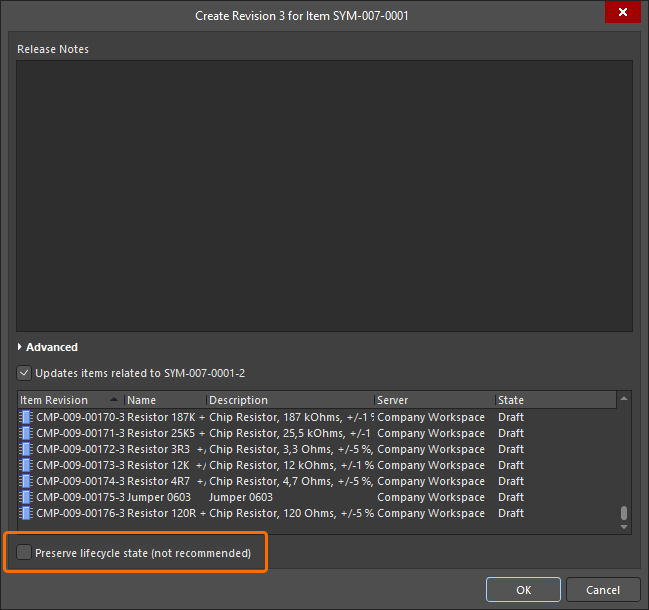
For more information about creating and editing content directly through a Workspace, refer to the Creating & Editing Content page.
Defining Component Name and Description Using Parameters
When connected to the Enterprise Server Workspace from Altium Designer, it is now possible to use parameters to define the Name and/or Description when creating a new component (or editing an existing released component) in the Workspace (e.g., [ParameterName1]_[ParameterName2]), provided the parameters (with values) have been defined for the component. This feature is supported in both Single Component Editing and Batch Component Editing modes of the Component editor.
In the example shown below, the Name field of a capacitor component is defined based on its Value, Tolerance, Voltage Rating, and Case/Package parameters.
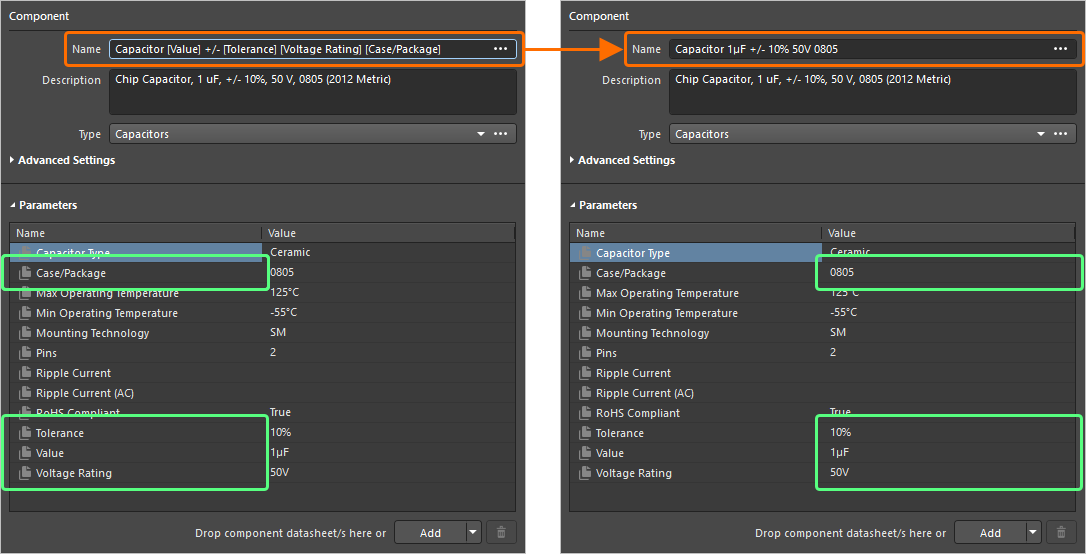
For more information, refer to the Single Component Editing and Batch Component Editing pages.
Upgrade to .NET 10
The Altium Enterprise Server has been upgraded to the use of .NET 10. This upgrade ensures long-term support, enhanced performance, and improved security. It introduces modern features, better developer tools, and compatibility with the latest technologies, enabling more efficient and robust operations. This upgrade also future-proofs the platform, aligns with industry best practices, and reduces technical debt while enhancing scalability and reliability.
Upgrade to Firebird 5
The Firebird database server used by the Enterprise Server has been upgraded from version 3.0 to 5.0.4, with its configuration tuned for Firebird 5.