
Collaboration Lessons from a Hardware Design CEO
Oct 27, 2026 9:00am PDT

Your Team Isn't the Bottleneck.
Coordinating It Is.
You always know where the work stands, and you can keep it moving.
Trusted by more than 1,000 Innovators Worldwide












Engineering Management for
Companies of Any Industry and Any Size
Explore the solutions below based on your needs
Share the Current Design, Not a File Copy
Share a project directly from Altium Designer through an Altium 365 workspace. Reviewers open it in a browser, cross-probe schematic, PCB, and 3D views, and take measurements, without installing Altium Designer.
Keep Feedback Attached to the Design
Pin comments to the exact component, net, or design area, and convert feedback into an assigned task. Designers keep working in Altium Designer while reviewers contribute via the browser.
Know What Changed and Preserve Project History
Committed revisions in an Altium 365 workspace create a clear project history. Compare schematic and PCB revisions visually, return to earlier states, and get notified when content you rely on changes.
Reuse a Proven Project Starting Point
Project templates carry forward the setup that should repeat: structure, document set, and configuration. Start from an established foundation each time rather than rebuilding it, and reuse what works across projects.

Design, Share, and Stay in Sync.
Altium Develop helps individual engineers and small groups get started fast, design without friction, and share work when it matters. No heavy setup required.


Free access to Altium Develop
No credit card required
What Teams Say About Staying in Control

"With Altium 365, all communication stays within the project, providing greater transparency, traceability, and accountability of all data."


"The biggest benefit of having [our processes] directly in Altium is to see if it's gone through the workflows, you can see if it's in the review state and ready to be produced, or in the draft state, and it's a nice double check before we build something."

"Credibility is a big factor at Apollo Fusion. Our CEO is very involved with what we do, so Altium 365 helps him stay in the loop. Management can get insight into how projects are progressing, which has significantly increased the timeliness and comprehensiveness of their reporting to our investors."

Resources
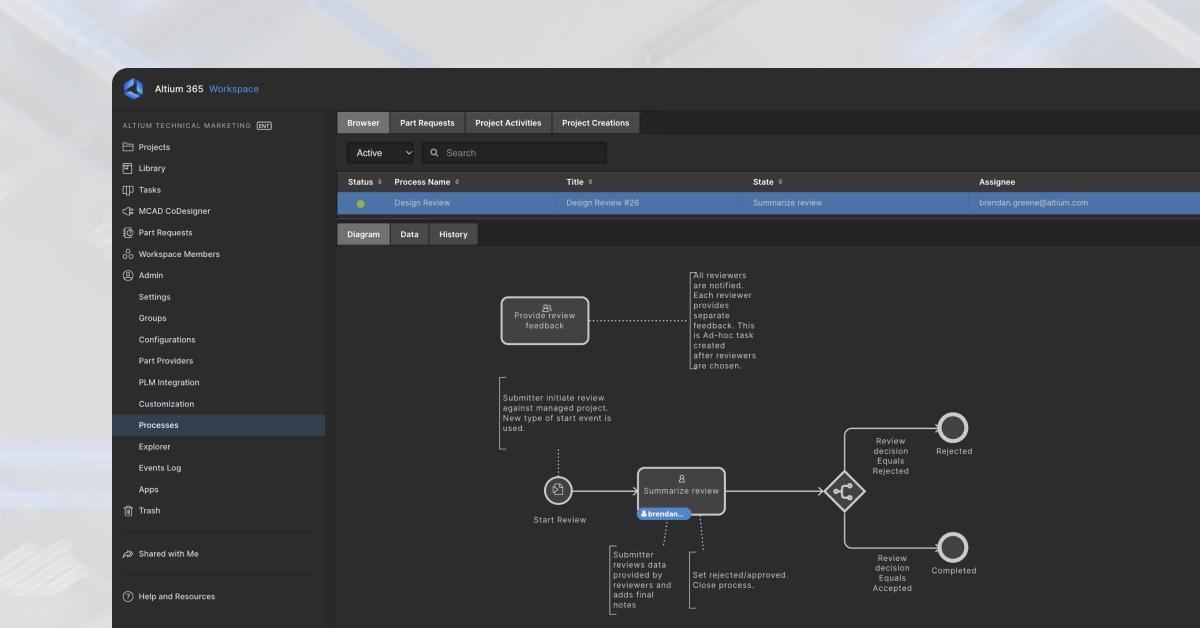
Standardize Your Design Process With Configurable Workflows
A Smarter Way to Manage Electronics Development - How Engineering Managers Can Regain Control with Structured Collaboration
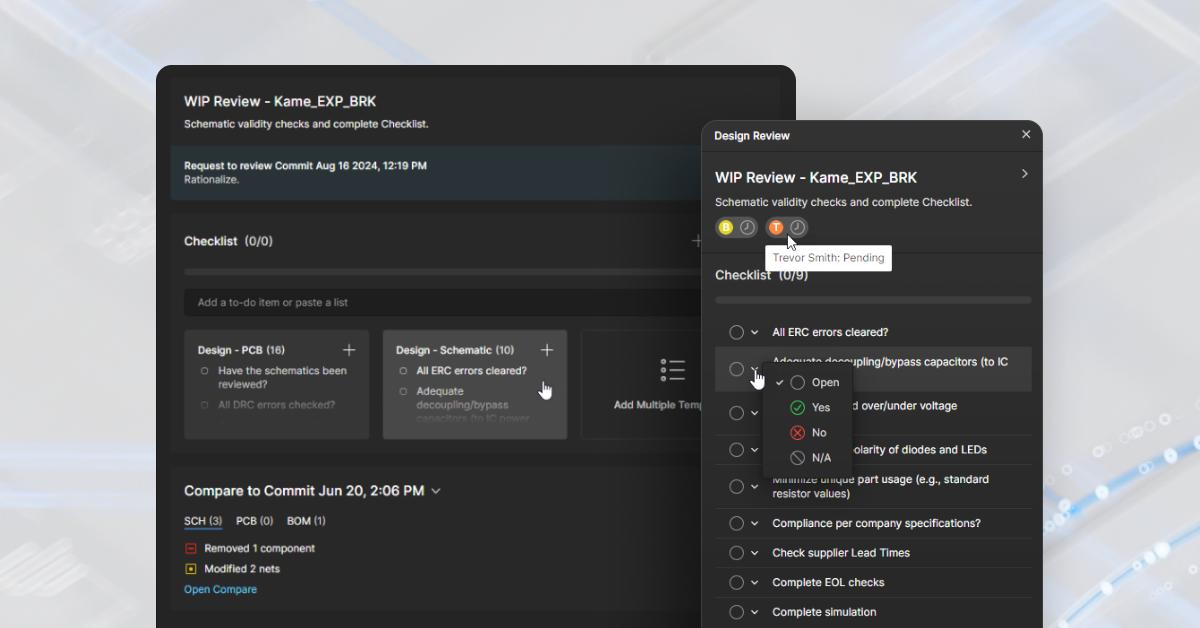
Run Structured Design Reviews That Catch Errors Early
Ready to get started with Altium Develop?
Free 30-day access. No credit card required.
One Standard Flow, From Requirements to Release
Prebuilt and configurable workflows move every project from task to task automatically, with review gates and rework loops built in. When a review stalls, reassign it without breaking the process.
Every Requirement Linked to the Design That Implements It
Import requirements from existing specs into the Requirements Portal, assign them to schematic blocks and the engineers responsible, and track validation coverage. When a requirement changes, you see exactly what is affected.
Run Structured Design Reviews in the Browser
Review schematics and PCB layouts asynchronously, with checklist templates, comments captured in context, and every reviewer's status tracked to closure. The result is a recorded, repeatable review, not a thread of emails.
Edit the Same Board at the Same Time
PCB-CoDesign lets several designers work on one layout in parallel. Review each teammate's changes, check for conflicts, and merge with confidence. Nobody waits their turn, and nothing gets overwritten.
See Who Changed What, and When
The workspace events log gives the team visibility into project activity, with author attribution behind every change. That traceability is the foundation the whole team relies on when a question comes up later.


Speed at Scale. Structured Repeatability. Secure Flexibility.
Structured collaboration for multidisciplinary electronics teams and development that keeps people and data aligned without sacrificing speed.

Free 30-day access
What Teams Say About Staying in Control
"With Altium 365, all communication stays within the project, providing greater transparency, traceability, and accountability of all data."
"The biggest benefit of having [our processes] directly in Altium is to see if it's gone through the workflows, you can see if it's in the review state and ready to be produced, or in the draft state, and it's a nice double check before we build something."
"Credibility is a big factor at Apollo Fusion. Our CEO is very involved with what we do, so Altium 365 helps him stay in the loop. Management can get insight into how projects are progressing, which has significantly increased the timeliness and comprehensiveness of their reporting to our investors."
Resources
Standardize Your Design Process With Configurable Workflows
A Smarter Way to Manage Electronics Development - How Engineering Managers Can Regain Control with Structured Collaboration
Run Structured Design Reviews That Catch Errors Early
Ready to get started with Altium Agile Teams?
Free 30-day access. No credit card required.
Governed Workflows, at Any Scale
Enforced stage gates, approvals, and compliance checks run the same way across every site and product line, with every decision on the audit trail. Stalled review? Reassign it and keep the process moving.
Record Every Design Change Automatically, Without Effort
Every modification, commit, and project event is recorded automatically (who changed what, when, and why) giving engineering managers a complete, always-current history without manual documentation effort.
Connect Every Engineering Domain on One Platform
Digital bridges keep data consistent across ECAD, MCAD, and simulation domains, letting engineering managers align cross-functional teams without handoff friction or version conflicts.
Align Engineering and Procurement Around One BOM
A single governed BOM connects engineering, procurement, and manufacturing, so component risk, cost, and compliance data stay visible to engineers as they design rather than surfacing after the design is locked.
Lock In Commercial Feasibility at the Moment of Design
Engineers select components using pre-negotiated pricing, preferred supplier status, and historical category data, so commercial feasibility is locked in alongside technical viability and not discovered later by procurement.
Extend Governed Access to Every Partner and Team
Role-based access, SSO/SCIM, and scoped external permissions let engineering managers extend collaboration to partners and contractors without losing control over who can act and what they can reach.


Digital Thread at Scale
Connected context from intent through release with an intelligent, governed, extensible platform.
Contact Us
See How Altium Agile Enterprise Addresses
Electronics Hardware Development in Your Industry



What Teams Say About Staying in Control
"With Altium 365, all communication stays within the project, providing greater transparency, traceability, and accountability of all data."
"The biggest benefit of having [our processes] directly in Altium is to see if it's gone through the workflows, you can see if it's in the review state and ready to be produced, or in the draft state, and it's a nice double check before we build something."
"Credibility is a big factor at Apollo Fusion. Our CEO is very involved with what we do, so Altium 365 helps him stay in the loop. Management can get insight into how projects are progressing, which has significantly increased the timeliness and comprehensiveness of their reporting to our investors."
Resources
Standardize Your Design Process With Configurable Workflows
A Smarter Way to Manage Electronics Development - How Engineering Managers Can Regain Control with Structured Collaboration
Run Structured Design Reviews That Catch Errors Early
Ready to Talk Through Altium Agile Enterprise?
Tell us how your organization works, and we will map the platform to it.
Find the right solution for where
your team is today
Each solution is a different stage, not just a different feature count

For the designer who is also the IT department.
Cloud-connected version control and a centralized library without a server to manage.
- Git-based version control with visual diffs
- Centralized cloud component library
- Design reuse blocks
- Live DRC and high-speed routing

For teams where the next wrong-version build is one commit away.
Conflict prevention, lifecycle states, and design review inside the platform.
- Change conflict prevention before commit
- Configurable lifecycle states and release
- In-platform design review
- Where-used tracking across all projects

For regulated organizations where data must connect to enterprise systems.
Granular permissions, enterprise PLM, and flexible deployment.
- Role-based access and IP separation
- Windchill, Teamcenter, Aras, Oracle PLM sync
- Customizable data structures
- Cloud, on-premise, or single-tenant