
系统要求
Ensure that your computer/server meets the system requirements detailed below, prior to installing the Altium On-Prem Enterprise Server.
Operating System Support
The Altium On-Prem Enterprise Server should be installed on a PC running one of the following officially supported Operating Systems:
-
Windows Server 2025 Datacenter or Standard Edition
-
Windows Server 2022 Datacenter or Standard Edition
-
Windows Server 2019 Datacenter or Standard Edition
-
Windows Server 2016 Datacenter or Standard Edition
Recommended System Requirements
The following are the recommended system requirements to install and run the Altium On-Prem Enterprise Server. Note that these recommendations are for 5 concurrent users.
-
OS: Windows Server 2025 Datacenter or Standard Edition
-
RAM: 32GB+
-
Processor: Intel® Xeon® processor or equivalent (4 or more cores)
-
Disk space: 200GB (SSD)
Minimum System Requirements
The following are the minimum system requirements to install and run the Altium On-Prem Enterprise Server. Note that these recommendations are for 5 concurrent users.
-
OS: Windows Server 2016 Standard Edition
-
RAM: 16GB+
-
Processor: Intel Core i3/i5 processor or equivalent (2 or more cores)
-
Disk space: 200GB
Altium Designer Requirements
Browser Requirements
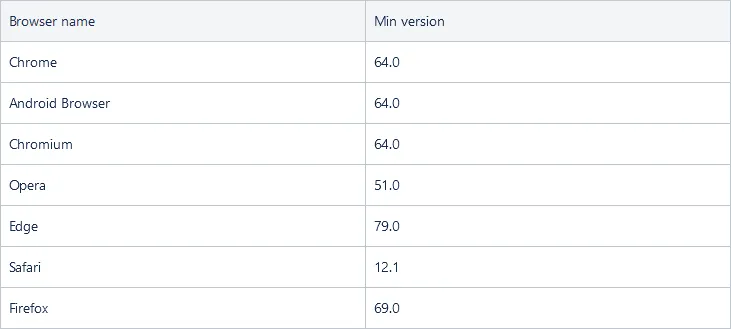
To ensure a smooth experience with the Web Viewer - within the Enterprise Server's browser interface - ensure you have:
-
The latest version of a supported browser installed. Supported browsers (and their minimum supported version) are listed below:
-
That WebGL (or WebGL 2.0) is enabled for it.
-
That the video drivers for your computer are up to date (including drivers for dedicated graphics cards).
Installation & Other Software
Due to the observed unpredictable behavior of antivirus software, it is recommended to disable such software during the installation of the Altium On-Prem Enterprise Server.
If the computer is also running Microsoft Exchange Server, you might receive an HTTP Error 503 error when you first attempt to log in. The installation of the Exchange Server can change the Internet Information Services (IIS) configuration in a way that conflicts with the Altium On-Prem Enterprise Server. To resolve this, the following changes must be made to the applicationHost.config file:
<handlers accessPolicy="Read, Script">

	...
<add name="kerbauth" image="C:\Program Files\Microsoft\Exchange Server\V15\Bin\kerbauth.dll" preCondition="bitness64" />

	<add name="WSMan" image="C:\Windows\system32\wsmsvc.dll" preCondition="bitness64" />

	<add name="exppw" image="C:\Program Files\Microsoft\Exchange Server\V15\ClientAccess\Owa\auth\exppw.dll" preCondition="bitness64" />

	<add name="cafe_exppw" image="C:\Program Files\Microsoft\Exchange Server\V15\FrontEnd\HttpProxy\bin\exppw.dll"  preCondition="bitness64" />
...

	</handlers>
Additional Software Installed or Configured
-
Internet Information Services (IIS). Installation of the Altium On-Prem Enterprise Server will install IIS 10.0 – the version native to the supported operating systems.
-
Firebird 3.0 database engine. Ensure that IPv4 network addressing is enabled – to check for active IPv4 addresses, run
ipconfig /allin a command prompt. -
Microsoft .NET (.NET 8 and .NET 10) software platform (incorporates .NET Runtime, .NET Server Hosting, and ASP.NET Framework components).