
Importing a Design from Xpedition
Altium Designer can import binary format PCB and PCB libraries designed in Siemens EDA® Xpedition™ (formerly Expedition®) software.
Run the Importer via Altium Designer's Import Wizard (File » Import Wizard).
The Xpedition file importer is available through Altium Designer's Import Wizard (File » Import Wizard) by selecting the Mentor Expedition Designs and Libraries option on the Wizard's Select Type of Files to Import page.

Select Mentor Expedition Designs and Libraries in the Import Wizard to import Xpedition files.
Import Wizard - Mentor Expedition Designs and Libraries
Mentor Expedition Designs and Libraries

Importing Mentor Expedition Design Files

Click Add to choose which Xpedition design files to include in the process. You can delete a selected file by clicking Remove.
Importing Mentor Expedition Library Files

Click Add to choose which Xpedition library files (*.lmc) to include in the process. You can delete a selected file by clicking Remove.

Current User Layer Mappings

If desired, you can edit the layer mapping for any or all Xpedition PCB designs or library files on this page of the Wizard. To group by a column, drag the column header into the area at the top of the table specified.
Right-clicking in the grid region provides you with the following sub-menu.
-
Load Layer Mapping – select to open the Load Configuration dialog to load the desired mapping files.
- Save Layer Mapping – select to open the Choose File to Save Layer Mapping dialog and choose the path in which to save the layer mapping.
-
Toggle selected – select to toggle the selected layers for inclusion or exclusion from the import.
Use the Create extruded body from drop-down to select the desired layer for the extruded body.
Use the Import Pad/Via Template names option to control the import of pad/via template names:
-
When the option is disabled, default automatic names based on the pad/via attributes will be used, in accordance with the IPC-7251/7351 Padstack naming conventions (described here).
-
When the option is enabled, original padstack names from Xpedition will be used.
Output Projects
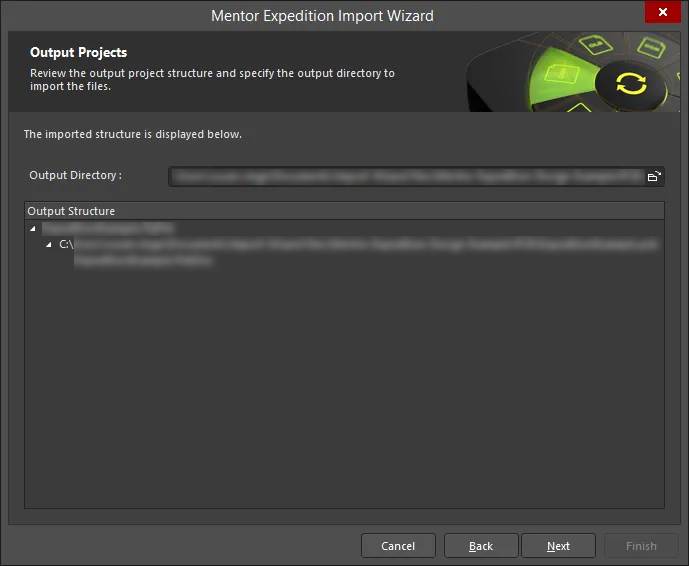
Use this page of the Wizard to review the output project structure and specify the output directory in which to import the files. Use the Browse Folder icon to search for and choose the Output Directory.
Executing Import Process
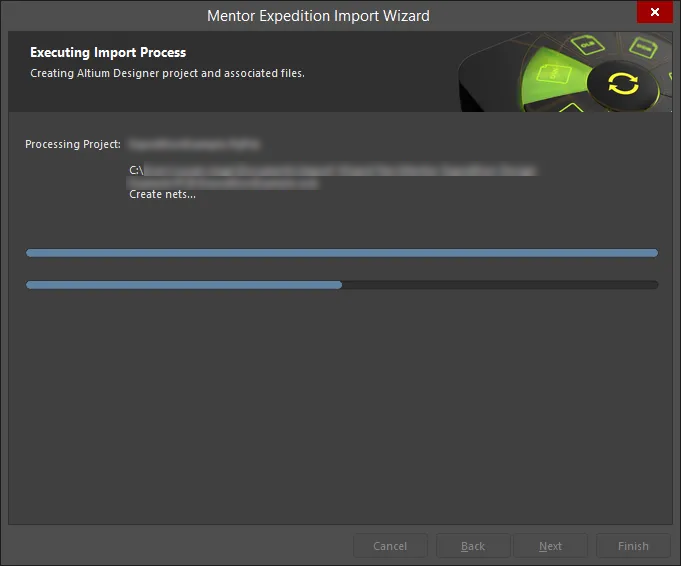
On this page of the Wizard, a green progress bar shows the progress of the import process while also listing each file at the process continues.
Closing the Wizard

The Mentor Expedition Import Wizard has completed. Click Finish to close the Wizard.
Notes on Using the Importer
The following notes summarize the functionality of the importer:
-
In Xpedition, a PCB design or library does not exist as a single file, but rather, as a structure of interdependent folders and files. Altium Designer's importer requires the entire folder/file structure to be intact to successfully import a PCB or library.
-
To import a PCB design file, select the
*.prjor*.pcbfile in the design structure. Note that:-
When the
*.prjfile is selected, the.xmlconstraint file is also recognized, and the Xpedition constraints are converted into Altium Designer rules in the imported PCB file. -
When the
*.pcbfile is selected, the Xpedition constraints are not converted. All of the Xpedition rule definitions are enumerated in a section of the*.logfile, so you can then examine this list and create appropriate rules in Altium Designer.
-
-
To import a library file, select the
*.lmcfile in the library's top-level folder. -
Problems during import are detailed in the
*.logfile report. -
The Import Wizard supports custom pad shapes. When such pads are imported into Altium Designer, they are imported as pads of the custom shape type. Learn more about Customizing a Pad Stack in Altium Designer.
-
The Import Wizard supports custom thermal reliefs defined in an Xpedition board design. In addition, where a predefined ‘8-leg’ (8-spoke) thermal relief is defined in Xpedition, this will also be imported as a custom thermal relief. Note that Xpedition’s support for the custom rotation of spikes is not supported when imported into Altium Designer. Learn more about Defining Custom Thermal Reliefs in Altium Designer.
-
The Import Wizard supports rounded/chamfered rectangle-shaped pads with pad corner radius/chamfer defined in an Xpedition as an absolute value. When such pads are imported into Altium Designer, their Corner Radius property is defined as an absolute value. Learn more about Working with Pads & Vias in Altium Designer.
-
The Import Wizard supports 'Round Donut' pad shapes when importing an Xpedition design/library.
-
Defined pad hole tolerances are included when importing an Xpedition library.
-
Replicated text strings in footprints (i.e., mounting hole 'A's) are supported when importing an Xpedition library. The original string, its replicates, and associated parameters are imported.
-
Zero-width lines defined for a footprint on the Placement Outline layer are supported when importing an Xpedition library.