
Novedades de esta versión
Esta versión incorpora más mejoras beneficiosas para Altium On-Prem Enterprise Server y sus tecnologías relacionadas. Además, se han realizado numerosas correcciones para resolver problemas reportados por los clientes a través de la Altium Community.
Altium On-Prem Enterprise Server 8.1.4
Released: 27 August 2026 - Version: 8.1.4 (build 13)
Notas de la versión de Altium On-Prem Enterprise Server
Búsqueda de usuarios mejorada al transferir la propiedad
El cuadro de diálogo Transfer Ownership (se abre al eliminar un usuario de la página Admin – Users si el usuario es el propietario del contenido del Workspace) ahora proporciona búsqueda del lado del servidor en todos los usuarios en lugar de una lista desplegable limitada, de modo que la propiedad pueda reasignarse en instancias de Enterprise Server con más de 1000 usuarios.
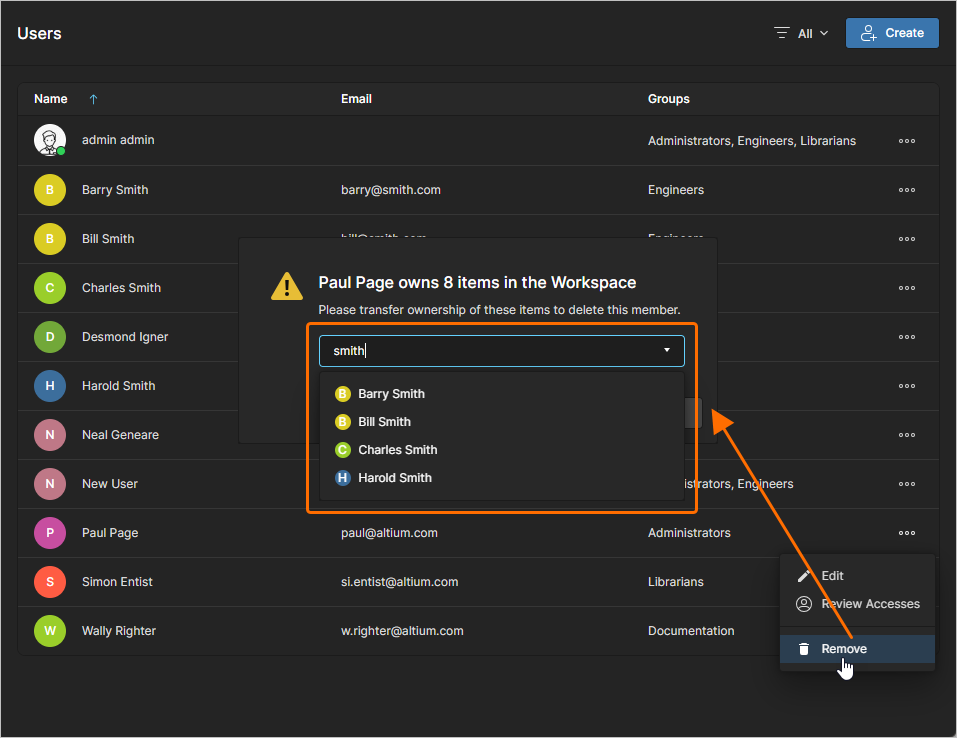
Para obtener más información sobre la transferencia de propiedad, consulte la página Managing Users & Groups.
Altium On-Prem Enterprise Server 8.1.3
Released: 30 July 2026 - Version: 8.1.3 (build 17)
Notas de la versión de Altium On-Prem Enterprise Server
Esta versión incluye correcciones de errores para mejorar la funcionalidad general y la experiencia del usuario. Consulte la página de Notas de la versión para conocer los detalles de los cambios de esta versión.
Altium On-Prem Enterprise Server 8.1.2
Released: 26 June 2026 - Version: 8.1.2 (build 27)
Notas de la versión de Altium On-Prem Enterprise Server
Compatibilidad con tipos de datos adicionales con reconocimiento de unidades
Cuando se conecta al Workspace de Enterprise Server desde Altium Designer y define un parámetro de usuario como parte de una plantilla de componente en el Workspace, ahora se admiten los siguientes tipos de datos adicionales con reconocimiento de unidades:
-
Área (mm2)
-
Bar (bar)
-
Bit
-
Candela (cd)
-
Decimal
-
Entero
-
Julio (J)
-
Lumen (lm)
-
Milímetro (mm)
-
Pascal (Pa)
-
Libras por pulgada cuadrada (psi)
-
Revoluciones por minuto (rpm)
-
Siemens (S)
-
Coeficiente de temperatura (ppm/°C)
-
Tesla (T)
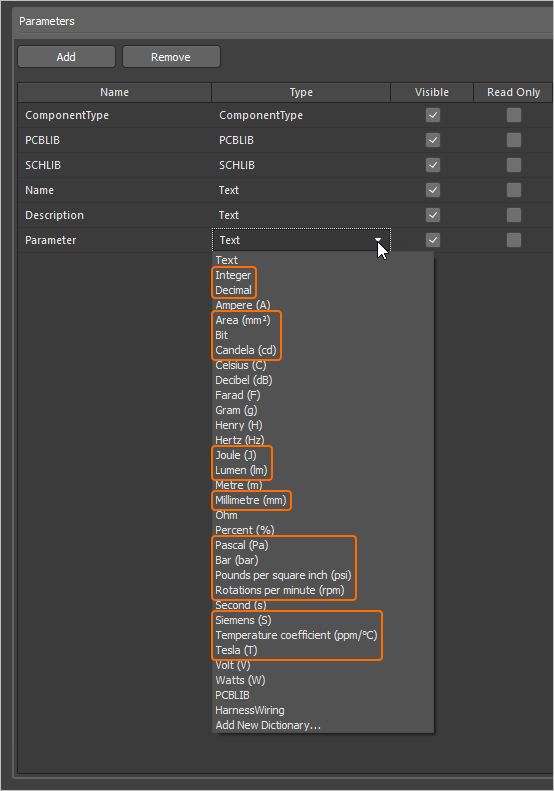
Los parámetros que utilizan estos nuevos tipos de unidad son compatibles en varias áreas de Altium Designer, incluidos el panel Components panel, el editor de componentes (tanto en el modo de edición single como en el de batch), y mediante la función Library Importer y Components Synchronization (en la sección Parameter Mapping del panel Properties).
Para obtener más información sobre los tipos de datos de parámetros de componentes con reconocimiento de unidades, consulte la página Component Templates.
Altium On-Prem Enterprise Server 8.1.1
Released: 29 May 2026 - Version: 8.1.1 (build 76)
Notas de la versión de Altium On-Prem Enterprise Server
Mejoras en la instalación de Enterprise Server
Se han implementado las siguientes mejoras en el instalador de Enterprise Server:
-
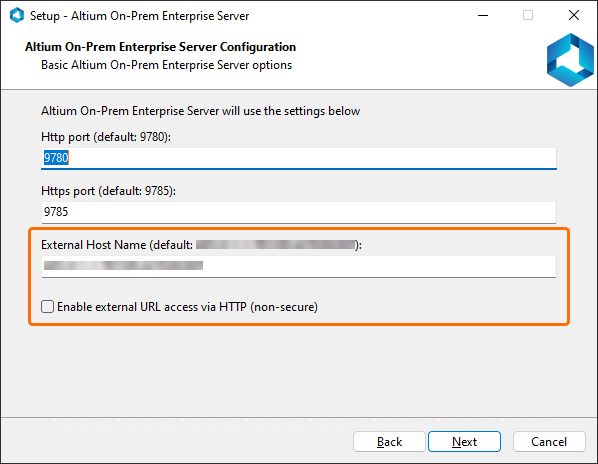
External base URL support – se agregó la configuración para una URL base externa que define cómo se accede a Enterprise Server desde fuera de la red, lo que permite la generación correcta de URL para enlaces compartidos en implementaciones con balanceador de carga y proxy inverso. Utilice las nuevas opciones de la página Altium On-Prem Enterprise Server Configuration del Altium On-Prem Enterprise Server Setup asistente para hacerlo.
-
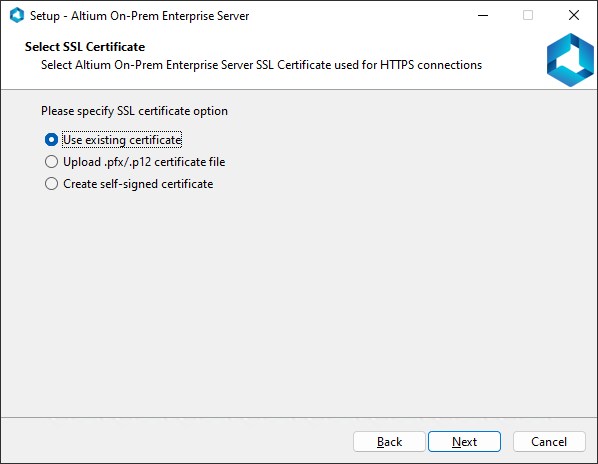
SSL certificate management – ahora puede configurar el certificado SSL para la instancia de Enterprise Server que se está instalando. Una nueva página Select SSL Certificate del Altium On-Prem Enterprise Server Setup asistente le permite seleccionar un certificado existente del almacén de certificados de Windows, cargar un archivo de certificado *.pfx/*.p12 o generar un certificado autofirmado.
Además, se ha agregado compatibilidad con las entradas
sslCertFile,sslCertPasswordysslCertThumbprintal usar la línea de comandos para instalar Enterprise Server. -
Removed LDAP port configuration – la configuración del puerto LDAP se ha eliminado del asistente de instalación, ya que es un aspecto de la infraestructura interna y no forma parte de la configuración del usuario final.
-
Global PreferredProtocol enforcement – PreferredProtocol ahora se aplica globalmente en toda la aplicación.
-
Database cleanup and trimming – la limpieza y compactación de la base de datos ahora se realizan durante la actualización de Enterprise Server para aumentar el rendimiento de la base de datos. Al usar la línea de comandos para actualizar Enterprise Server, el paso de compactación puede omitirse mediante el parámetro
SkipDbCompact.
Para obtener más información sobre la instalación de Enterprise Server, consulte la página Installing the Software.
Compatibilidad con proyectos multivariante en el flujo de trabajo del proceso 'Project with initialise in PLM'
La definición del proceso de creación de proyectos Project with initialise in PLM (y el flujo de trabajo subyacente) ahora admite proyectos creados a partir de plantillas de proyectos multivariante para reservar números de ID de PLM para cada variante sin necesidad de liberar y publicar el proyecto.
Para obtener más información sobre procesos, flujos de trabajo e integración con PLM, consulte las páginas Creating & Managing Processes y PLM Integration.
Mejoras en el posprocesamiento de diseño del lado del servidor
El posprocesamiento de diseño del lado del servidor (incluida la generación de vistas previas) ahora se ejecuta en paralelo sin causar problemas de concurrencia. Como resultado, las operaciones relacionadas con ARK se han escalado según los núcleos de CPU del servidor para maximizar su uso. Los principales beneficios son:
-
Posprocesamiento más rápido.
-
Colas más pequeñas.
-
Entorno más estable: ya no se producen fallos importantes al ejecutar múltiples operaciones de posprocesamiento en paralelo.
-
Utilización del hardware significativamente mejorada.
La configuración predeterminada de concurrencia se ha actualizado para aprovechar la ejecución en paralelo:
-
La ejecución en paralelo de los procesos ARK está ACTIVADA de forma predeterminada.
-
La cantidad de ejecutores en paralelo se establece de forma predeterminada en la mitad del número de núcleos de CPU.
 Localizado por IA