
Altium オンプレミス エンタープライズ サーバーのシステム要件
Altium On-Prem Enterprise Server をインストールする前に、お使いのコンピューター/サーバーが以下のシステム要件を満たしていることを確認してください。
対応オペレーティングシステム
Altium On-Prem Enterprise Server は、以下の公式サポート対象オペレーティングシステムのいずれかを実行している PC にインストールする必要があります。
-
Windows Server 2025 Datacenter または Standard Edition
-
Windows Server 2022 Datacenter または Standard Edition
-
Windows Server 2019 Datacenter または Standard Edition
-
Windows Server 2016 Datacenter または Standard Edition
推奨システム要件
以下は、Altium On-Prem Enterprise Server のインストールおよび実行に推奨されるシステム要件です。なお、これらの推奨値は同時接続ユーザー 5 名を想定しています。
-
OS: Windows Server 2025 Datacenter または Standard Edition
-
RAM: 32GB 以上
-
プロセッサー: Intel® Xeon® プロセッサーまたは同等品(4 コア以上)
-
ディスク容量: 200GB(SSD)
最小システム要件
以下は、Altium On-Prem Enterprise Server のインストールおよび実行に必要な最小システム要件です。なお、これらの推奨値は同時接続ユーザー 5 名を想定しています。
-
OS: Windows Server 2016 Standard Edition
-
RAM: 16GB 以上
-
プロセッサー: Intel Core i3/i5 プロセッサーまたは同等品(2 コア以上)
-
ディスク容量: 200GB
Altium Designer の要件
ブラウザー要件
Enterprise Server のブラウザーインターフェース内にある Web Viewer を快適に使用するため、以下を確認してください。
-
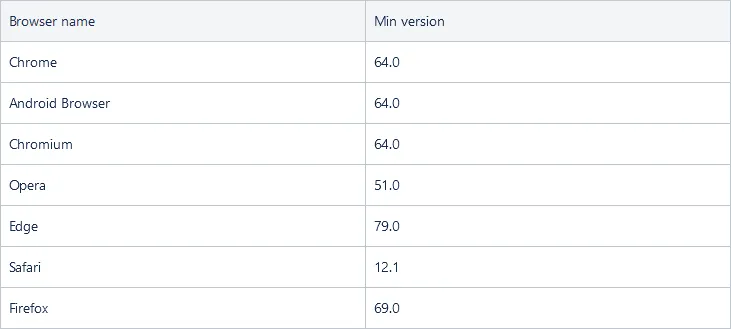
サポート対象ブラウザーの最新バージョンがインストールされていること。サポート対象ブラウザー(およびサポートされる最小バージョン)は以下のとおりです。
-
そのブラウザーで WebGL(または WebGL 2.0)が有効になっていること。
-
コンピューターのビデオドライバー(専用グラフィックスカードのドライバーを含む)が最新であること。
インストールおよびその他のソフトウェア
ウイルス対策ソフトウェアによる予測不能な動作が確認されているため、Altium On-Prem Enterprise Server のインストール中は、そのようなソフトウェアを無効にすることを推奨します。
コンピューター上で Microsoft Exchange Server も実行されている場合、最初にログインを試みた際に HTTP Error 503 エラーが発生することがあります。Exchange Server のインストールにより、Altium On-Prem Enterprise Server と競合する形で Internet Information Services(IIS)の構成が変更される場合があります。これを解決するには、applicationHost.config ファイルに対して以下の変更を行う必要があります。
<handlers accessPolicy="Read, Script">

	...
<add name="kerbauth" image="C:\Program Files\Microsoft\Exchange Server\V15\Bin\kerbauth.dll" preCondition="bitness64" />

	<add name="WSMan" image="C:\Windows\system32\wsmsvc.dll" preCondition="bitness64" />

	<add name="exppw" image="C:\Program Files\Microsoft\Exchange Server\V15\ClientAccess\Owa\auth\exppw.dll" preCondition="bitness64" />

	<add name="cafe_exppw" image="C:\Program Files\Microsoft\Exchange Server\V15\FrontEnd\HttpProxy\bin\exppw.dll"  preCondition="bitness64" />
...

	</handlers>
インストールまたは構成される追加ソフトウェア
-
Internet Information Services(IIS)。Altium On-Prem Enterprise Server のインストールにより、サポート対象オペレーティングシステムにネイティブ対応するバージョンである IIS 10.0 がインストールされます。
-
Firebird 3.0 データベースエンジン。IPv4 ネットワークアドレッシングが有効になっていることを確認してください。アクティブな IPv4 アドレスを確認するには、コマンドプロンプトで
ipconfig /allを実行します。 -
Microsoft .NET (.NET 8 および .NET 10)ソフトウェアプラットフォーム(.NET Runtime、.NET Server Hosting、ASP.NET Framework コンポーネントを含む)。
 AI で翻訳