
회로 시뮬레이션을 사용한 설계 분석
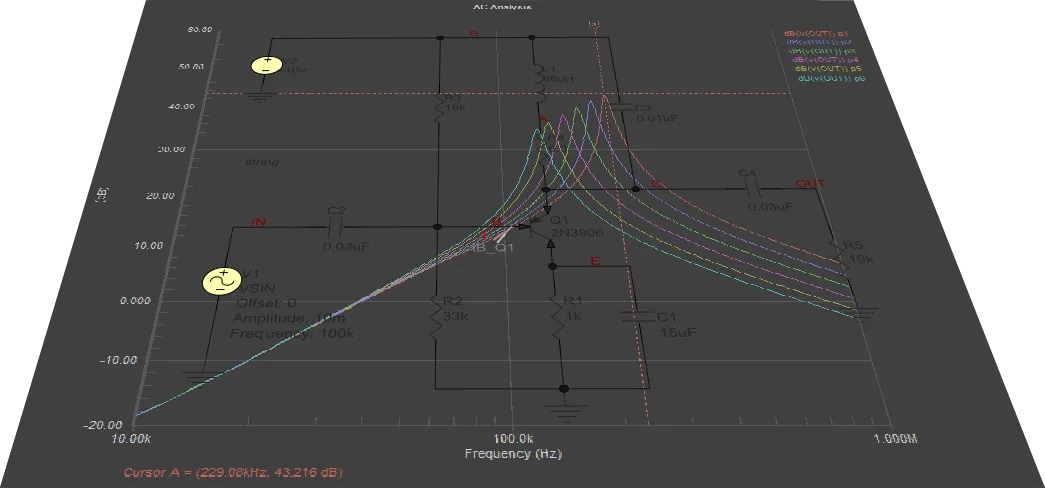
회로 시뮬레이션을 사용하면 제조를 진행하기 전에 아이디어를 검토할 수 있습니다. 개념을 검증할 수 있고, 회로를 빠르고 정확하게 튜닝할 수 있습니다. 또한 회로 시뮬레이션은 작업대에서 물리적으로는 불가능할 수도 있는 측정을 수행할 기회도 제공합니다.
전자 장치의 동작을 시뮬레이션하는 주된 목적은 설계의 성능을 표현하고 분석하는 것입니다. 시뮬레이션이 제공하는 기능 없이 가장 단순한 장치조차 설계하는 것은 상상하기 어렵습니다. 시뮬레이션 소프트웨어를 사용하면 설계 중인 장치의 모든 동작 모드를 손상 위험 없이 분석할 수 있고, 실제 조건에서는 측정하기 어려운 파라미터와 특성을 확인할 수 있으며, 그렇지 않으면 고가의 측정 장비가 필요할 수도 있는 측정을 수행할 수 있습니다.
SPICE (Simulation Program with Integrated Circuit Emphasis)는 오픈소스 소프트웨어 패키지로 개발되었으며, 이로 인해 널리 보급되고 지속적으로 발전해 왔습니다. Altium Designer의 Mixed Simulation(MixedSim) 기술은 SPICE 알고리즘 기반의 개선된 코어를 사용하며, 아날로그, 디지털 또는 아날로그-디지털 혼합 장치의 전기 회로를 시뮬레이션하도록 설계되었습니다. 이는 진정한 혼합 신호 시뮬레이터로, 아날로그와 디지털 장치를 모두 포함하는 회로를 분석할 수 있다는 의미입니다. SPICE3f5와 완벽하게 호환되며, 다양한 PSpice® 및 LTspice® 장치 모델도 지원합니다.
Altium Designer의 시뮬레이션 프로세스는 다음 단계로 나눌 수 있습니다.
- 시뮬레이션을 위한 프로젝트 검증 및 준비 – 시뮬레이션할 설계는 올바른 시뮬레이션 결과를 얻을 수 있도록 검증하고 적절히 준비해야 합니다. 여기에는 시뮬레이션 모델이 포함된 부품 배치, 신호 소스 설정, 프로브를 사용한 회로 내 관심 지점 정의가 포함됩니다. 검증 과정에서는 분석할 회로도에 문제가 있을 경우 피드백을 제공합니다.
- 시뮬레이션 구성 및 실행 – 시뮬레이션은 회로도에서 직접 수행되며, 시뮬레이션 파형을 분석하는 중에도 다시 실행할 수 있습니다. 필요한 해석 유형과 플로팅할 출력 표현식을 빠르게 설정한 다음 시뮬레이션을 실행합니다.
- 시뮬레이션 결과 작업 – 시뮬레이션 결과는 SimData 편집기에 표시됩니다. 이곳은 기능이 풍부한 환경으로, 시뮬레이션 결과를 빠르고 효율적으로 분석하여 설계를 평가하고 디버그하며, 최종적으로 설계의 동작에 대한 확신을 가질 수 있게 해줍니다.
Mixed Simulation – 예제 가이드
아래의 접을 수 있는 섹션에서는 필터 회로의 시뮬레이션 준비가 완료된 회로도를 만드는 과정을 안내하며, 이후 이를 사용해 몇 가지 회로 시뮬레이션 해석을 실행합니다.
Creating a New Design Project
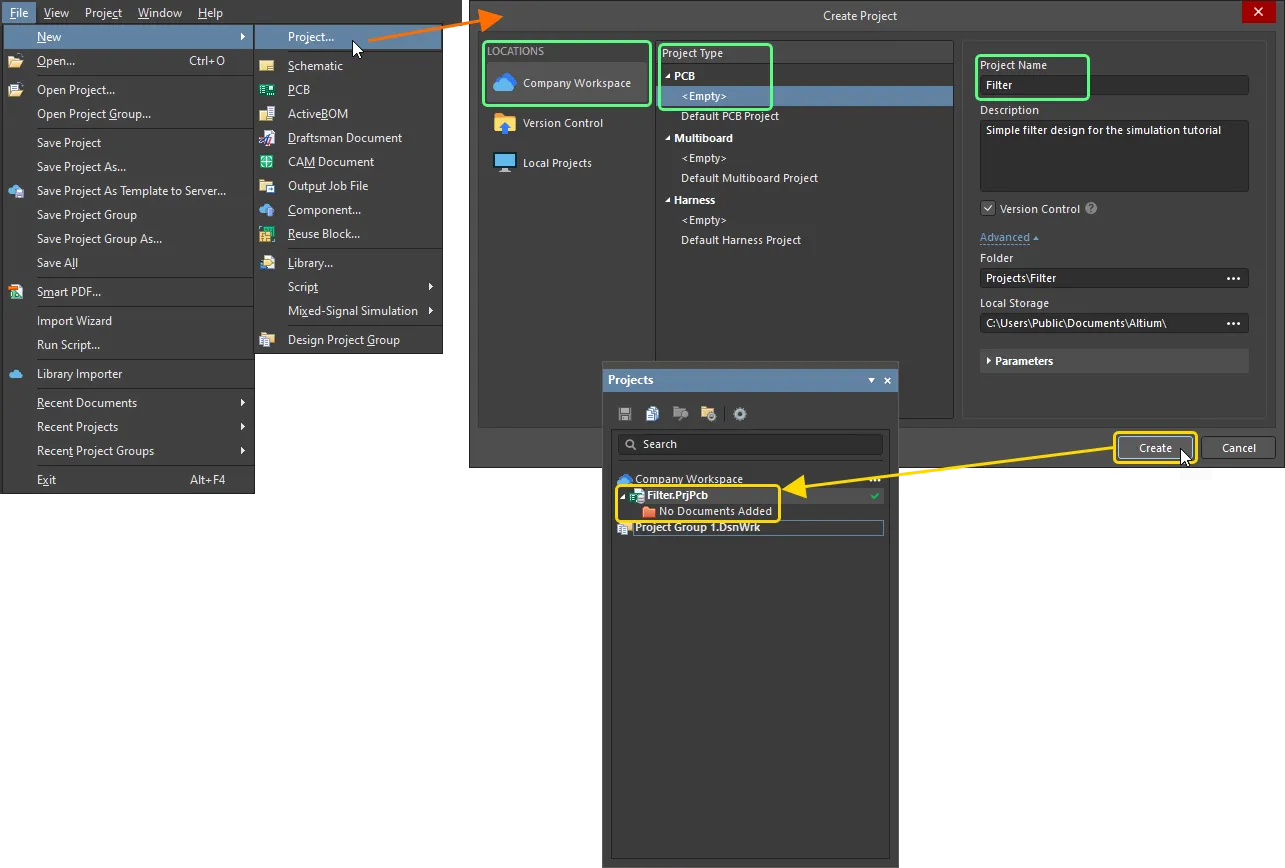
- 메인 메뉴에서 File » New » Project 명령을 선택합니다.
-
Create Project 대화상자가 열립니다.
- Locations 목록에서 사용 중인 Workspace 항목(또는 Workspace를 사용하지 않는 경우 Local Projects 항목)을 선택합니다.
- Project Type 목록에서 PCB 유형 아래의 <Empty> 항목을 선택합니다.
-
Project Name 필드에
Filter을 입력합니다. - 대화상자 오른쪽에서 다른 옵션(예: 저장 폴더)을 필요에 맞게 설정한 후 Create 버튼을 클릭합니다.
새 프로젝트가 생성되고, 프로젝트 항목이 Projects 패널에 표시됩니다.
-
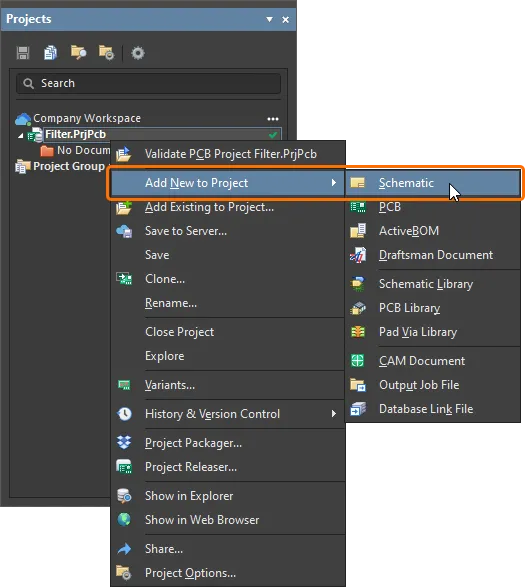
Projects 패널에서 프로젝트 항목을 마우스 오른쪽 버튼으로 클릭한 다음, 컨텍스트 메뉴에서 Add New to Project » Schematic 명령을 선택합니다.
-
새 회로도 문서의 빈 시트가 나타납니다. Projects 패널에서 해당 항목을 마우스 오른쪽 버튼으로 클릭하고 컨텍스트 메뉴에서 Save As 명령을 선택하여 하드 드라이브에 저장합니다. Save As 대화상자가 열리며, 프로젝트 파일과 동일한 위치에 문서를 저장할 수 있도록 준비됩니다. File name 필드에
Filter를 입력한 후 Save 를 클릭합니다(확장자는 자동으로 추가되므로 직접 입력할 필요가 없습니다). - 새 문서를 프로젝트에 추가했으므로 프로젝트 파일이 변경되었습니다. Projects 패널에서 프로젝트 항목을 마우스 오른쪽 버튼으로 클릭한 다음 Save 를 선택하여 프로젝트 변경 내용을 저장합니다.
Capturing the Circuit
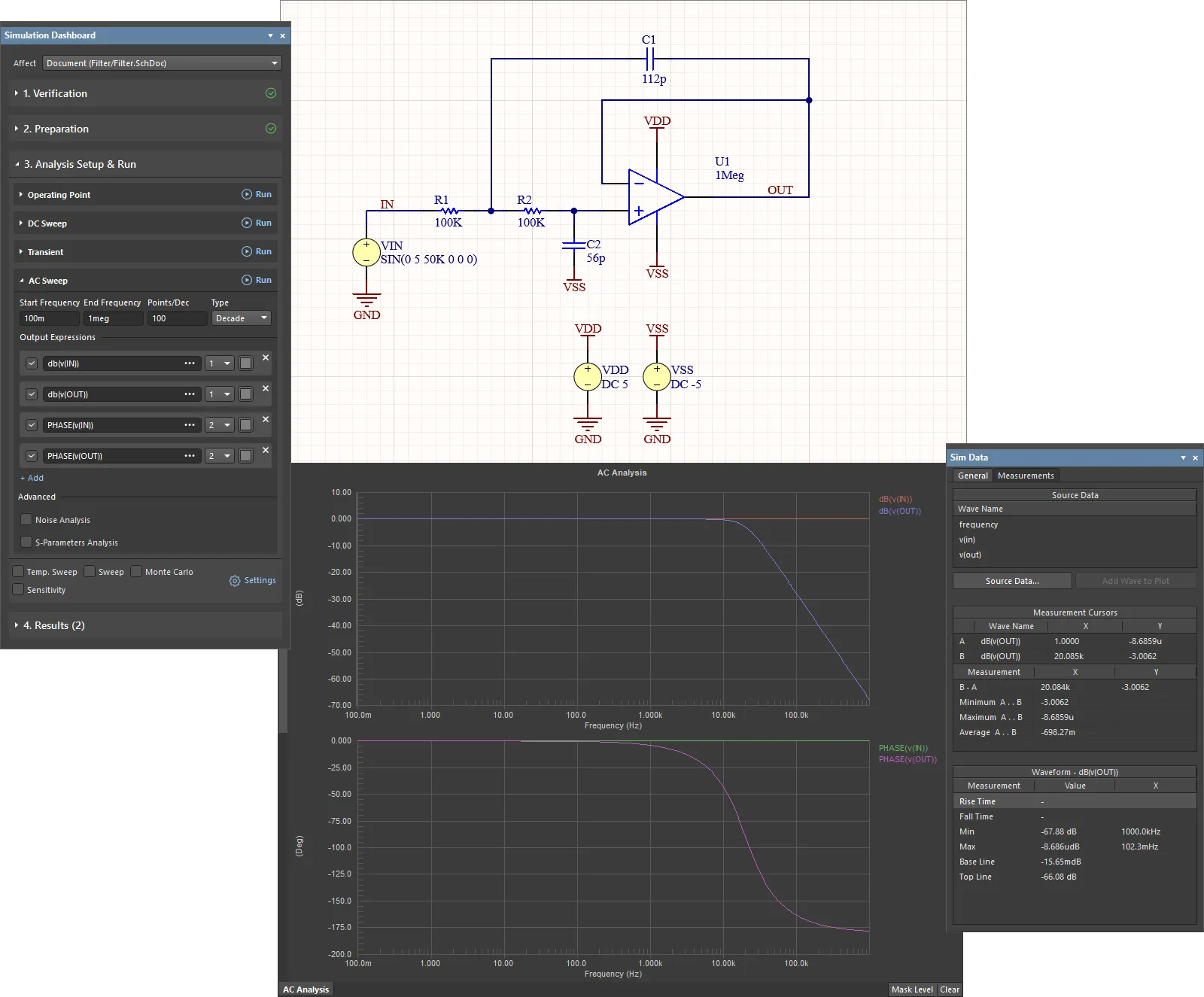
시뮬레이션할 필터 회로는 아래에 나와 있습니다. 이 섹션에서는 필요한 부품을 찾고, 해당 부품의 속성을 설정한 다음 회로도를 배선합니다.
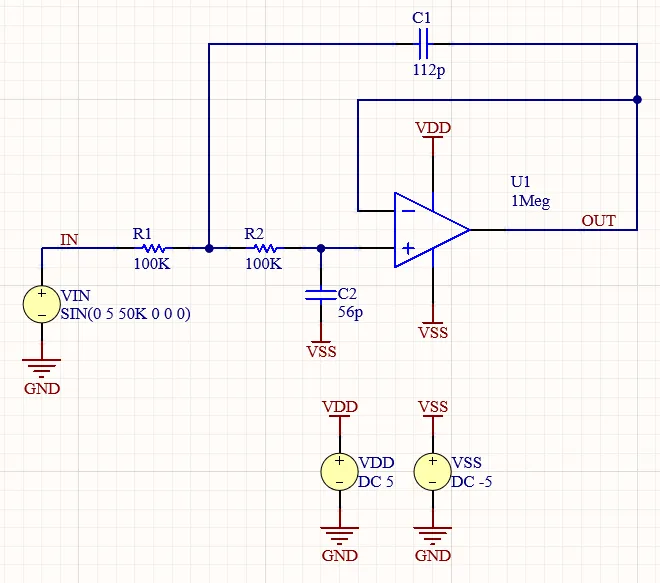
필터 회로의 회로도
시뮬레이션 준비가 된 부품 배치
-
회로도용 부품은 기본적으로 Altium Designer 설치 시 제공되는
Simulation Generic Components라이브러리에서 가져옵니다.-
디자인 공간 오른쪽 아래의 Components 버튼을 클릭하고 표시되는 메뉴에서 Components를 선택하여 Panels 패널을 엽니다.
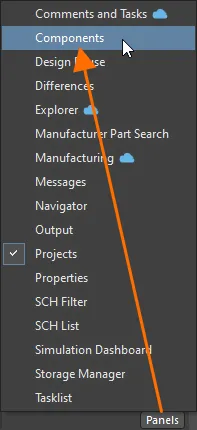
-
패널 상단의 드롭다운(패널이 간소화 모드인 경우) 또는 패널 왼쪽 상단의
 버튼을 클릭해 접근하는 Categories 창(패널이 일반 모드인 경우)에서
 Simulation Generic Components라이브러리를 선택합니다. 해당 라이브러리가 제공하는 부품 목록이 패널에 표시됩니다.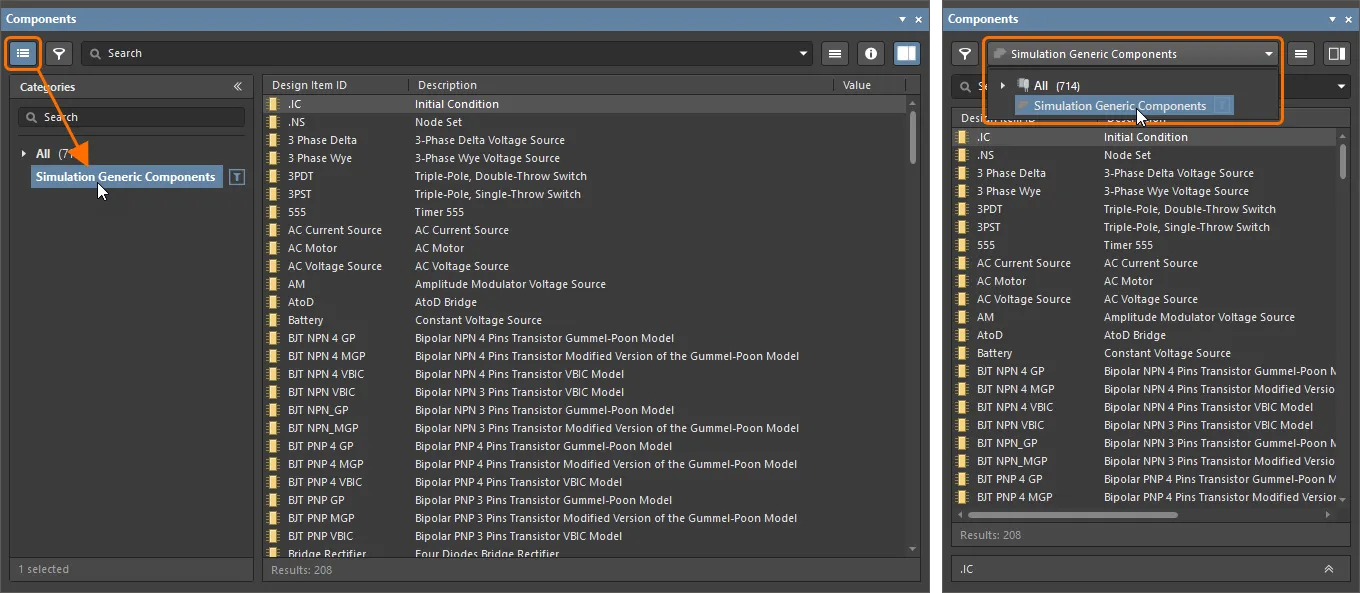
-
-
연산 증폭기를 배치합니다.
-
부품 목록에서 OpAmp with power terminals 부품을 찾은 다음 해당 항목을 마우스 오른쪽 버튼으로 클릭하고 메인 메뉴에서 Place 명령을 선택합니다. 부품이 디자인 공간에서 커서에 붙은 상태로 나타나지만, 아직은 배치하지 마십시오.
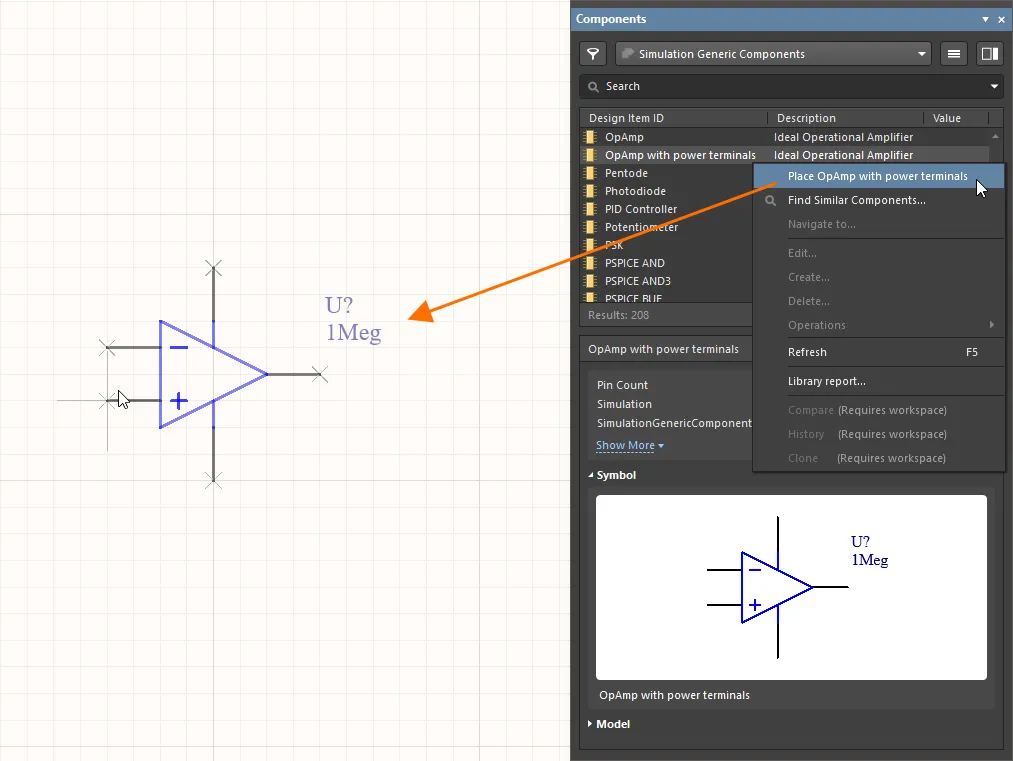
- op amp가 커서에 매달린 상태에서 Tab 키를 눌러 Properties 패널을 엽니다. 여기서 회로도에 부품을 배치하기 전에 속성을 편집할 수 있습니다.
-
General 패널의 Properties 영역에서 Designator를
U1(으)로 변경합니다.
-
디자인 공간에서 일시 정지 버튼(
 )을 클릭하여 부품 배치로 돌아갑니다.
- 디자인 공간을 클릭하여 op amp 인스턴스를 배치합니다.
- 추가 부품 인스턴스를 배치하기 위해 부품 배치 모드는 계속 유지됩니다. 이 회로에는 op amp 부품 인스턴스가 하나만 필요하므로, 마우스 오른쪽 버튼을 클릭하여 부품 배치 모드를 종료합니다.
-
-
저항을 배치합니다.
- Components 패널에서 Resistor 부품을 찾고, 해당 항목을 마우스 오른쪽 버튼으로 클릭한 다음 메인 메뉴에서 Place 명령을 선택합니다.
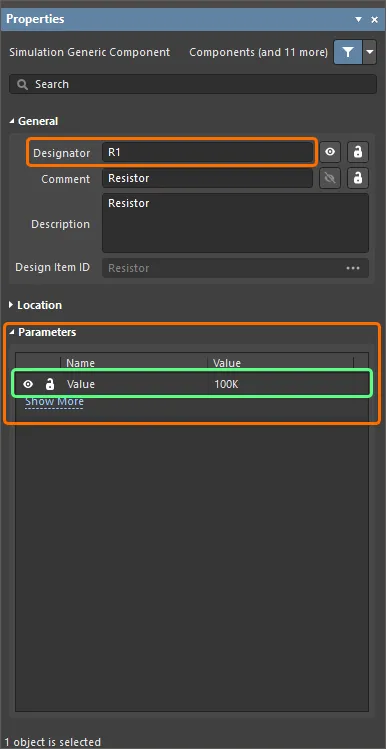
- 저항이 커서에 매달린 상태에서 Tab 키를 누릅니다.
-
열리는 Properties 패널에서 부품 속성을 다음과 같이 변경합니다.
-
General 영역에서 Designator를
R1(으)로 변경합니다. -
Parameters 영역에서
Value파라미터의 Value를100K(으)로 변경합니다.
-
General 영역에서 Designator를
-
디자인 공간에서 일시 정지 버튼()을 클릭하여 부품 배치로 돌아갑니다.
-
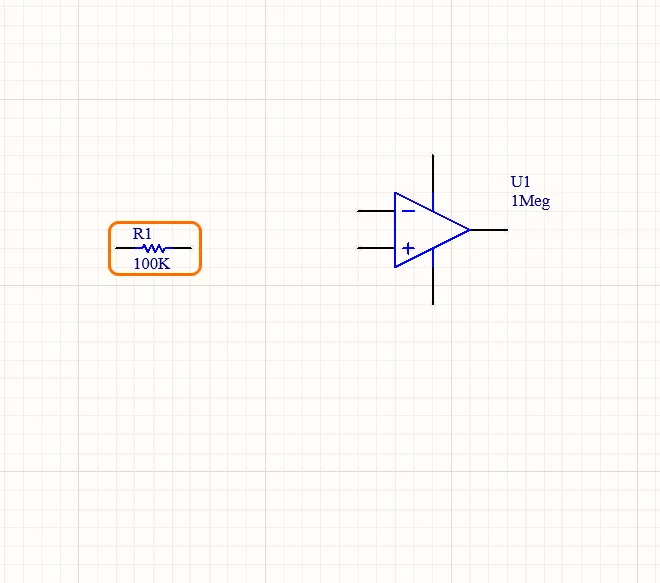
디자인 공간을 클릭하여 저항 인스턴스를 배치합니다.
-
커서를 이동한 후 디자인 공간을 클릭하여 동일한 값의 저항 인스턴스를 하나 더 배치합니다. 새 인스턴스의 designator는 자동으로 증가합니다(
R2).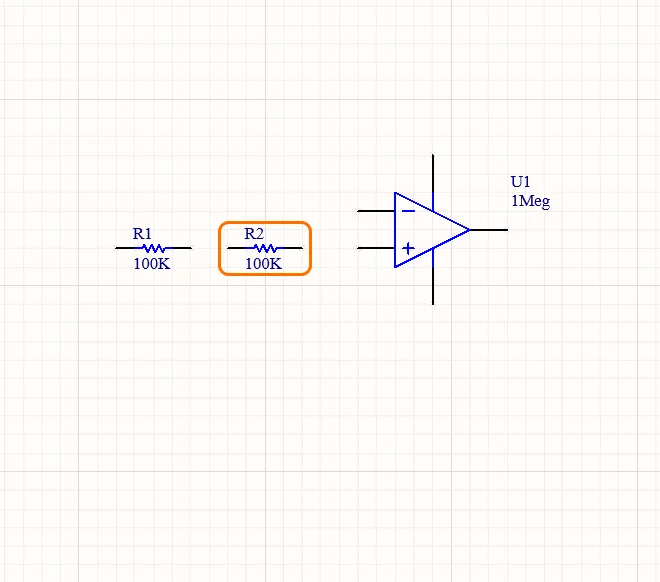
- 마우스 오른쪽 버튼을 클릭하여 부품 배치 모드를 종료합니다.
-
커패시터를 배치합니다.
- Components 패널에서 Capacitor 부품을 찾고, 해당 항목을 마우스 오른쪽 버튼으로 클릭한 다음 메인 메뉴에서 Place 명령을 선택합니다.
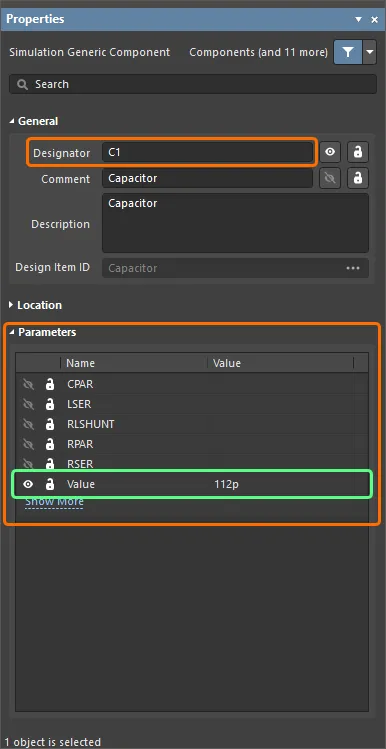
- 커패시터가 커서에 매달린 상태에서 Tab 키를 누릅니다.
-
열리는 Properties 패널에서 부품 속성을 다음과 같이 변경합니다.
-
General 영역에서 Designator를
C1(으)로 변경합니다. -
Parameters 영역에서
Value파라미터의 Value를112p(으)로 변경합니다.
-
General 영역에서 Designator를
-
디자인 공간에서 일시 정지 버튼()을 클릭하여 부품 배치로 돌아갑니다.
-
디자인 공간을 클릭하여 커패시터 인스턴스를 배치합니다.
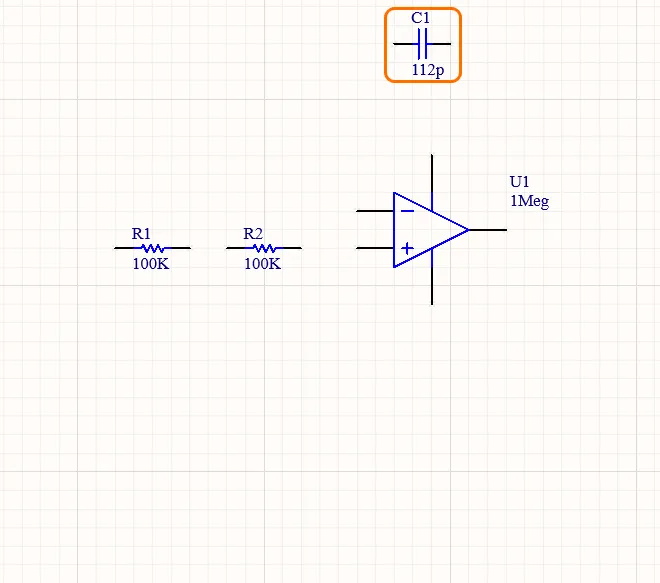
- 커패시터가 여전히 커서에 매달려 있어 다음 커패시터 인스턴스를 배치할 준비가 된 상태에서 Tab 키를 누릅니다.
-
Parameters 영역의 Properties 패널에서
Value파라미터의 Value를56p(으)로 변경합니다. -
디자인 공간에서 일시 정지 버튼()을 클릭하여 부품 배치로 돌아갑니다.
- Spacebar 키를 눌러 부품을 90°씩 회전시켜 올바른 방향이 될 때까지 조정합니다.
-
커서를 이동한 후 디자인 공간을 클릭하여 다른 커패시터 인스턴스를 배치합니다. 새 인스턴스의 designator는 자동으로 증가합니다(
C2).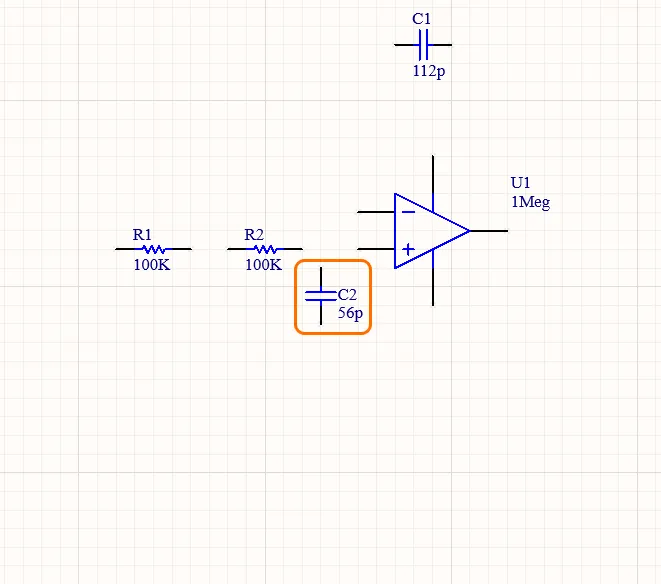
- 마우스 오른쪽 버튼을 클릭하여 부품 배치 모드를 종료합니다.
전압 소스 추가
시뮬레이션 시 회로에 전원을 공급하려면 전압 소스가 필요합니다.
-
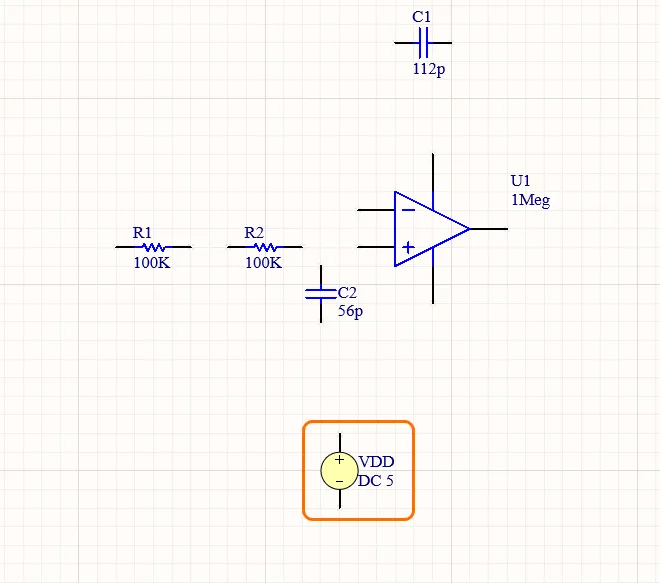
VDD 전압 소스를 배치합니다.
- 메인 메뉴에서 Simulate » Place Sources » Voltage Source 명령을 선택합니다.
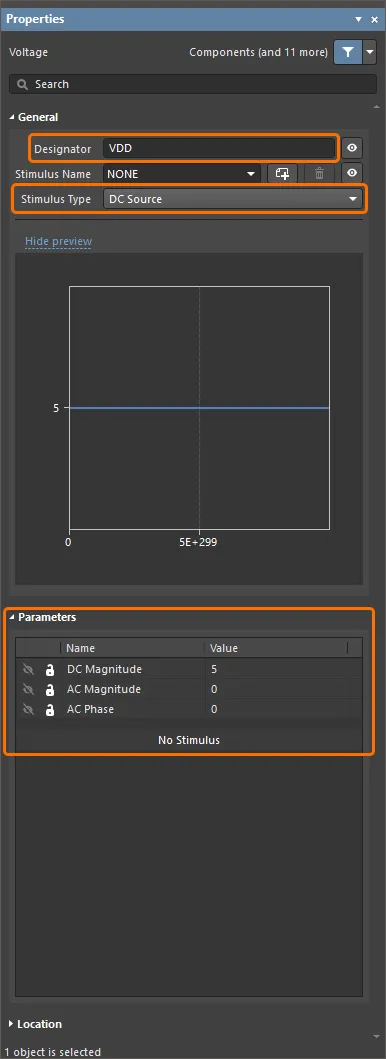
- 전압 소스가 커서에 매달린 상태에서 Tab 키를 누릅니다.
-
열리는 Properties 패널에서 소스 속성을 다음과 같이 변경합니다.
-
General 영역에서 Designator를
VDD(으)로 변경하고, 소스의 Stimulus Type(으)로 DC Source를 선택합니다. -
Parameters 영역에서 파라미터 값을 다음과 같이 변경합니다.
DC Magnitude=5
AC Magnitude=0
AC Phase=0
-
General 영역에서 Designator를
-
디자인 공간에서 일시 정지 버튼()을 클릭하여 전압 소스 배치로 돌아갑니다.
-
디자인 공간을 클릭하여 전압 소스 인스턴스를 배치합니다.
-
VSS 전압 소스를 배치합니다.
- 전압 소스가 여전히 커서에 매달려 있어 다음 소스 인스턴스를 배치할 준비가 된 상태에서 Tab 키를 누릅니다.
-
열리는 Properties 패널에서 소스 속성을 다음과 같이 변경합니다.
-
General 영역에서 Designator를
VSS(으)로 변경하고, 소스의 Stimulus Type(으)로 DC Source를 선택합니다. -
Parameters 영역에서 파라미터 값을 다음과 같이 변경합니다.
DC Magnitude=-5
AC Magnitude=0
AC Phase=0

-
General 영역에서 Designator를
-
디자인 공간에서 일시 정지 버튼()을 클릭하여 전압 소스 배치로 돌아갑니다.
-
커서를 이동한 후 디자인 공간을 클릭하여 다른 전압 소스 인스턴스를 배치합니다.
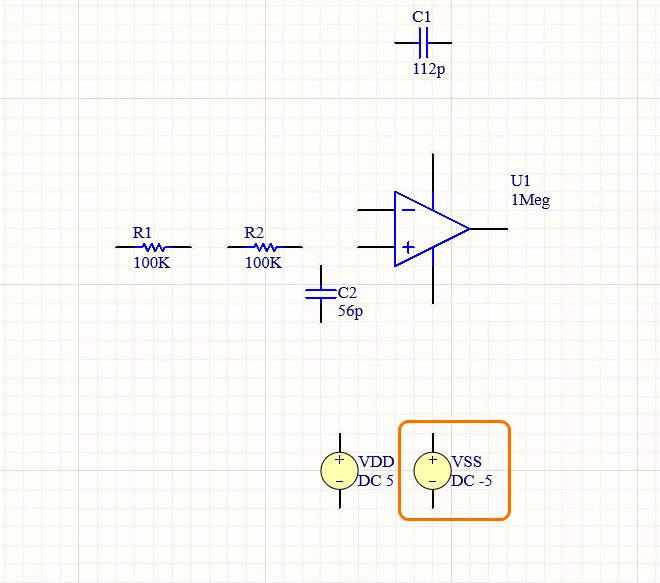
-
사인파 전압 소스를 배치합니다.
- 전압 소스가 여전히 커서에 매달려 있어 다음 소스 인스턴스를 배치할 준비가 된 상태에서 Tab 키를 누릅니다.
-
열리는 Properties 패널에서 소스 속성을 다음과 같이 변경합니다.
-
General 패널의 Properties 영역에서 Designator를
VIN(으)로 변경하고, 소스의 Stimulus Type(으)로 Sinusoidal 를 선택합니다. -
Parameters 패널의 Properties 영역에서 파라미터 값을 다음과 같이 변경합니다.
DC Magnitude=0
AC Magnitude=1
AC Phase=0
Offset=0
Amplitude=5
Frequency=50K
Delay=0
Dampling Factor=0
Phase=0
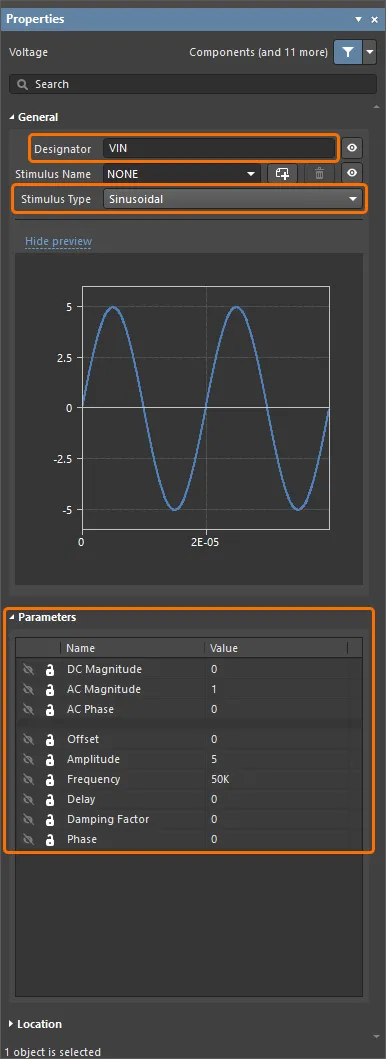
-
General 패널의 Properties 영역에서 Designator를
-
디자인 공간에서 일시 정지 버튼()을 클릭하여 전압 소스 배치로 돌아갑니다.
-
커서를 이동한 후 디자인 공간을 클릭하여 다른 전압 소스 인스턴스를 배치합니다.
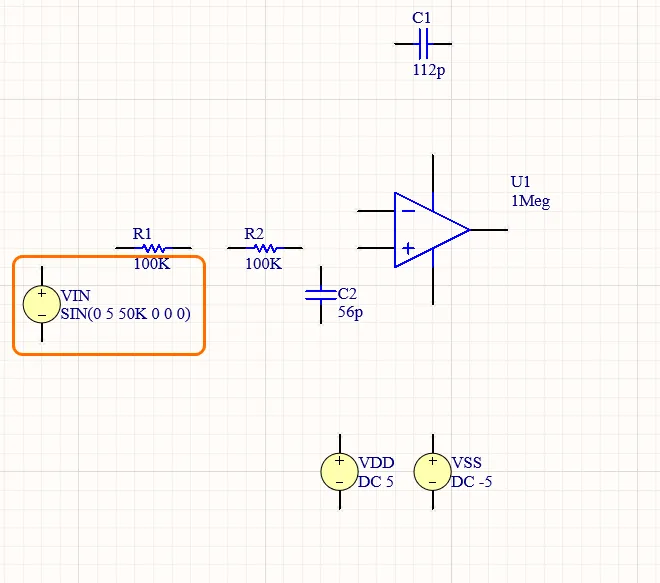
- 마우스 오른쪽 버튼을 클릭하여 부품 배치 모드를 종료합니다.
회로 배선하기
배선은 회로의 여러 부품 사이에 연결을 만드는 과정입니다. 이 섹션에서는 아래 이미지에 따라 회로를 배선합니다.
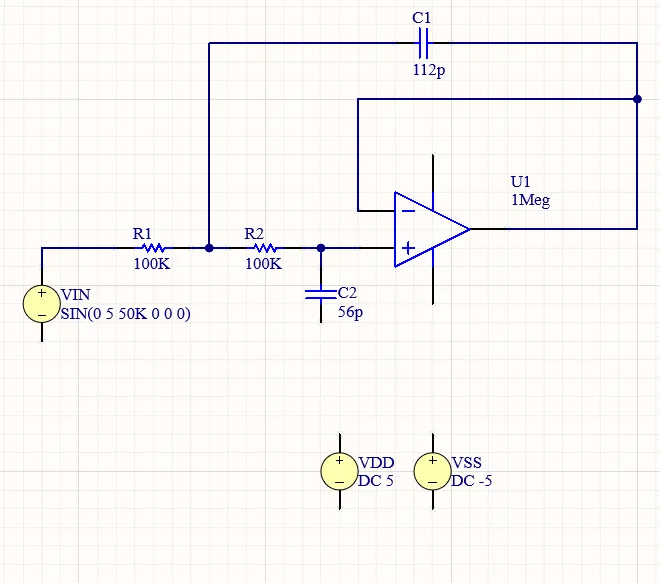
- 메인 메뉴에서 Place » Wire 명령을 선택합니다.
- op amp의 "+" 핀의 핫스팟 위에 커서를 놓으면 커서 위치에 빨간 연결 마커(빨간 십자)가 나타납니다. 이는 커서가 부품의 유효한 전기적 연결 지점 위에 있음을 의미합니다.
- 클릭하여 와이어의 시작점을 고정합니다.
-
커서를
R2의 가장 가까운 핀의 핫스팟 위로 이동하고, 커서가 빨간 연결 마커로 바뀔 때까지 위치시킵니다. - 클릭하여 와이어를 해당 핀에 연결합니다. 그러면 커서가 그 와이어에서 해제됩니다.
- 아래 비디오와 같이 나머지 회로도 배선합니다.
- 모든 와이어 배치가 끝나면 마우스 오른쪽 버튼을 클릭하여 배치 모드를 종료합니다.
전원 포트 추가
-
GND 전원 포트를 배치합니다.
- 메인 메뉴에서 Place » Power Port 명령을 선택합니다.
- 전원 포트가 커서에 매달린 상태에서 Tab 키를 누릅니다.
-
Properties 영역의 Properties 패널에서 Name =
GND, Style = Power Ground로 설정합니다.
-
디자인 공간에서 일시 정지 버튼()을 클릭하여 전원 포트 배치로 돌아갑니다.
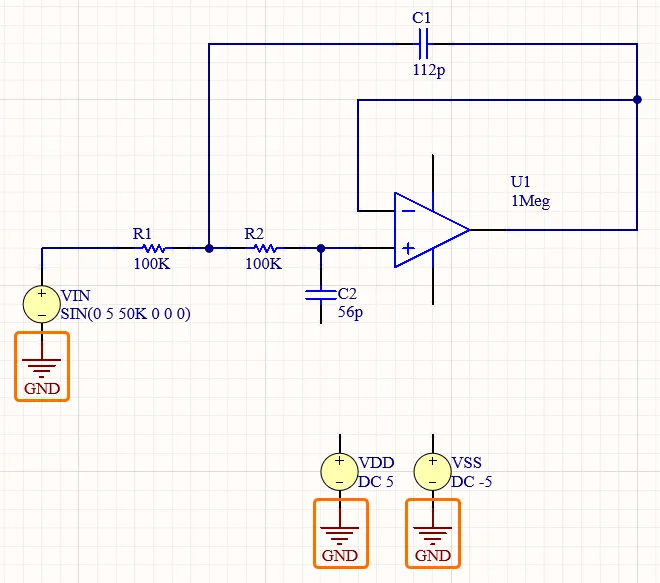
-
아래 이미지와 같이 전압 소스 부품의 "-" 핀 각각에 하나씩, 총 3개의 전원 포트를 배치합니다.
-
VDD 전원 포트를 배치합니다.
-
전원 포트가 커서에 매달린 상태에서 Tab 키를 누르고, Properties 패널에서 Name =
VDD, Style = Bar(으)로 설정합니다. -
디자인 공간에서 일시 정지 버튼()을 클릭하여 전원 포트 배치로 돌아갑니다.
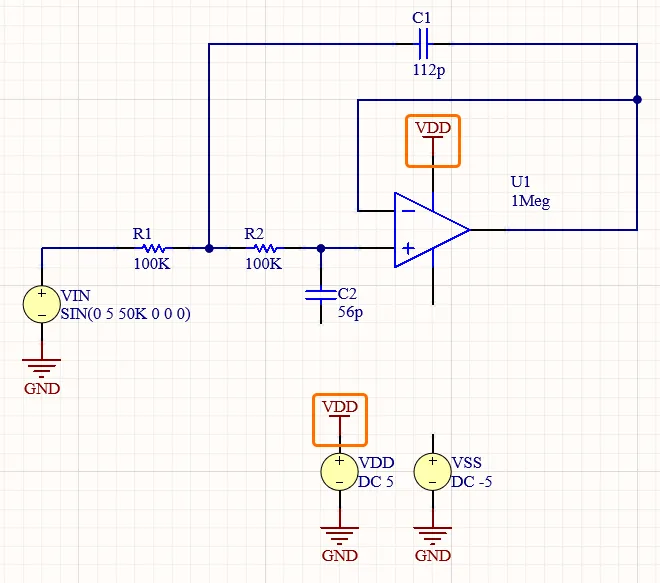
-
아래 이미지와 같이 전원 포트 2개를 배치합니다.
-
전원 포트가 커서에 매달린 상태에서 Tab 키를 누르고, Properties 패널에서 Name =
-
VSS 전원 포트를 배치합니다.
-
전원 포트가 커서에 매달린 상태에서 Tab 키를 누르고, Properties 패널에서 Name =
VSS, Style = Bar(으)로 설정합니다. -
디자인 공간에서 일시 정지 버튼()을 클릭하여 전원 포트 배치로 돌아갑니다.
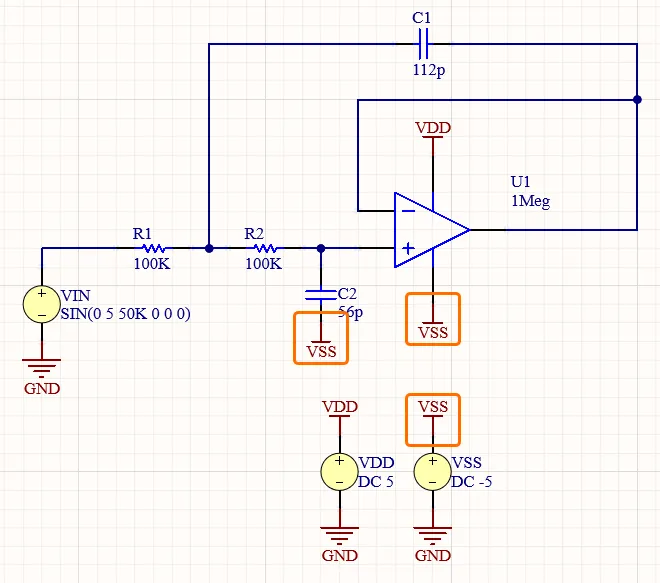
-
아래 이미지와 같이 전원 포트 3개를 배치합니다.
- 마우스 오른쪽 버튼을 클릭하여 배치 모드를 종료합니다.
-
전원 포트가 커서에 매달린 상태에서 Tab 키를 누르고, Properties 패널에서 Name =
넷 라벨 추가
-
입력 넷용 넷 라벨을 배치합니다.
- 메인 메뉴에서 Place » Net Label 명령을 선택합니다.
-
전원 포트가 커서에 매달린 상태에서 Tab 키를 누르고 Net Name =
IN(으)로 설정합니다.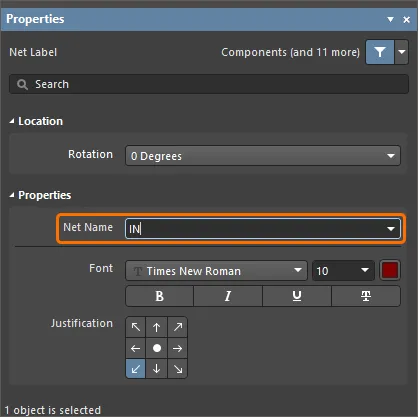
-
디자인 공간에서 일시 정지 버튼()을 클릭하여 넷 라벨 배치로 돌아갑니다.
-
VIN와R1사이의 와이어 위를 클릭하여 넷 라벨을 배치합니다. 넷 라벨의 왼쪽 아래 모서리가 핫스팟이라는 점에 유의하십시오. 이 지점이 와이어에 닿아 있어야 합니다.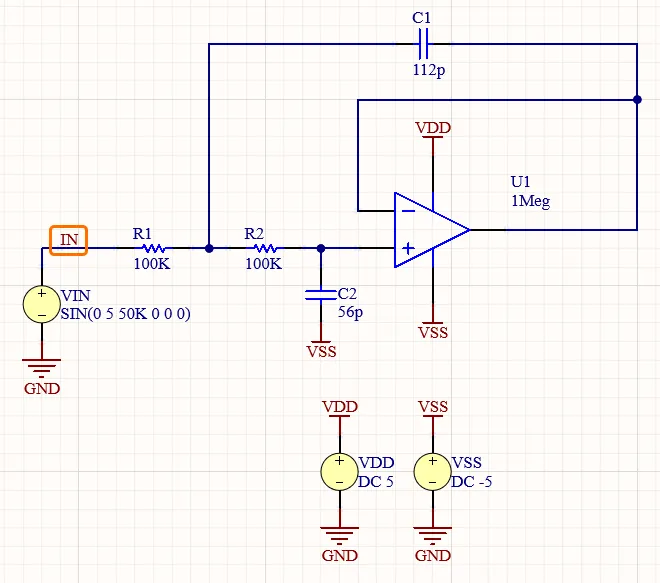
-
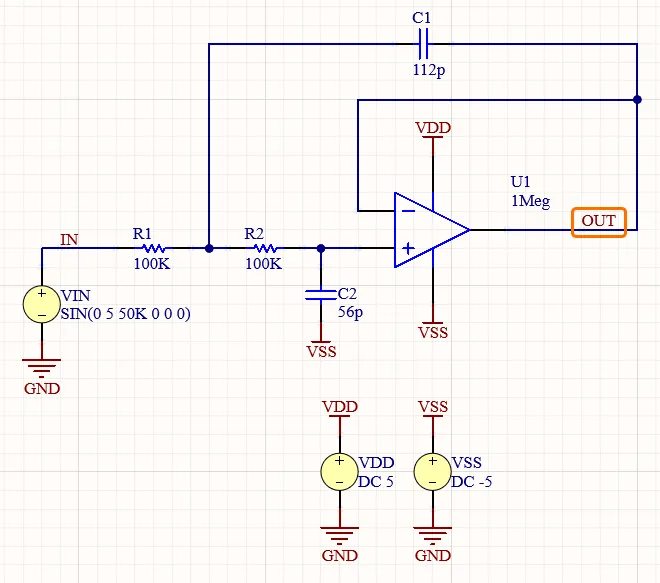
출력 넷용 넷 라벨을 배치합니다.
-
전원 포트가 커서에 매달린 상태에서 Tab 키를 누르고 Net Name =
OUT(으)로 설정합니다. -
op amp의 출력 핀에서 나가는 와이어 위를 클릭하여 넷 라벨을 배치합니다.
- 마우스 오른쪽 버튼을 클릭하여 배치 모드를 종료합니다.
-
전원 포트가 커서에 매달린 상태에서 Tab 키를 누르고 Net Name =
- Projects 패널에서 해당 항목을 마우스 오른쪽 버튼으로 클릭하고 컨텍스트 메뉴에서 Save를 선택하여 회로도 문서를 저장합니다.
Preparing the Project for Simulation
Altium Designer에서는 회로도에서 직접 회로 시뮬레이션을 실행할 수 있습니다. 시뮬레이션은 Simulation Dashboard 패널에서 구성하고 실행합니다.
- 디자인 공간 오른쪽 아래의 Panels 버튼을 클릭하고 표시되는 메뉴에서 Simulation Dashboard를 선택하여 Simulation Dashboard 패널을 엽니다.
-
패널의 Verification 접을 수 있는 영역을 펼친 다음 Start Verification 버튼을 클릭합니다. 해당 영역의 Electrical Rule Check 및 Simulation Models 항목 모두에 녹색 체크 표시가 나타나야 합니다.
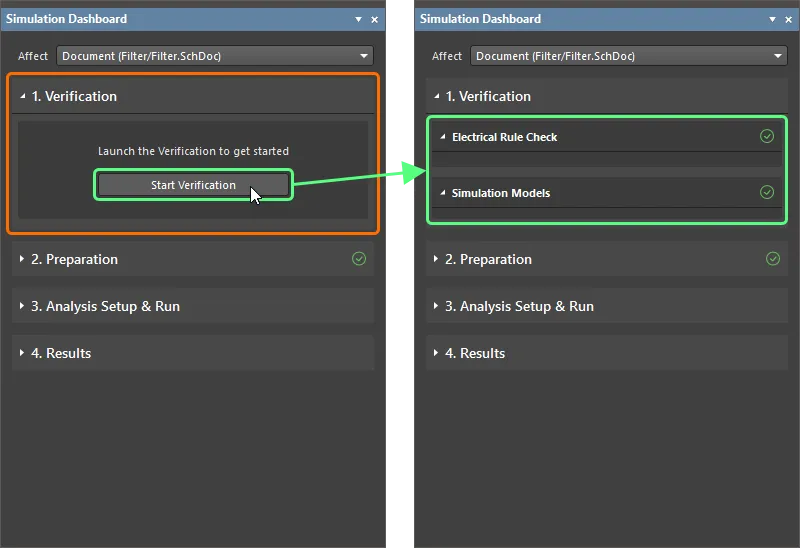
- 위반 사항이 감지되면, 계속 진행하기 전에 위반 조건을 찾아 수정하십시오.
-
패널의 Preparation 접을 수 있는 영역을 펼치고, 회로도에 추가한 세 개의 전압 소스가 모두 Simulation Sources 목록에 표시되어 있으며 활성화되어 있는지 확인합니다.
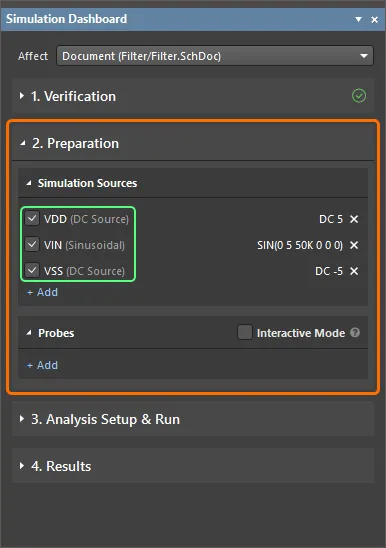
Configuring the Analyses
과도 해석 설정하기
과도 해석은 일반적으로 오실로스코프에 표시되는 형태의 출력을 생성하며, 사용자가 지정한 시간 구간 동안 시간에 따른 과도 출력 변수(전압, 전류 또는 전력)를 계산합니다.
-
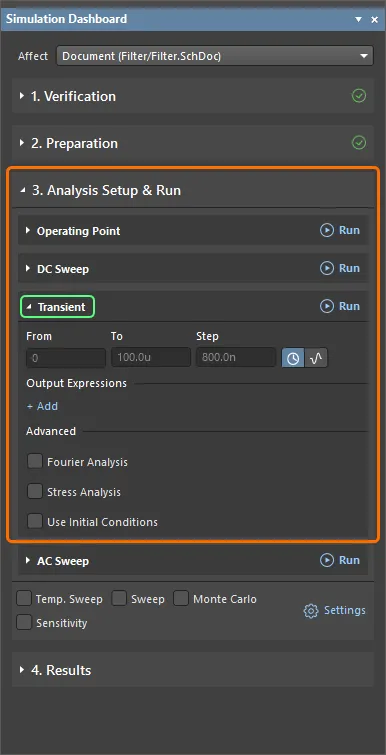
Analysis Setup & Run Simulation Dashboard 패널의 접을 수 있는 영역과 그 안의 Transient 영역을 펼칩니다.
-
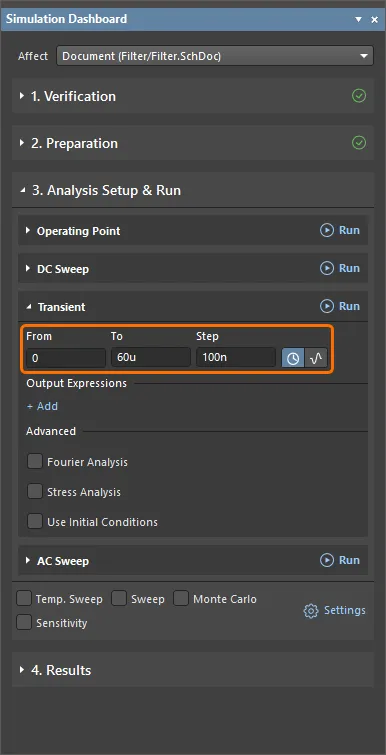
Interval 옵션이 선택되어 있는지 확인하고(
 ), 다음 값을 입력합니다:
-
From =
0 -
To =
60u -
Step =
100n
-
From =
-
입력 신호에 대한 새 식을 추가합니다. 이 식은 시뮬레이션 결과 문서에서 파형으로 출력됩니다:
-
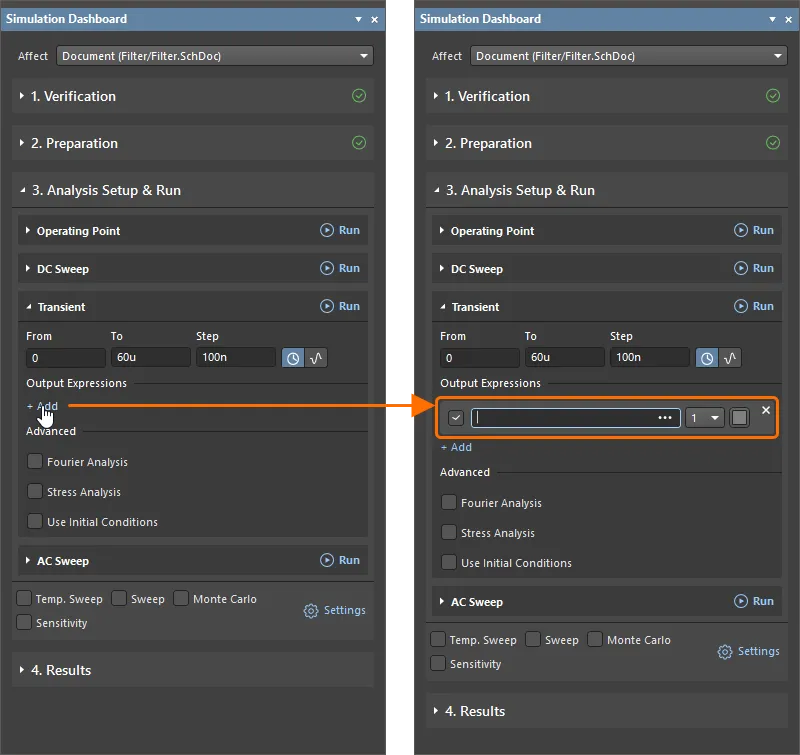
Output Expressions 헤더 아래의 Add 컨트롤을 클릭하여 시뮬레이션 결과 문서에서 파형으로 출력할 새 식의 필드를 추가합니다.
-
추가된 필드 오른쪽의
 버튼을 클릭하여 Add Output Expression 대화상자를 열고, 여기서 출력 식을 구성합니다.
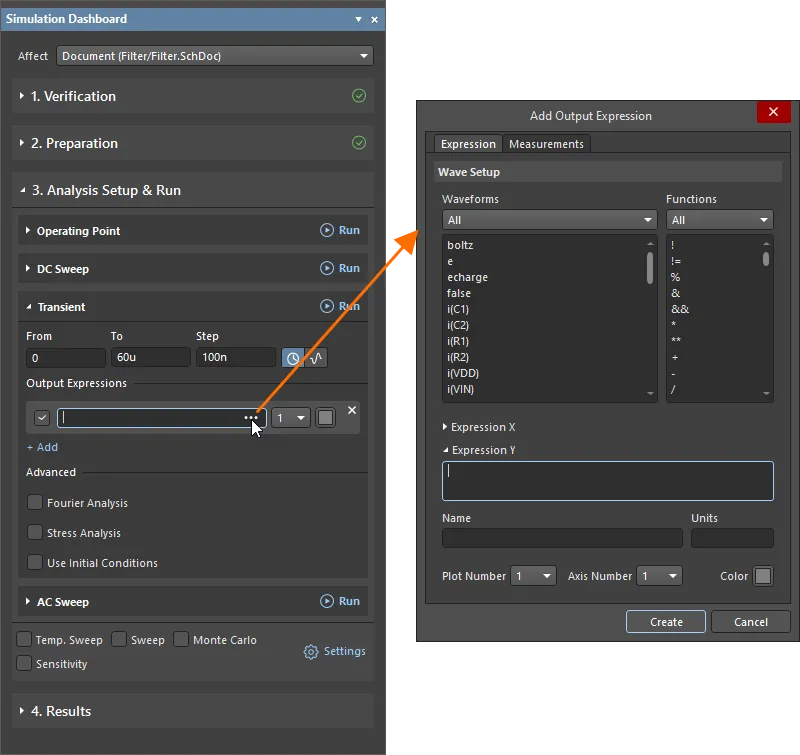
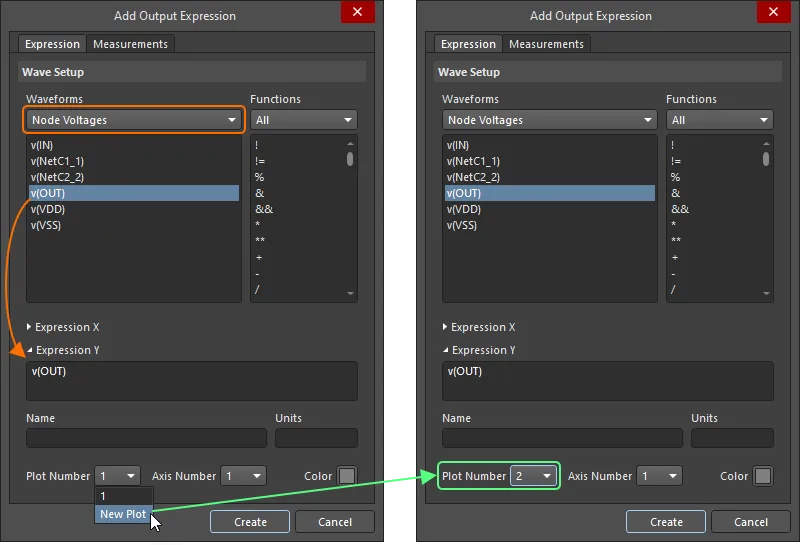
- Add Output Expression 대화상자에서 Waveform 영역의 드롭다운에서 Node Voltages을(를) 선택한 다음, 아래 목록에서 v(IN) 항목을 클릭합니다. 그러면
v(IN)식이 대화상자의 Expression Y 필드에 추가됩니다. -
Add Output Expression 대화상자에서 Create을(를) 클릭합니다. 그러면 식이 Simulation Dashboard 패널에 표시됩니다.

-
-
출력 신호에 대한 출력 식을 추가합니다:
- Simulation Dashboard 패널에서 Add 컨트롤을 클릭하여 다른 출력 식용 필드를 추가한 다음, 추가된 필드 오른쪽의 버튼을 클릭합니다.
- Add Output Expression 대화상자에서 Waveform 영역의 드롭다운에서 Node Voltages을(를) 선택한 다음, 아래 목록에서 v(OUT) 항목을 클릭합니다.
-
이 식의 파형을 시뮬레이션 결과 문서의 다른 플롯에 그리려면 Plot Number 드롭다운에서 New Plot을(를) 선택합니다. 선택 후 드롭다운에는 2이(가) 표시됩니다.
- Add Output Expression 대화상자에서 Create을(를) 클릭하여 식을 Simulation Dashboard 패널에 추가합니다.
- Simulation Dashboard 패널에서 Add 컨트롤을 클릭하여 다른 출력 식용 필드를 추가한 다음, 추가된 필드 오른쪽의
-
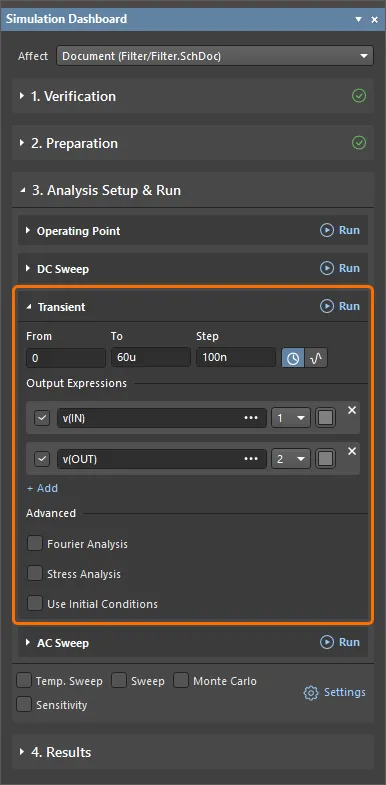
이 시점에서 과도 해석 구성이 완료됩니다. 옵션은 아래와 같이 Simulation Dashboard 패널에 표시되어야 합니다.
AC 스윕 해석 설정하기
AC 스윕 해석은 회로의 주파수 응답을 보여주는 출력을 생성하며, 주파수에 따른 소신호 AC 출력 변수를 계산합니다. AC 소신호 해석의 원하는 출력은 일반적으로 전달 함수(예: 전압 이득)입니다.
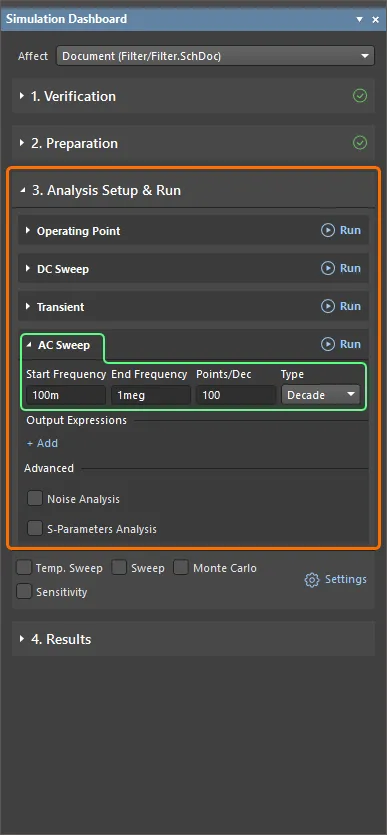
- Simulation Dashboard 패널에서 Analysis Setup & Run 접을 수 있는 영역 안의 AC Sweep 영역을 펼칩니다.
-
스윕 Type으로 Decade을(를) 선택하고 다음 값을 입력합니다:
-
Start Frequency =
100m -
End Frequency =
1meg -
Points/Dec =
100
-
Start Frequency =
-
입력 신호의 데시벨 크기에 대한 출력 식을 추가합니다:
- Output Expressions 헤더 아래의 Add 컨트롤을 클릭하여 새 식용 필드를 추가한 다음, 추가된 필드 오른쪽의 버튼을 클릭합니다.
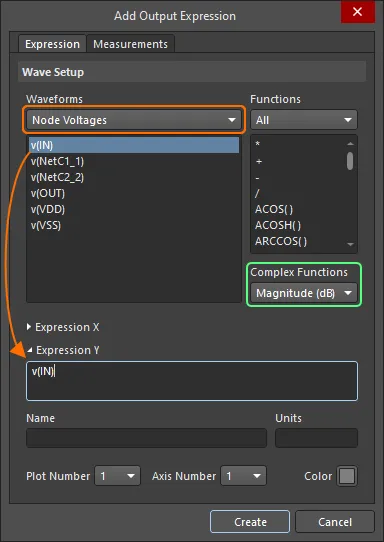
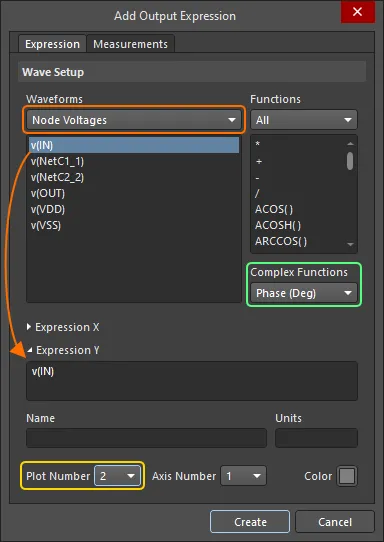
- Add Output Expression 대화상자에서 Waveform 영역의 드롭다운에서 Node Voltages을(를) 선택한 다음, 아래 목록에서 v(IN) 항목을 클릭합니다.
- Add Output Expression 대화상자에서 Complex Functions 드롭다운의 Magnitude (dB)을(를) 선택하고 Create을(를) 클릭합니다.
- Output Expressions 헤더 아래의 Add 컨트롤을 클릭하여 새 식용 필드를 추가한 다음, 추가된 필드 오른쪽의
-
출력 신호의 데시벨 크기에 대한 출력 식을 추가합니다:
- Output Expressions 헤더 아래의 Add 컨트롤을 클릭하여 새 식용 필드를 추가한 다음, 추가된 필드 오른쪽의 버튼을 클릭합니다.
- Add Output Expression 대화상자에서 Waveform 영역의 드롭다운에서 Node Voltages을(를) 선택한 다음, 아래 목록에서 v(OUT) 항목을 클릭합니다.
- Add Output Expression 대화상자에서 Complex Functions 드롭다운의 Magnitude (dB)을(를) 선택하고 Create을(를) 클릭합니다.
- Output Expressions 헤더 아래의 Add 컨트롤을 클릭하여 새 식용 필드를 추가한 다음, 추가된 필드 오른쪽의
-
입력 신호의 위상(도 단위)에 대한 출력 식을 추가합니다:
- Simulation Dashboard 패널에서 Add 컨트롤을 클릭하여 다른 출력 식용 필드를 추가하고, 추가된 필드 오른쪽의 버튼을 클릭합니다.
- Add Output Expression 대화상자에서 Waveform 영역의 드롭다운에서 Node Voltages을(를) 선택한 다음, 아래 목록에서 v(IN) 항목을 클릭합니다.
- Add Output Expression 대화상자에서 Complex Functions 드롭다운의 Phase (Deg) 을(를) 선택합니다.
- Plot Number 드롭다운에서 New Plot을(를) 선택한 다음, Add Output Expression 대화상자에서 Create을(를) 클릭합니다.
- Simulation Dashboard 패널에서 Add 컨트롤을 클릭하여 다른 출력 식용 필드를 추가하고, 추가된 필드 오른쪽의
-
출력 신호의 위상(도 단위)에 대한 출력 식을 추가합니다:
- Simulation Dashboard 패널에서 Add 컨트롤을 클릭하여 다른 출력 식용 필드를 추가하고, 추가된 필드 오른쪽의 버튼을 클릭합니다.
- Add Output Expression 대화상자에서 Waveform 영역의 드롭다운에서 Node Voltages을(를) 선택한 다음, 아래 목록에서 v(OUT) 항목을 클릭합니다.
- Add Output Expression 대화상자에서 Complex Functions 드롭다운의 Phase (Deg) 을(를) 선택합니다.
- Simulation Dashboard 패널에서 Add 컨트롤을 클릭하여 다른 출력 식용 필드를 추가하고, 추가된 필드 오른쪽의
-
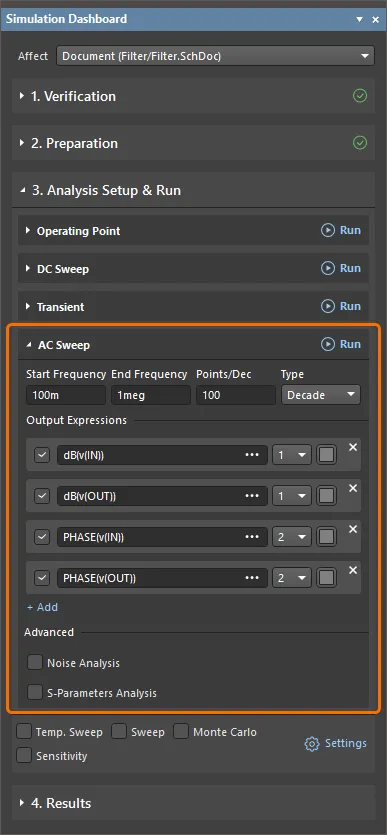
이 시점에서 AC 스윕 해석 구성이 완료됩니다. 옵션은 아래와 같이 Simulation Dashboard 패널에 표시되어야 합니다.
-
시뮬레이션 구성 파일(
project_sim_config.simcfg)은 Projects 패널의 프로젝트 구조에서Settings\Simulation Documents폴더에 표시됩니다. 문서를 저장하려면 Projects 패널에서 해당 항목을 마우스 오른쪽 버튼으로 클릭하고 컨텍스트 메뉴에서 Save As 명령을 선택합니다.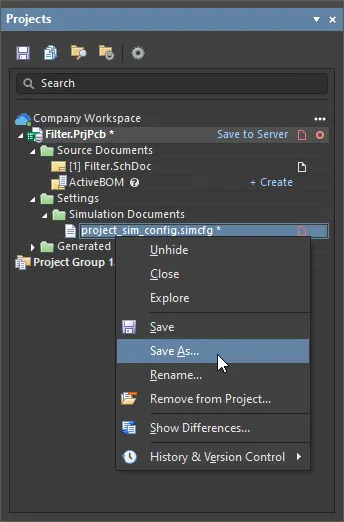
Save As 대화상자가 열리고, 하드 드라이브의 프로젝트 폴더에 문서를 저장할 준비가 됩니다. 기본 위치와 기본 이름으로 문서를 저장하려면 Save 를 클릭합니다.
- Projects 패널에서 프로젝트 파일 항목을 마우스 오른쪽 버튼으로 클릭하고 컨텍스트 메뉴에서 Save 명령을 선택하여 프로젝트 파일을 저장합니다.
Running the Analyses and Exploring the Results
-
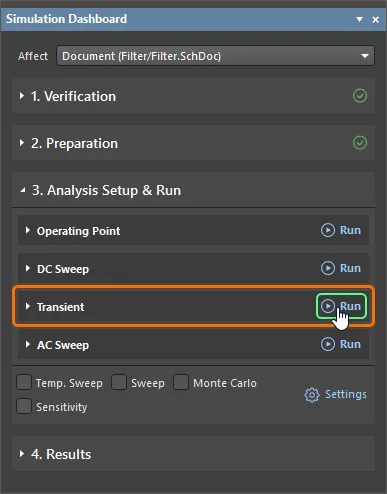
Simulation Dashboard 패널에서 Transient 영역 헤더 오른쪽의 Run 버튼을 클릭하여 과도 해석을 수행합니다.
- 시뮬레이션이 성공하면 Messages 패널에 시뮬레이션이 성공적으로 완료되었다는 내용이 보고됩니다. 이 패널은 닫아도 됩니다.
-
Filter.sdf라는 이름의 새 시뮬레이션 결과 문서가 문서 탭으로 SimData 편집기에서 자동으로 열립니다. 이 문서에는 단일 Transient Analysis 차트(문서 하단의 탭으로 표시됨)가 포함되어 있으며, 두 개의 플롯이 있고 각각 하나의 파형v(IN)및v(OUT)을(를) 포함합니다.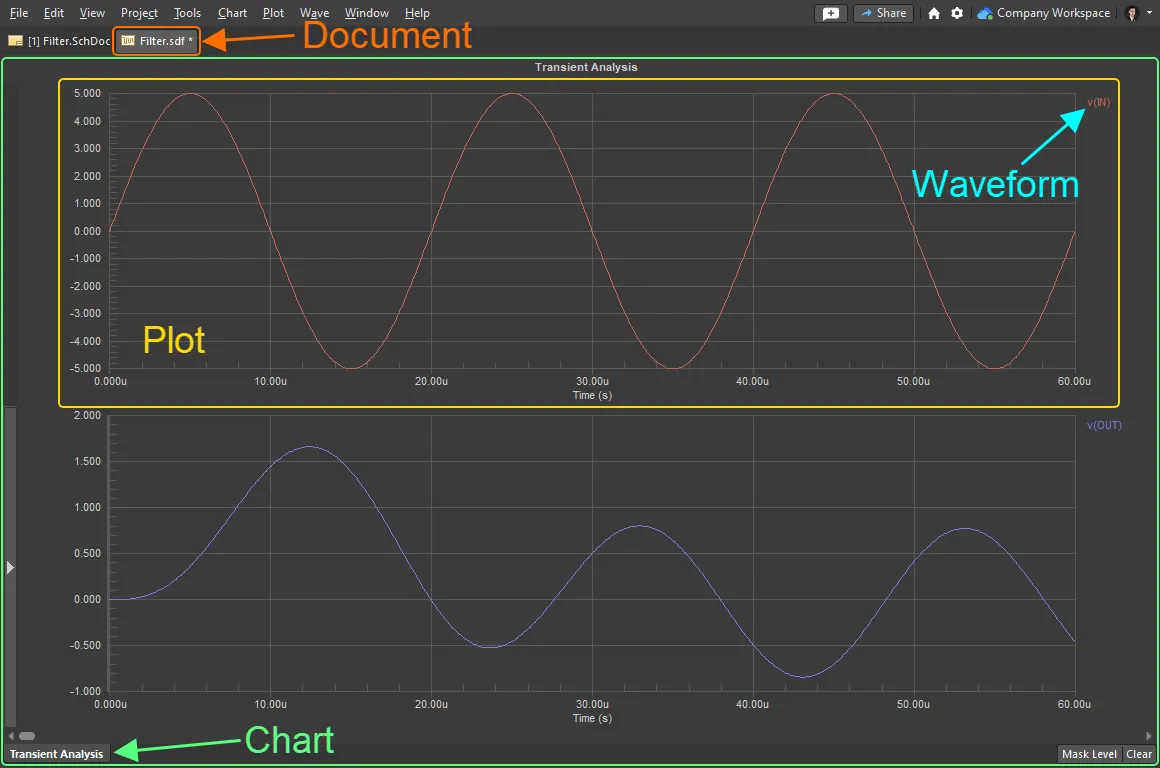
- 디자인 공간 상단의 탭을 클릭하여 회로도 문서로 전환합니다.
-
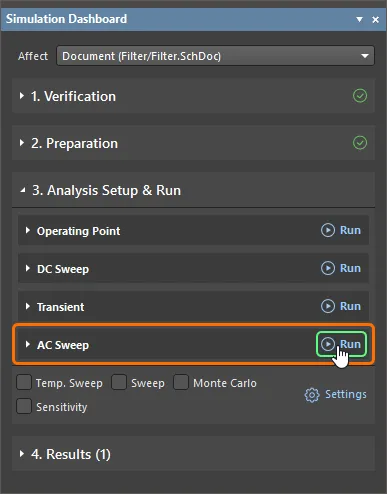
Simulation Dashboard 패널에서 AC Sweep 영역 헤더 오른쪽의 Run 버튼을 클릭하여 AC 스윕 해석을 수행합니다.
- Messages 패널을 닫습니다.
-
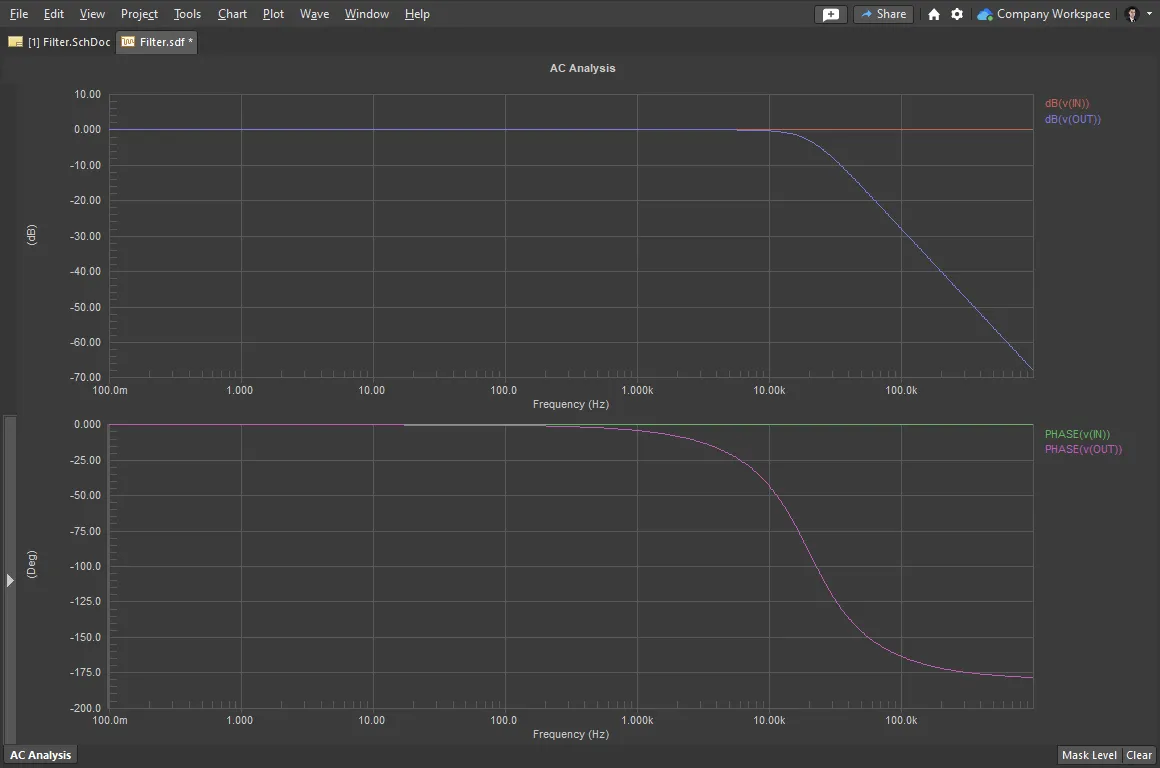
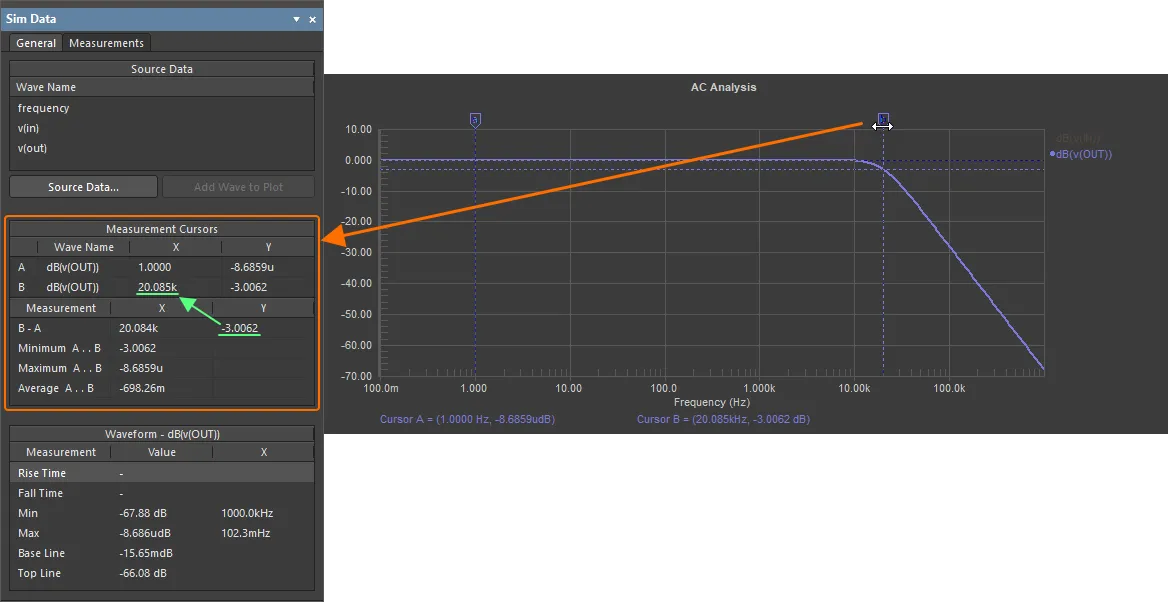
단일 AC Analysis 차트를 포함하는 시뮬레이션 결과 문서가 열립니다. 이 차트에는 두 개의 플롯이 있으며, 각 플롯에는 두 개의 파형이 포함됩니다.
-
측정 커서를 사용하여 3dB 지점을 확인합니다:
-
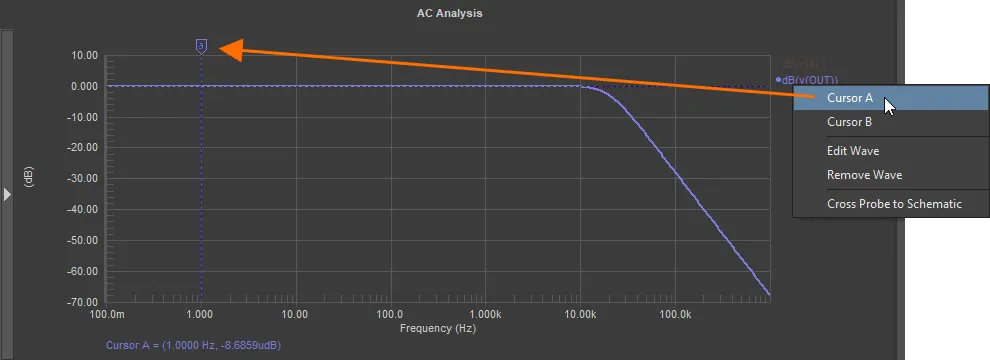
dB(v(OUT))파형을 마우스 오른쪽 버튼으로 클릭하고 Cursor A을(를) 선택합니다. -
마커를 드래그하여 커서 A를 저역통과 구간에 배치합니다(저역통과 영역 안에 있기만 하면 정확한 위치는 중요하지 않음).
-
dB(v(OUT))파형을 다시 마우스 오른쪽 버튼으로 클릭하고 Cursor B을(를) 선택합니다. - 커서 위치를 찾는 데 Sim Data 패널이 사용됩니다(패널이 보이지 않으면 디자인 공간 오른쪽 아래의 Panels 버튼을 클릭하고 나타나는 메뉴에서 Sim Data 을(를) 선택하여 표시합니다).
- Sim Data 패널의 Measurement Cursors 영역에서 B-A Measurement 값을 보면서, 커서 B를 클릭한 채 드래그하여 Y(이득) 값이 -3이 되도록 합니다.
-
Wave Name B의 X 결과가 대략 20k임을 확인할 수 있으며, 이는 필터 회로의 3dB 지점이 20kHz임을 의미합니다.
- 커서를 지우려면 각 커서 마커를 마우스 오른쪽 버튼으로 클릭하고 Cursor Off을(를) 선택합니다.
- 문서의 필터링을 지우려면 디자인 공간 오른쪽 아래의 Clear 버튼을 클릭합니다.
-
-
시뮬레이션 결과 문서(
Filter.sdf)는 Projects 패널의 프로젝트 구조에서Generated\Simulation Documents폴더에 표시됩니다. 문서를 저장하려면 Projects 패널에서 해당 항목을 마우스 오른쪽 버튼으로 클릭하고 컨텍스트 메뉴에서 Save As 명령을 선택합니다.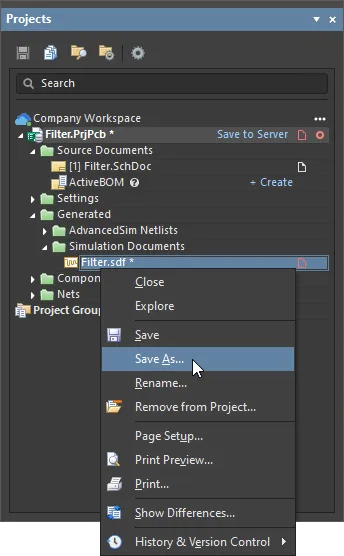
Save As 대화상자가 열리고, 하드 드라이브의 프로젝트 폴더 아래
Simulation하위 폴더에 문서를 저장할 준비가 됩니다. 기본 위치와 기본 이름으로 문서를 저장하려면 Save 를 클릭합니다. - 디자인 공간 상단의 탭을 클릭하여 회로도 문서로 전환합니다.
-
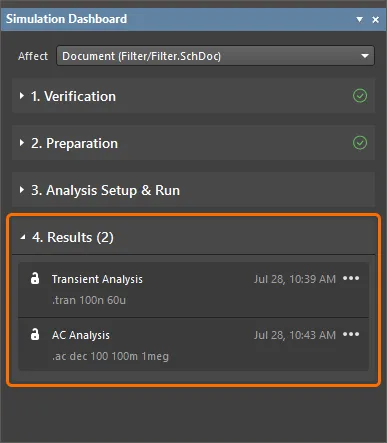
Simulation Dashboard 패널에서 Results 접을 수 있는 영역을 펼칩니다. 이 영역에는 수행된 시뮬레이션 실행 목록이 포함됩니다(이 예에서는 Transient Analysis 및 AC Analysis).
-
이전에 수행한 과도 해석 실행의 결과를 표시하려면
항목 오른쪽의  버튼을 클릭하고 Show Results을(를) 선택합니다.

시뮬레이션 결과 문서가 열리며 과도 해석 결과가 표시됩니다.
- Projects 패널에서 해당 항목을 마우스 오른쪽 버튼으로 클릭하고 컨텍스트 메뉴에서 Save 명령을 선택하여 수정된 프로젝트 문서와 프로젝트 자체를 저장합니다.
- 연결된 Workspace에서 프로젝트를 생성한 경우, Projects 패널에서 프로젝트 항목을 마우스 오른쪽 버튼으로 클릭하고 컨텍스트 메뉴에서 Save to Server 명령을 선택한 다음, 열리는 Save to Server 대화상자에서 OK 를 클릭합니다.
 AI로 번역됨