
PDN Analyzer
Краткий обзор
- Узнайте, что анализ PI-DC, или анализ падения напряжения IR, позволяет выяснить о цепях питания и земли, включая потери напряжения, плотность тока и потенциальные проблемы с надежностью.
- Разберитесь, как PDN Analyzer интегрируется с Altium Designer, что необходимо для доступа к нему и как результаты моделирования отображаются в редакторе печатных плат.
- Узнайте, как этот инструмент помогает обоснованно выбирать размеры дорожек, плоскостей и переходных отверстий, чтобы оптимизировать использование площади платы, не полагаясь лишь на эмпирические правила.
PDN Analyzer powered by CST® (Computer Simulation Technology) интегрируется непосредственно с Altium Designer, позволяя выполнять моделирование и анализ целостности питания по постоянному току (PI-DC) для текущего проекта печатной платы. Поскольку PDN Analyzer работает внутри Altium Designer, не требуется вручную импортировать и экспортировать данные, преобразовывать их или запускать отдельные приложения — достаточно открыть PDN Analyzer из редактора схем или печатных плат, задать нужные параметры проверки и запустить моделирование. Результаты преимущественно отображаются в виде 2D/3D-моделей медных проводящих структур печатной платы, что позволяет быстро оценивать их и проводить исследовательское тестирование топологии платы по принципу «что, если».
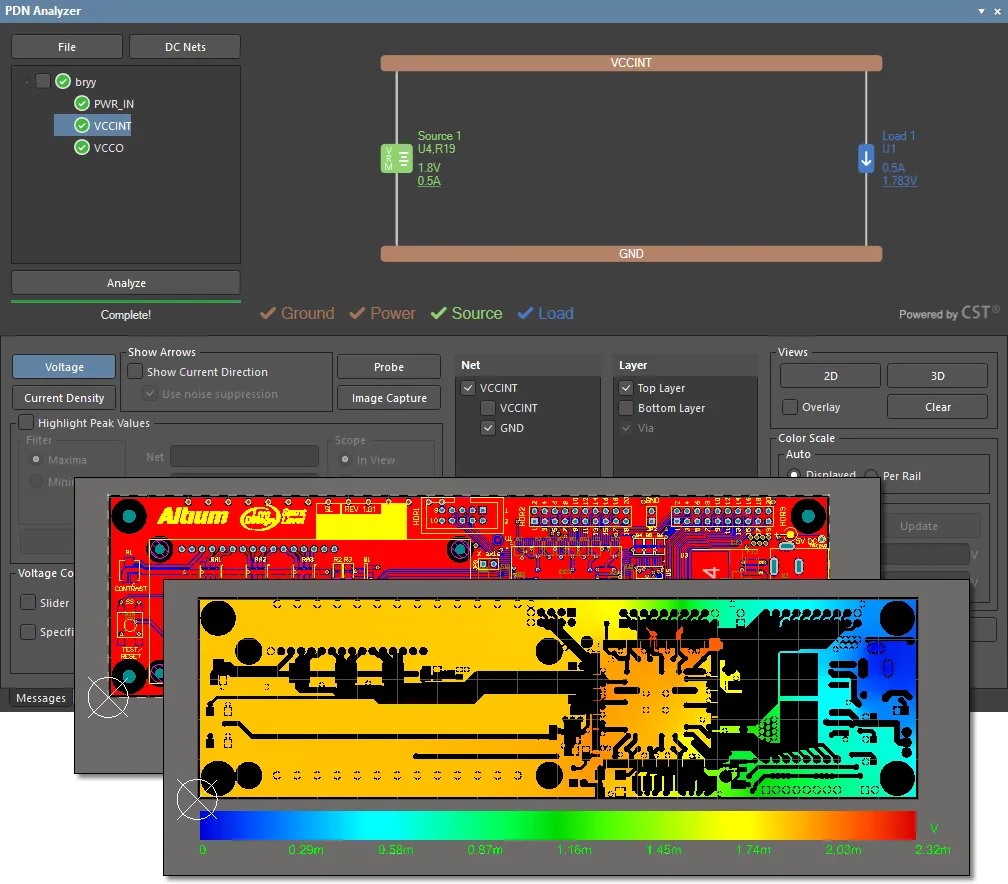
Интерфейс PDN Analyzer с примером печатной платы Spirit Level из Altium Designer и результатами моделирования падения напряжения PI-DC в обратном проводнике цепи GND на верхнем слое для питания VCCINT.
Доступ к функциям PDN Analyzer
Для доступа к функциям PDN Analyzer в Altium Designer необходимо установить программное расширение PDN Analyzer . Это расширение можно установить или удалить вручную.
Подробнее об управлении расширениями см. на странице Extending Your Installation (Altium Designer Develop, Altium Designer Agile, Altium Designer).
Для доступа к этим функциям также необходима действующая подписка на PDN Analyzer.
Основы целостности питания
По сути, проблема PI-DC (или «падения напряжения IR») довольно проста: сопротивление проводящих структур питания платы (дорожек, полигонов, плоскостей и т. д.) приводит к потерям мощности и падению напряжения, уменьшая мощность и напряжение, доступные различным нагрузкам. Как и следовало ожидать, с увеличением числа нагрузок в цепи питания проблемы, связанные с падением напряжения IR, усложняются из-за взаимного влияния медных проводников питания и земли.
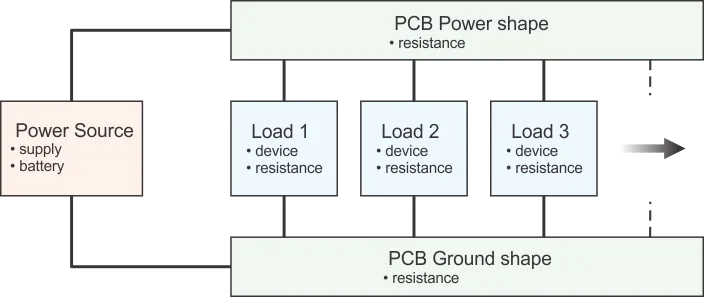
Рисунок 1. Упрощённая структурная схема проводящих структур питания и земли и подключённых нагрузок.
На рисунке 1 (выше) показана упрощённая структурная схема источника питания цепи и проводящих структур питания и земли (дорожек и плоскостей), по которым питание подаётся к различным нагрузкам (памяти, микроконтроллерам и т. д.). Обратите внимание: все нагрузки подключены к одним и тем же проводящим структурам питания и земли и получают через них рабочие напряжения. Обычно мы склонны считать, что сопротивление этих структур равно 0 Ом, однако это не всегда так, и такое допущение может привести к проблемам. Поскольку токи зачастую довольно велики, даже небольшое сопротивление проводящих структур питания и земли может вызывать значительные потери мощности и падения напряжения.
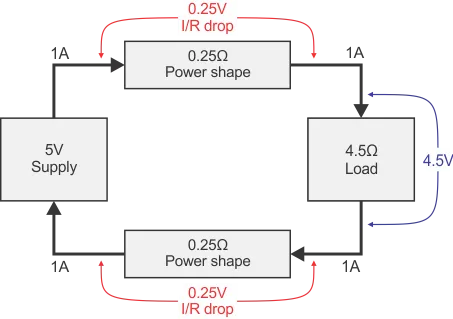
Рисунок 2. Последствия падения напряжения IR
На рисунке 2 показан пример проблем, которые могут возникнуть, если не учитывать должным образом сопротивление проводящих структур питания и земли. Хотя сопротивление каждой структуры относительно невелико и составляет всего 0,25 Ом, оно привело к снижению напряжения на нагрузке с 5 до 4,5 В. Разработчик должен учитывать это падение и убедиться, что оно допустимо, либо изменить конструкцию, чтобы уменьшить его и обеспечить безотказную работу готового устройства в условиях эксплуатации.
Однако решение этой проблемы кажется простым: достаточно сделать проводящие структуры питания и земли настолько короткими или большими, чтобы их сопротивление стало пренебрежимо малым, используя следующее соотношение: R = ρ * L/A, где:
-
R— полное сопротивление проводящей структуры (дорожки или плоскости) -
ρ— удельное сопротивление материала проводящей структуры (обычно меди,ρ ≈ 1.7µΩ-cm) -
L— длина проводящей структуры -
A— площадь поперечного сечения проводящей структуры (ширинаxтолщина)
Проще говоря, если сделать проводящие структуры питания и земли короткими, толстыми и широкими, их сопротивление будет минимальным.
Однако сложность заключается в том, что чрезмерно большие проводящие структуры занимают ценное пространство для трассировки и могут ограничивать место для проводников других напряжений. Плата с правильно подобранными размерами проводящих структур питания и земли будет компактнее и потребует меньше слоёв, чем плата, в которой без достаточных оснований используются чрезмерно большие плоскости или дорожки. Цель анализа PI-DC — помочь разработчику убедиться, что проводящие структуры питания и земли на плате имеют достаточные, но не избыточные размеры.
Ещё один аспект падения напряжения IR связан с тем, что величина рассеиваемой мощности составляет I2R, поэтому небольшое увеличение тока через сопротивление приводит к значительному росту потерь мощности. Это может проявляться в виде тепловых проблем: устройство существенно нагревается, поскольку размеры проводящих структур питания и/или земли недостаточны для протекающего через них тока. Если обеспечить очень малое падение напряжения IR на проводящих структурах питания и земли, потери мощности в них будут минимальными.
В крайнем случае, если сопротивление проводящей структуры достаточно велико (она очень узкая и длинная), а протекающий через неё ток достаточно высок, такая структура фактически превращается в «плавкий предохранитель»: медь плавится, что приводит к отказу устройства и может создать опасную ситуацию. Стандарт IPC-2152, определяющий допустимую токовую нагрузку печатных плат, рассматривает эту проблему, но исходит из неблагоприятных допущений (например, отсутствия рядом теплопроводящей меди, способствующей отводу тепла). При этом разработчики часто применяют его требования, выбирая наиболее консервативные условия, например допуская лишь минимальное повышение температуры. Хотя анализ PI-DC не может заменить стандарт IPC-2152 в качестве руководства по тепловому расчёту, он позволяет получить ценную информацию о том, как безопасно оптимизировать конструкцию, исследуя падения напряжения и плотности тока в системе распределения питания. Конструкция, оптимизированная для минимальной плотности тока и минимального падения напряжения между источниками и всеми нагрузками, также будет выделять меньше тепла и иметь меньшую вероятность возникновения тепловых проблем.
Ещё один аспект, рассматриваемый при анализе PI-DC, — количество переходных отверстий, используемых для подачи питания. Эта задача очень похожа на подбор размеров медных проводящих структур: если переходных отверстий недостаточно, падение напряжения IR приводит к снижению напряжения и потерям мощности; если же их слишком много, расходуется ценное пространство для трассировки. В частности, если для цепи определённого напряжения используется слишком много переходных отверстий, они проходят через проводящие структуры на других слоях и уменьшают поперечное сечение их меди, создавая проблемы для цепей других напряжений. Как и при выборе размеров проводящих структур, анализ напряжения в точках подключения нагрузок позволяет правильно подобрать размеры и/или количество переходных отверстий.
Наконец, моделирование окончательной конструкции в точном соответствии с её физическим исполнением даёт значительное преимущество, позволяя убедиться в её оптимальности. Моделирование PI-DC обеспечивает заключительную проверку того, что разъёмы и стабилизаторы выбраны с подходящими параметрами, например если в процессе проектирования были удалены или добавлены нагрузки.
Не имея достоверных данных о падении напряжения на различных медных областях питания и земли, а также переходных отверстиях печатной платы, разработчик вынужден перестраховываться: использовать избыточно большие области полигонов, увеличивать ширину дорожек и количество переходных отверстий. Это занимает ценное пространство на плате, увеличивает число слоев и габариты изделия. Altium PDN Analyzer в простой и удобной форме предоставляет точную информацию о пригодности системы распределения питания постоянного тока в проекте, позволяя разработчикам создавать максимально эффективные системы питания.
Результаты подходят не только для окончательной проверки проекта, но и для использования на этапе планирования, чтобы заранее спроектировать максимально эффективную систему питания. Анализ PI-DC — незаменимый инструмент для создания максимально эффективной и надежной сети распределения питания, а PDN Analyzer делает процесс моделирования и анализа простым, интуитивно понятным и эффективным.
Помимо этих и других преимуществ для проектирования печатных плат, PDN Analyzer также обеспечивает:
- Надежность изделия: помогает обеспечить корректную работу отдельных цепей питания в проекте с точки зрения установившихся уровней напряжения, стабильности напряжения, а также нагрева и повреждения дорожек.
- Улучшенную топологию печатной платы: предоставляет информацию для наиболее эффективного использования пространства платы и позволяет легко выявлять и устранять проблемные участки с высокой плотностью тока.
- Обоснованность решений: при проектировании путей протекания постоянного тока больше не нужно полагаться на эмпирические правила или приблизительные расчеты.
Моделирование в PDN Analyzer
В самом простом случае топология платы для анализа PI-DC может состоять из источника питания на основе стабилизатора напряжения и его нагрузки, соединенных медными областями различной формы и дорожками различной ширины.
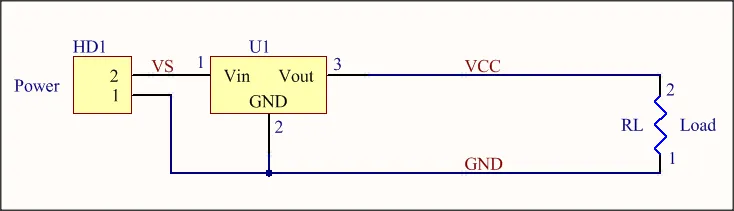
Пример базовой схемы с источником питания и нагрузкой.
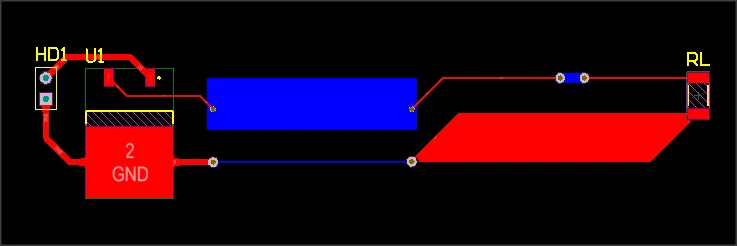
Топология печатной платы для базовой схемы с медными областями различной формы и дорожками, соединенными между слоями переходными отверстиями.
Интерфейс панели PDN Analyzer (Tools » PDN Analyzer) наглядно представляет цепь от источника питания до нагрузки, включающую физические пути питания и земли — аналогично приведенной выше схеме и концептуальной блок-схеме (рис. 1). Приложение автоматически извлекает всю физическую и электрическую информацию (список соединений, компоненты, геометрию медных областей на слоях и т. д.) из текущего активного проекта печатной платы, предоставляя данные для механизма моделирования PI-DC.
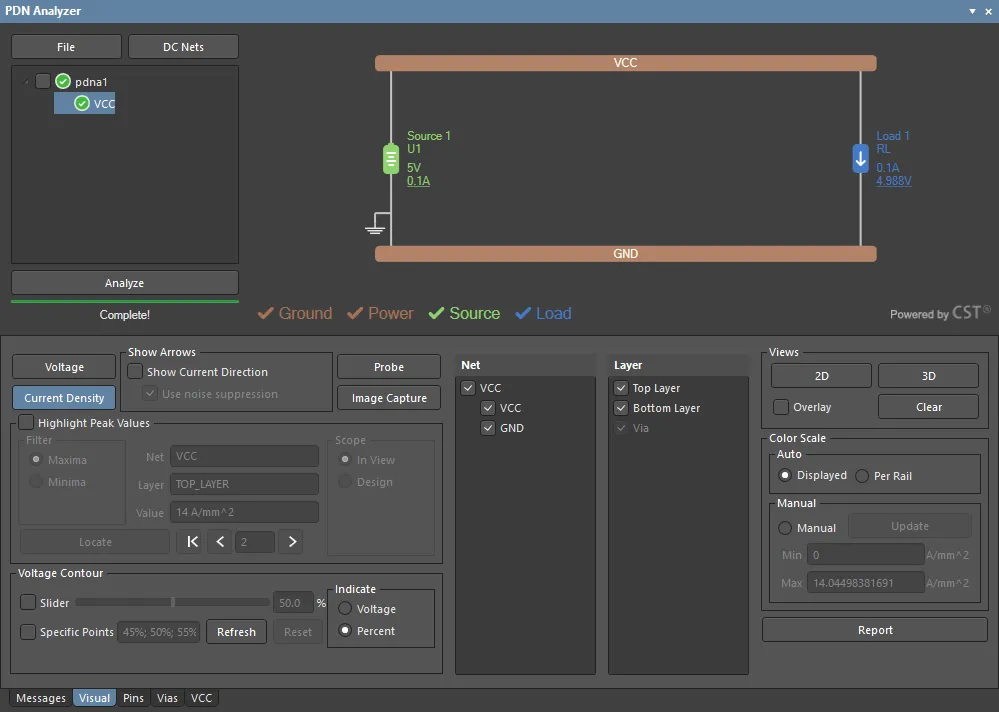
Интерфейс панели PDN Analyzer с настройками моделирования целостности питания для базовой схемы и топологии платы.
Здесь источником напряжения служит выход U1 (5 В между выводами 3 и 2), а нагрузка задается током через RL (0,1 А). После ввода исходных параметров через интерфейс (напряжений и токов источника и нагрузки и т. д.) и выполнения моделирования результаты анализа отображаются в редакторе печатных плат в виде визуализации в 2D или 3D.
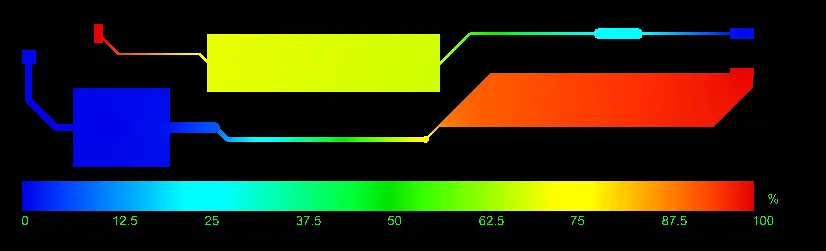 Результаты моделирования падения напряжения на медных участках цепей PWR и GND платы (от U1 к RL и от RL к U1).
Моделирование целостности питания в PDN Analyzer можно настроить для отображения результатов по напряжению (падению напряжения IR, изображение выше) или плотности тока (изображение ниже) для всех соответствующих слоев платы.
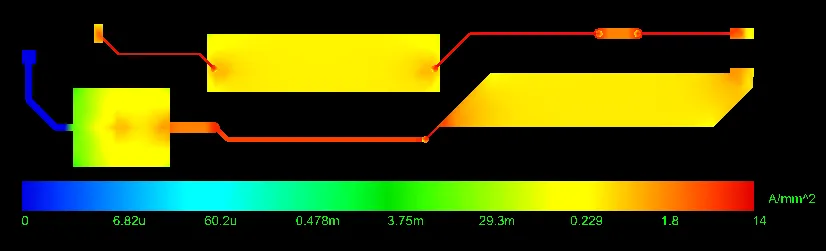
Карта плотности тока для обеих цепей — PWR и GND (от U1 к RL).
► Полное описание использования PDN Analyzer и интерпретации его результатов см. в руководстве с примером работы в PDN Analyzer.
 Локализовано с помощью ИИ