Jump To Location

Parent page: PCB Dialogs

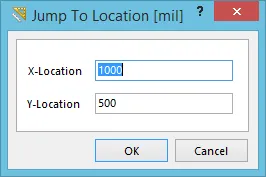
The Jump To Location dialog.The Jump To Location dialog.

Summary

This dialog allows the designer to quickly jump to a location within the design workspace, by specifying required coordinates.

The location will be relative to the workspace's absolute origin (bottom-left corner of the workspace), unless a user-defined (Current) origin has been set, in which case it will be relative to this point.

Access

The dialog can be accessed from both the PCB Editor, and PCB Library Editor:

  • PCB Editor - click Home | Grids and Units |  » New Location, from the main menus.
  • PCB Library Editor - click Home | Grids and Units |  » New Location, from the main menus.

Options/Controls

  • X-Location - use this field to specify the X coordinate for the required location you wish to jump to.
  • Y-Location - use this field to specify the Y coordinate for the required location you wish to jump to.


如您发现任何问题,请选中相关文本/图片,并按 Ctrl + Enter 键向我们提交反馈。
Content