
准备后处理输出
Updated: 五月 12, 2023
PostProcess 输出类型允许将非 Altium Designer 原生的文件类型作为输出的一部分包含进来。它会把目标文件从项目目录结构中复制到已配置的“文件夹结构”输出容器所指定的文件夹中。
可通过文件中 PostProcess Outputs 区域内的 [Add New PostProcess Output] 控件菜单,或通过主菜单的 Edit » Add Post Process Outputs 子菜单,将 PostProcess 输出添加到当前活动的输出作业(Output Job)文件中。

将 PostProcess 输出添加到 Output Job 文件
添加新的 PostProcess 输出后,在主作业配置窗口中右键单击其条目,然后单击 Configure 以打开 Copy Files List Setup 对话框。使用该对话框可向 OutJob 添加多个文件或文件组。
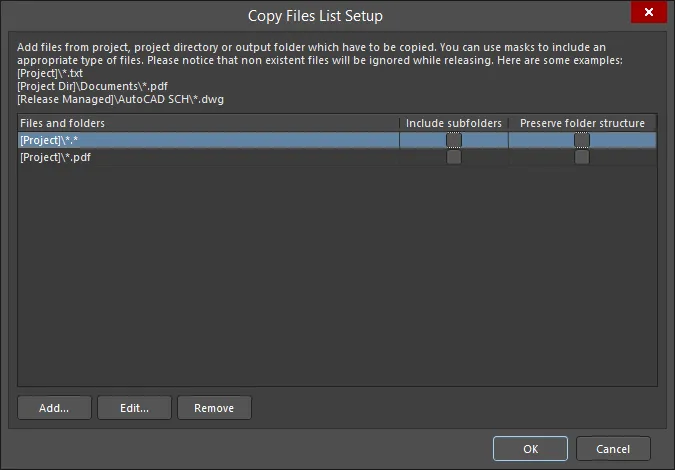
Copy Files List Setup 对话框
Options and Controls of the Copy Files List Setup Dialog
- Files and folders - 显示要复制的文件和文件夹。
- Include subfolders - 启用后可包含所列文件或文件夹的子文件夹。仅在使用 Add 按钮添加了文件或文件夹后,此选项才可用。
- Preserve folder structure - 启用后可确保在运行输出生成器时保留文件源文件夹结构。仅在使用 Add 按钮添加了文件或文件夹后,此选项才可用。
- Add - 单击以打开 Build Macro Path dialog,使用组合的宏字符串搜索并添加所需文件/文件夹的路径。
- Edit - 单击以打开 Build Macro Path dialog,可使用组合的宏字符串编辑所选文件/文件夹的路径。
- Remove - 单击以移除所选文件。
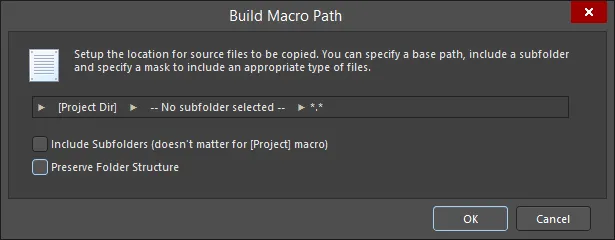
Build Macro Path 对话框
Options and Controls of the Build Macro Path Dialog
-
[Project] (第一个字段)- 单击以打开子菜单来创建所需路径:
- [Project] - 选择以使用项目本身;这将仅包含已添加到 Altium Designer 项目中的文档。
- [Project Dir] - 选择以使用包含该项目的本地目录。
- [Release Managed] - 选择以指定文件源将由后续的 project release 流程动态确定。
-
Subfolder (中间字段)- 单击以打开子菜单来创建所需路径:
- Use base path – 文件路径为源位置,如上方初始选项中所定义。
-
Choose subfolder – 文件路径为源路径中的指定子目录。可直接输入子文件夹路径,或使用
 按钮浏览并选择子文件夹。
- Filter (右侧字段)- 单击以打开下拉列表,从中选择所需的文件类型扩展名,或手动输入所需扩展名。
- Include Subfolders (doesn't matter for [Project] macro) – 启用后,掩码过滤器将应用(从而包含)任何子文件夹中的文件。
- Preserve Folder Structure – 启用后可确保在运行输出生成器时保留文件源文件夹结构。
 AI 翻译
AI 翻译