
포스트프로세스 출력 준비하기
Updated: May 12, 2023
PostProcess 출력 유형을 사용하면 Altium Designer의 네이티브 파일 형식이 아닌 파일도 출력의 일부로 포함할 수 있습니다. 이 기능은 프로젝트 디렉터리 구조 내에 있는 대상 파일을, 구성된 Folder Structure 출력 컨테이너에 지정된 폴더로 복사합니다.
PostProcess 출력은 파일의 [Add New PostProcess Output] 영역에 있는 PostProcess Outputs 컨트롤 메뉴에서, 또는 메인 메뉴의 Edit » Add Post Process Outputs 하위 메뉴에서 활성 Output Job 파일에 추가할 수 있습니다.

Output Job 파일에 PostProcess 출력 추가하기
새 PostProcess Output을 추가한 후, 메인 작업 구성 창에서 해당 항목을 마우스 오른쪽 버튼으로 클릭한 다음 Configure을(를) 클릭하여 Copy Files List Setup 대화상자에 접근합니다. 이 대화상자를 사용해 OutJob에 여러 파일 또는 파일 그룹을 추가할 수 있습니다.
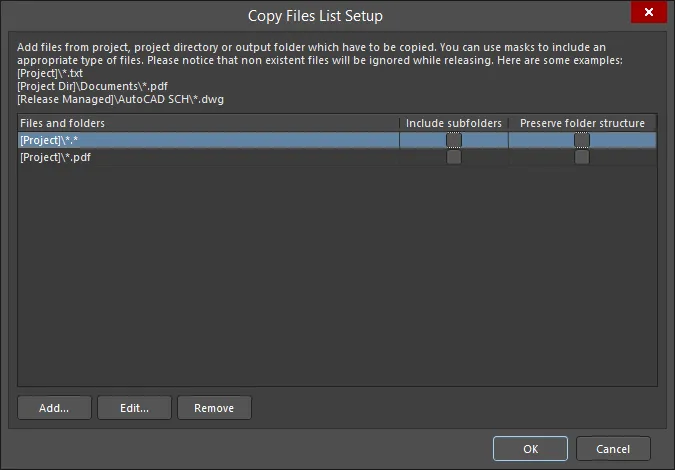
Copy Files List Setup 대화상자
Options and Controls of the Copy Files List Setup Dialog
- Files and folders - 복사할 파일과 폴더를 표시합니다.
- Include subfolders - 목록에 있는 파일 또는 폴더의 하위 폴더를 포함하려면 활성화합니다. 이 옵션은 Add 버튼을 사용해 파일 또는 폴더를 추가한 후에만 사용할 수 있습니다.
- Preserve folder structure - Output generator 실행 시 파일 원본 폴더 구조가 유지되도록 하려면 활성화합니다. 이 옵션은 Add 버튼을 사용해 파일 또는 폴더를 추가한 후에만 사용할 수 있습니다.
- Add - 조합된 매크로 문자열을 사용해 원하는 파일/폴더의 경로를 검색하고 추가할 수 있도록 Build Macro Path dialog를 열려면 클릭합니다.
- Edit - 조합된 매크로 문자열을 사용해 선택한 파일/폴더의 경로를 편집할 수 있는 Build Macro Path dialog를 열려면 클릭합니다.
- Remove - 선택한 파일을 제거하려면 클릭합니다.
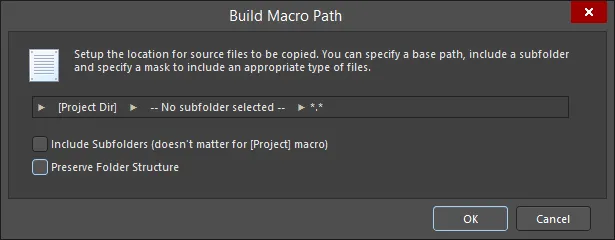
Build Macro Path 대화상자
Options and Controls of the Build Macro Path Dialog
-
[Project] (첫 번째 필드) - 원하는 경로를 생성하기 위한 하위 메뉴에 접근하려면 클릭합니다:
- [Project] - 프로젝트 자체를 선택합니다. 이렇게 하면 Altium Designer 프로젝트에 추가된 문서만 포함됩니다.
- [Project Dir] - 프로젝트가 들어 있는 로컬 디렉터리를 선택합니다.
- [Release Managed] - 파일 소스가 이후 project release 프로세스에서 동적으로 결정되도록 지정하려면 선택합니다.
-
Subfolder (가운데 필드) - 원하는 경로를 생성하기 위한 하위 메뉴에 접근하려면 클릭합니다:
- Use base path – 파일 경로는 위의 초기 옵션에서 정의된 소스 위치입니다.
-
Choose subfolder – 파일 경로는 Source 경로 내에 지정한 하위 디렉터리입니다. 하위 폴더 경로를 직접 입력하거나
 버튼을 사용해 찾아보고 하위 폴더를 선택합니다.
- Filter (오른쪽 필드) - 원하는 파일 형식 확장자를 선택하거나 원하는 확장자를 수동으로 입력할 수 있는 드롭다운에 접근하려면 클릭합니다.
- Include Subfolders (doesn't matter for [Project] macro) – 마스크 필터가 적용되어(따라서 포함되어) 모든 하위 폴더의 파일까지 포함되도록 하려면 활성화합니다.
- Preserve Folder Structure – Output generator 실행 시 파일 원본 폴더 구조가 유지되도록 하려면 활성화합니다.
 AI로 번역됨