
컴포넌트 유효성 검사
개요
- 컴포넌트 Editor의 싱글 컴포넌트 편집 모드와 일괄 컴포넌트 편집 모드에서 컴포넌트 Rule 검사를 실행하고 Messages Panel에서 결과를 검토하는 방법을 알아보세요.
- 어떤 유효성 검사 실패가 워크스페이스에 컴포넌트를 저장하지 못하게 하는지 알아보세요.
- 사용자 정의 검사를 구성하는 위치와 일반적인 컴포넌트 위반 사항을 해결하는 방법을 알아보세요.
컴포넌트 편집기에서 정의하거나 편집한 워크스페이스 라이브러리 컴포넌트를(싱글 컴포넌트 편집 또는 일괄 컴포넌트 편집 모드) 연결된 워크스페이스 에 저장하여 설계에 사용할 수 있도록 하기 전에, 해당 컴포넌트가 구성된 설정에 따른 요구 사항을 충족하는지 반드시 확인해야 합니다. 컴포넌트를 워크스페이스에 다시 저장하려고 하면 컴포넌트 편집기는 컴포넌트 Rule 검사라는 유효성 검사를 실행합니다.
보드 프로젝트에 위반 사항을 감지하는 유효성 검사 프로세스가 있는 것처럼, 컴포넌트 편집기에도 컴포넌트 유효성 검사 기능이 있습니다. 발견된 모든 위반 사항은 Messages 패널에 나열됩니다.
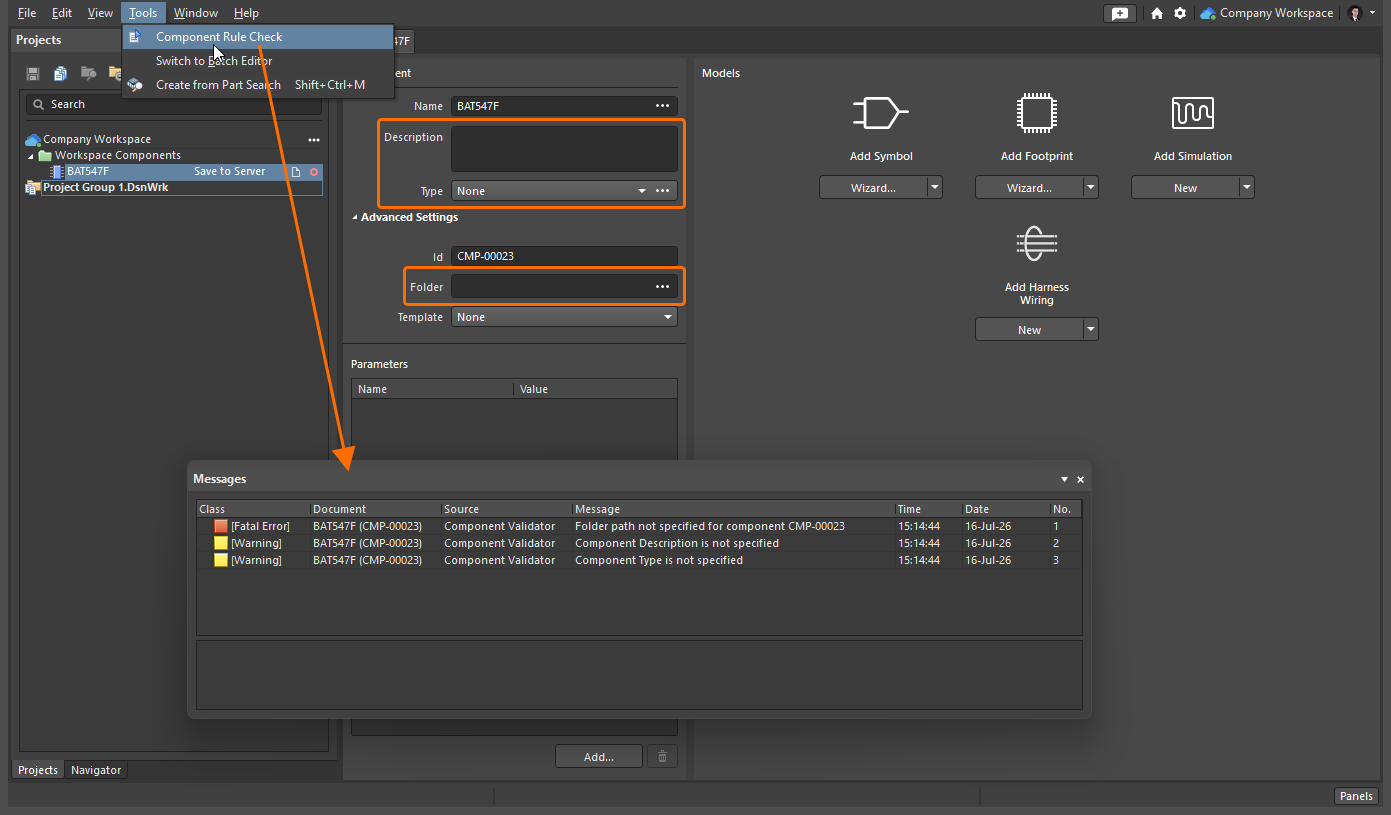
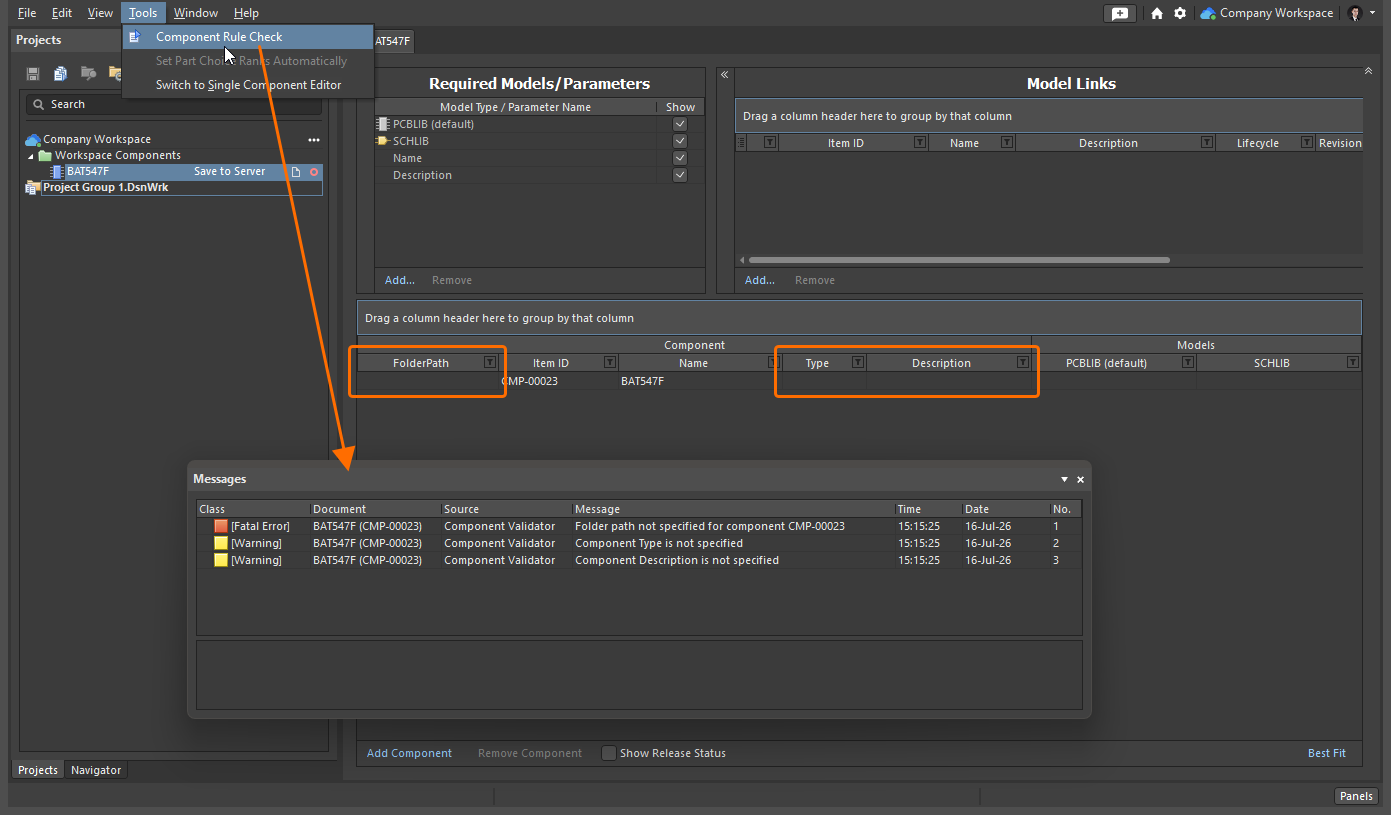
컴포넌트 유효성 검사는 컴포넌트와 여기에 정의된 모델의 다양한 잠재적 문제를 검사합니다. 여기에는 기본 제공 검사와 전역 수준에서 사용자가 정의할 수 있는 다양한 위반 유형 검사가 포함됩니다.
다음 기본 제공 유효성 검사의 보고 모드는 모두  입니다.
입니다.
Folder path not specified for component
| Summary | This violation occurs when a target Workspace folder where a component being defined in the Component editor should be saved is not specified. |
|---|---|
| Notification | A notification will be displayed in the Messages panel in the following format:
where:
|
| Recommendation for Resolution |
|
 button to access the Choose Folder dialog. Browse to, and choose an existing folder, or create a new one on-the-fly.
 button, and click to access the Choose Folder dialog. Browse to, and choose an existing folder, or create a new one on-the-fly.
Component not having a unique Id
| Summary | This violation occurs when the Item ID of a component being defined in the Component editor is the same as the Item ID of another item in the connected Workspace. |
|---|---|
| Notification | A notification will be displayed in the Messages panel in the following format:
where:
|
| Recommendation for Resolution |
|
| Note | This violation typically occurs when an automatically assigned Item ID value of a component is manually overridden. For a new component created through the File » New » Component command or the Components panel (learn more), this field is populated in accordance with the component template defined for the component type chosen in the Create new component dialog. Where a template does not exist, or where the <Undefined> entry is chosen in the dialog, a default naming scheme ( |
사용자 정의 검사는 Preferences 대화 상자의 데이터 관리 – 컴포넌트 Rule 검사 페이지에서 구성합니다.
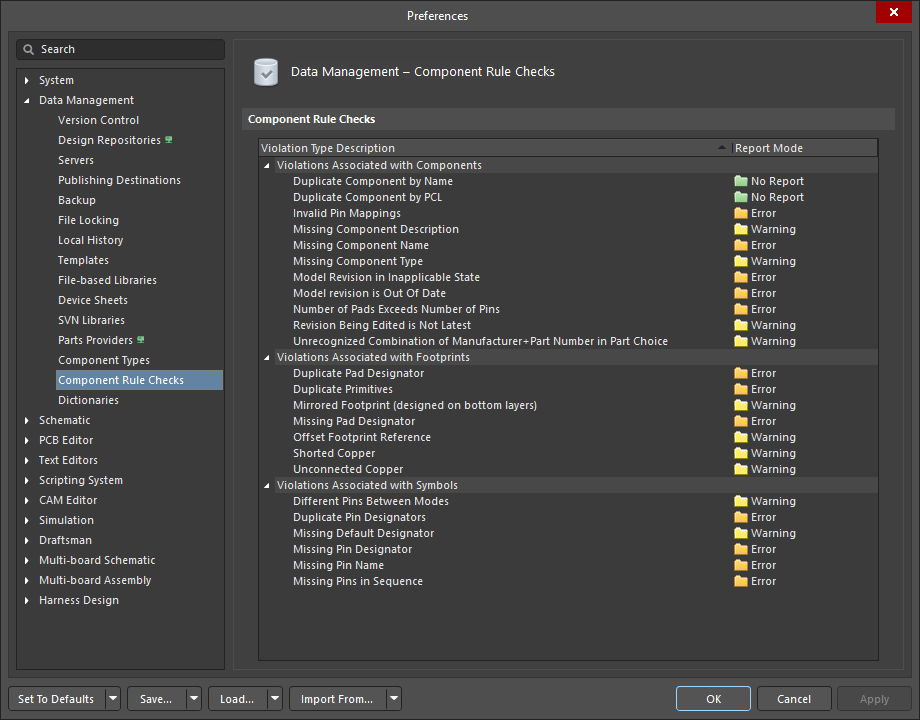
컴포넌트 유효성 검사에 사용하도록 전역 환경설정에서 구성할 수 있는 사용자 정의 위반 검사입니다.
내장된 테스트 중 하나라도 실패하거나 사용자 정의 검사에서 치명적 오류 수준의 문제가 발생하면 컴포넌트를 워크스페이스에 저장할 수 없습니다.
사용자 정의 검사의 기본 설정이 사용 중인 컴포넌트에 적합하지 않을 수 있으므로, 옵션과 이를 설계에 맞게 구성하는 방법을 숙지하는 것이 중요합니다. 각 사용자 정의 오류 검사에 대한 정보는 아래에서 확인할 수 있습니다.
컴포넌트 관련 위반 사항
Duplicate Component by Name
| Summary | This violation occurs when the name of a component being defined in the Component editor is the same as the name of a component in the connected Workspace. |
|---|---|
| Default Report Mode | |
| Notification | A notification is displayed in the Messages panel in the following format:
|
| Recommendation for Resolution | Assign different and unique name(s) to the component(s) as required.
|

Duplicate Component by PCL
| Summary | This violation occurs when a component being defined in the Component editor has a Part Choice that is used by another component in the connected Workspace. |
|---|---|
| Default Report Mode | |
| Notification | A notification is displayed in the Messages panel in the following format:
|
| Recommendation for Resolution | Assign different and unique Part Choice(s) to the component(s) as required.
|
Invalid Pin Mappings
| Summary | This violation occurs when a component being defined in the Component editor has an ambiguous mapping between component symbol and footprint(s). For example, the violation occurs if the symbol has pins defined in their Designator fields as |
|---|---|
| Default Report Mode | |
| Notification |
where:
|
| Recommendation for Resolution | Edit currently added or select another model to make sure that symbol pins have one-to-one matching to footprint pads.
|

 control at the top right of model's preview to modify the model that is currently being used (referenced) by the component in the corresponding temporary editor for that model type.
 control at the top right of model's preview and choose the Select Model entry from the menu to browse for and choose, a different model, or a different revision of that same model.
 control at the top right of symbol's preview to access the
  button to browse for and choose, a different model, or a different revision of that same model.
Missing Component Description
| Summary | This violation occurs when the description of a component being defined in the Component editor is not specified. |
|---|---|
| Default Report Mode | |
| Notification | A notification is displayed in the Messages panel in the following format:
|
| Recommendation for Resolution | Specify a description for the offending component(s) as required.
|

Missing Component Name
| Summary | This violation occurs when the name of a component being defined in the Component editor is not specified. |
|---|---|
| Default Report Mode | |
| Notification | A notification is displayed in the Messages panel in the following format:
|
| Recommendation for Resolution | Specify a name for the offending component(s) as required.
|
Missing Component Type
| Summary | This violation occurs when the type of component being defined in the Component editor is not specified. |
|---|---|
| Default Report Mode | |
| Notification | A notification is displayed in the Messages panel in the following format:
|
| Recommendation for Resolution | Specify a type for the offending component(s) as required.
|
Model Revision in Inapplicable State
| Summary | This violation occurs when a linked model that is being used (referenced) by a component definition is detected to be in an inapplicable state. For example, the model is currently |
|---|---|
| Default Report Mode | |
| Notification | A notification is displayed in the Messages panel in the following format:
where:
|
| Recommendation for Resolution | Choose a replacement model or revision of the same model that is valid for use in the component.
|
 ).
).Model revision is Out Of Date
| Summary | This violation occurs when a linked model that is being used (referenced) by a component definition is detected to be out of date. If there is a later revision of the model available, the Revision State field will reflect this using the text |
|---|---|
| Default Report Mode | |
| Notification | A notification is displayed in the Messages panel in the following format:
where:
|
| Recommendation for Resolution | Update the component model links that are out-of-date to use the latest revision of the models.
|
Number of Pads Exceeds Number of Pins
| Summary | This violation occurs when a footprint model that is being used (referenced) by a component definition includes more pads (SMD pads placed on copper layers and plated thru-hole pads) than pins of its referenced schematic symbol. |
|---|---|
| Default Report Mode | |
| Notification | A notification is displayed in the Messages Panel에 다음 형식으로 표시됩니다:
여기서:
|
| 권장 해결 방법 | 현재 추가된 모델을 편집하거나 다른 심볼/풋프린트 모델을 선택하여 풋프린트의 Pad 수가 심볼의 핀 수를 초과하지 않도록 하십시오.
|
Revision Being Edited is Not Latest
| Summary | This violation occurs when the component revision being edited is not the latest revision available in the connected Workspace. |
|---|---|
| Default Report Mode | |
| Notification | A notification is displayed in the Messages panel in the following format:
where:
|
| Recommendation for Resolution | Select the latest component revision for editing. To do this, browse for the component in the Components panel, right-click its entry in the panel and choose Edit. |
Unrecognized Combination of Manufacturer+Part Number in Part Choice
| Summary | This violation occurs when an incorrect entry for a component's part choice is added, and the part can not be retrieved by the Workspace. |
|---|---|
| Default Report Mode | |
| Notification | A notification is displayed in the Messages panel in the following format:
where:
|
| Recommendation for Resolution | Specify valid part choice for the offending component(s).
|
풋프린트 관련 위반 사항
Duplicate Pad Designator
| Summary | This violation occurs when a footprint model linked to a component being defined in the Component editor has multiple pad objects with the same value of the Designator property. |
|---|---|
| Default Report Mode | |
| Notification | A notification is displayed in the Messages panel in the following format:
where:
|
| Recommendation for Resolution | Assign different and unique designators to the pads of the linked footprint model.
The footprint model that is currently being used (referenced) by the component will open in the temporary PCB Library editor. Select offending pads and change values of their Designator property in the Properties panel when a pad is selected (learn more). |
Duplicate Primitives
| Summary | This violation occurs when a footprint model linked to a component being defined in the Component editor has identical objects placed in the same location on the same layer. |
|---|---|
| Default Report Mode | |
| Notification | A notification is displayed in the Messages Panel에 다음 형식으로 표시됩니다.
여기서:
|
| 권장 해결 방법 | 풋프린트 모델에서 중복 객체를 제거합니다.
컴포넌트에서 현재 사용(참조) 중인 풋프린트 모델이 임시 PCB 라이브러리 Editor에서 열립니다. 중복 객체를 선택하고 Delete 단축키를 사용하여 제거합니다. |
Mirrored Footprint (designed on bottom layer)
| Summary | This violation occurs when a footprint model linked to a component being defined in the Component editor has significant primitives (pads, tracks, arcs, fills, regions, rectangles, text strings, keepout objects) placed on the In the PCB Library editor, the footprint is built for the top side of the board; it can be flipped to the bottom during the PCB design process if required. |
|---|---|
| Default Report Mode | |
| Notification | A notification is displayed in the Messages panel in the following format:
|
| Recommendation for Resolution | Flip footprint primitives from the
The footprint model that is currently being used (referenced) by the component will open in the temporary PCB Library editor. Select primitives on the |
Missing Pad Designator
| Summary | This violation occurs when a footprint model linked to a component being defined in the Component editor has a Pad object with no value of the Designator property specified. |
|---|---|
| Default Report Mode | |
| Notification | A notification is displayed in the Messages panel in the following format:
where:
|
| Recommendation for Resolution | Specify designator values for the pads of the linked footprint model.
The footprint model that is currently being used (referenced) by the component will open in the temporary PCB Library editor. Select an offending pad and specify the value of its Designator property in the Properties panel when a pad is selected (learn more). |
Offset Footprint Reference
| Summary | This violation occurs when a footprint model linked to a component being defined in the Component editor has its reference point (origin) outside of the bounding rectangle formed by footprint objects. |
|---|---|
| Default Report Mode | |
| Notification | A notification is displayed in the Messages panel in the following format:
|
| Recommendation for Resolution | Change the location of the reference point for it is inside the bounding rectangle formed by footprint objects.
The footprint model that is currently being used (referenced) by the component will open in the temporary PCB Library editor. Use the commands of the Edit » Set Reference sub-menu of the main menus to change the current location of the footprint's reference. |
Shorted Copper
| Summary | This violation occurs when a footprint model linked to a component being defined in the Component editor has 구리 레이어의 객체를 통해 서로 연결된 Pad 객체입니다. |
|---|---|
| Default 보고 모드 | |
| 알림 | 다음 형식의 알림이 Messages Panel에 표시됩니다.
각 항목의 의미는 다음과 같습니다.
|
| 권장 해결 방법 | 연결된 풋프린트 모델의 Pad를 서로 연결하는 구리 레이어 객체를 제거합니다.
컴포넌트에서 현재 사용(참조) 중인 풋프린트 모델이 임시 PCB 라이브러리 Editor에서 열립니다. Pad를 연결하는 구리 레이어 객체를 선택한 다음, Pad를 연결하지 않도록 수정하거나 해당 객체를 제거합니다. |
Unconnected Copper
| Summary | This violation occurs when a footprint model linked to a component being defined in the Component editor has objects on a copper layer, and these objects are not connected to any pad objects. When such a footprint will be placed in a PCB design, a net will not be assigned to these copper layer objects, and they will become dead copper. |
|---|---|
| Default Report Mode | |
| Notification | A notification is displayed in the Messages panel in the following format:
where:
|
| Recommendation for Resolution | Change the footprint model so the objects which are not currently connected to any Pad object in the footprint model are connected to pads.
The footprint model that is currently being used (referenced) by the component will open in the temporary PCB Library editor. Place objects on copper layer(s) to form a connection between footprint pads and objects which are not currently connected to any pad object or remove these unconnected objects. |
심볼 관련 위반 사항
Different Pins Between Modes
| Summary | This violation occurs when one of the display modes for a symbol has an extra pin. |
|---|---|
| Default Report Mode | |
| Notification | A notification is displayed in the Messages panel in the following format:
where:
|
| Recommendation for Resolution | This violation typically arises when an alternate graphical mode is defined for a symbol and either:
Not only must there be an identical number of pins between graphical display modes, but the pins must be also identical in both Designator and Name. Learn more about creating multiple graphical display modes of the same component symbol. Change the Designator and/or Name of offending pin(s) so the number of pins and their Designator and Name properties are the same between the symbol's display modes or remove an extra pin from a display mode.
The symbol model that is currently being used (referenced) by the component will open in the temporary Schematic Library editor. Select offending pins and change values of their Designator and/or Name property in the Properties panel when a pin is selected (learn more), or remove these pins using the |
Duplicate Pin Designators
| Summary | This violation occurs when two or more pins in the component's symbol model have the same designator. |
|---|---|
| Default Report Mode | |
| Notification | A notification is displayed in the Messages Panel에 다음 형식으로 표시됩니다:
각 항목의 의미는 다음과 같습니다:
|
| 해결 권장 사항 | 문제가 있는 핀의 Designator를 변경하여 각 핀에 고유한 값이 할당되도록 하십시오.
컴포넌트가 현재 사용(참조) 중인 심볼 모델이 임시 Schematic 라이브러리 Editor에서 열립니다. 문제가 있는 핀을 선택하고, 핀이 선택된 상태에서 Properties Panel의 Designator 속성 값을 변경하거나(자세히 알아보기), |
Missing Default Designator
| Summary | This violation occurs when the component's symbol model has no default designator specified. |
|---|---|
| Default Report Mode | |
| Notification | A notification is displayed in the Messages panel in the following format:
|
| Recommendation for Resolution | Specify a default designator for the offending symbol model.
The symbol model that is currently being used (referenced) by the component will open in the temporary Schematic Library editor. Open the Properties panel when no object is selected in the design space (learn more) and specify the required designator prefix followed by the |
Missing Pin Designator
| Summary | This violation occurs when a pin in the component's symbol model has no designator specified. |
|---|---|
| Default Report Mode | |
| Notification | A notification is displayed in the Messages panel in the following format:
where:
|
| Recommendation for Resolution | Specify a designator for each pin in the offending symbol model.
The symbol model that is currently being used (referenced) by the component will open in the temporary Schematic Library editor. Select offending pins and specify values of their Designator property in the Properties panel when a pin is selected (learn more), or remove pins using the |
Missing Pin Name
| Summary | This violation occurs when a pin in the component's symbol model has no name specified. |
|---|---|
| Default Report Mode | |
| Notification | A notification is displayed in the Messages panel in the following format:
where:
|
| Recommendation for Resolution | Specify a name for each pin in the offending symbol model.
The symbol model that is currently being used (referenced) by the component will open in the temporary Schematic Library editor. Select offending pins and specify values of their Name property in the Properties panel when a pin is selected (learn more), or remove these pins using the |
| Note | Only one violation instance will be listed in the Messages panel for each distinct component. A component may well have a symbol with more than one pin with no name defined. |
Missing Pins in Sequence
| Summary | This violation occurs when missing pins have been detected in the numerical sequence of the offending symbol's pin designator values. For example, if the symbol has pins with designators |
|---|---|
| Default Report Mode | |
| Notification | A notification is displayed in the Messages 다음 형식으로 Panel에 표시됩니다:
여기서:
|
| 해결 권장 사항 | 문제가 있는 심볼 모델에서 시퀀스에 누락된 핀 지정자를 가진 핀을 추가하거나, 핀 지정자가 연속된 정수 시퀀스를 이루도록 핀 지정자를 변경합니다.
컴포넌트가 현재 사용(참조) 중인 심볼 모델이 임시 Schematic 라이브러리 Editor에서 열립니다. 기본 메뉴의 Place » Pin 명령을 사용하여 필요한 수의 핀을 추가하고, 심볼의 핀 지정자가 연속된 정수 시퀀스를 이루도록 핀을 선택한 상태에서 Properties Panel의 Designator 속성 값을 지정합니다(자세히 알아보기). 심볼에 이미 배치된 핀의 Designator 속성을 편집할 수도 있습니다. |
| 참고 | 일부 컴포넌트는 순차적인 핀 번호를 사용하지 않습니다. 예를 들어 BGA는 A1, A3, A5 등과 같이 비순차적인 핀 번호를 사용할 수 있습니다. 이 경우 해당 위반이 있는 상태로 컴포넌트를 릴리스하고 릴리스 노트에 그 이유를 명시하는 것이 좋습니다. 또는 Preferences 대화 상자의 Data Management – Component Rule Checks 페이지에서 Missing Pins in Sequence 검사 항목을 |
 AI로 번역됨