
보드 제작 뷰
개요
- 보드 제작 뷰가 무엇을 나타내며, 선택한 물리적 보드 레이어에서 어떻게 생성되는지 알아봅니다.
- Properties 패널에서 뷰의 모양, 내용, 렌더링 방식을 제어하는 설정을 살펴봅니다.
- 추가 레이어의 표시 여부와 그리기 순서를 관리하여 최종 제작 도면을 다듬는 방법을 알아봅니다.
Draftsman 보드 제작 뷰(Place » Board Fabrication View)는 PCB 프로젝트에서 부품이 실장되지 않은 베어 보드를 위쪽 또는 아래쪽에서 본 모습을 자동으로 합성한 그래픽입니다. 도면 데이터는 지정된 물리적 보드 레이어에서 가져오며, 필요에 따라 추가 레이어를 표시할 수 있습니다.

PCB의 상단 및 하단 레이어를 보여 주는 배치된 보드 제작 뷰 2개
설계 공간에서 배치된 보드 제작 뷰를 선택하면 Properties 패널에서 도면 표시 방식을 구성할 수 있습니다. 일반적인 뷰 속성은 패널의 General 탭( )에서 구성합니다.
축척 |
|
| Scale, Use Custom Scale |
이 옵션을 사용하여 뷰의 축척을 구성합니다. 자세한 내용은 뷰 작업하기 페이지를 참조하세요. |
제목 |
|
| Title, Location, Font |
이 옵션을 사용하여 뷰의 제목을 구성합니다. 자세한 내용은 뷰 작업하기 페이지를 참조하세요. |
스타일 |
|
| Board Line | 드롭다운에서 뷰의 테두리/외곽선을 그리는 데 사용할 선 두께와 패턴을 선택합니다. 사용 가능한 옵션은 설계 공간에서 아무 객체도 선택하지 않았을 때 Properties 패널의 Line Styles 영역에 정의됩니다. 자세한 내용은 Draftsman 문서 설정하기 페이지를 참조하세요. 연결된 색상 버튼을 사용하여 테두리/외곽선의 색상을 지정합니다. |
속성 |
|
| Layer | 보드 제작 뷰의 소스로 사용되는 보드 레이어입니다. 드롭다운 메뉴를 사용하여 소스 보드 설계에서 사용 가능한 레이어 중 하나를 선택합니다. |
| View Side | 보드 도면을 그릴 때 사용하는 보기 방향입니다. 드롭다운 메뉴를 사용하여 Top 또는 Bottom 보기 방향을 지정합니다. |
| Rotation | 드롭다운 메뉴에서 적용하는 뷰의 회전 각도입니다. |
| Drawing Mode | 보드 도체(트랙, 아크, 패드, 비아)를 표시하는 방식입니다. 드롭다운에서 Full (채움) 또는 Simplified (선으로 표시) 그리기 모드를 선택합니다. ( ) ) |
| Polygon Fill Mode | 폴리곤을 표시하는 방식입니다. 드롭다운을 사용하여 폴리곤을 Filled(채움), Hatched 또는 단순한 Outline(으)로 그리도록 설정합니다. ( ) ) |
| Override Color | 체크박스를 선택하여 뷰의 레이어에 대한 기본 색상을 재정의하고, 연결된 색상 버튼을 사용하여 재정의 색상을 지정합니다. |
| Show Out of Board Copper | 체크박스를 선택하면 보드 경계 밖에 배치된 구리도 표시됩니다. |
| Show Bond Wires | 이 옵션은 소스 PCB 설계에 와이어 본딩( 와이어 본딩에 대한 자세한 내용은 와이어 본딩 페이지를 참조하세요. |
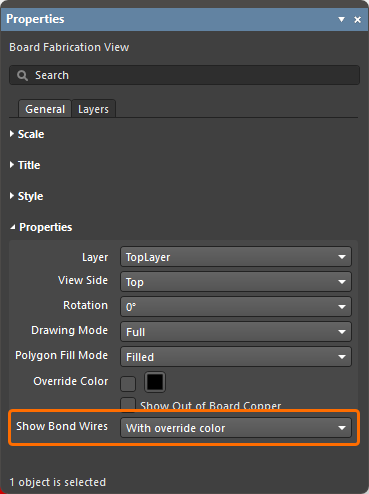 )
)패널의 Layers 탭에는 소스 PCB에서 사용 가능한 모든 레이어가 표로 나열됩니다. 선택한 뷰에서 각 레이어의 표시 여부를 전환하고 색상을 구성할 수 있습니다.
|
보드 제작 뷰를 선택했을 때의 Properties 패널에 있는 Layers 탭입니다. 이 뷰는 Bottom 레이어를 표시하도록 설정되어 있으며, 현재 추가로 표시되는 레이어는 없습니다. 이제 뷰에서 Top 및 Top Overlay 레이어가 활성화되었습니다. |


레이어의 그리기 순서는 목록에서의 순서에 따라 결정됩니다.  및
및  버튼을 사용하여 레이어의 상대적인 목록/그리기 순서를 지정합니다. 목록에서 활성화된 레이어 중 가장 위에 있는 레이어가 마지막에 그려지며, 목록에서 그다음 아래에 있는 활성화된 레이어 위에 표시됩니다. 나머지 레이어도 같은 방식으로 표시되므로 목록 순서가 그리기 순서를 나타냅니다.
 AI로 번역됨