
위치로 이동
Updated: August 07, 2018
기타 관련 리소스
Parent page: PCB 대화상자
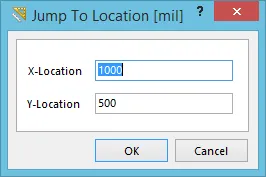 Jump To Location 대화상자.
요약
이 대화상자는 필요한 좌표를 지정하여 설계자가 설계 작업공간 내의 특정 위치로 빠르게 이동할 수 있도록 해줍니다.
액세스
이 대화상자는 PCB Editor와 PCB Library Editor 모두에서 접근할 수 있습니다:
-
PCB Editor - 메인 메뉴에서 Home | Grids and Units |
 » New Location을(를) 클릭합니다.
-
PCB Library Editor - 메인 메뉴에서 Home | Grids and Units |
 » New Location을(를) 클릭합니다.

옵션/컨트롤
- X-Location - 이 필드를 사용하여 이동하려는 위치에 대한 X 좌표를 지정합니다.
- Y-Location - 이 필드를 사용하여 이동하려는 위치에 대한 Y 좌표를 지정합니다.
 AI로 번역됨