
Подготовка выходных данных постобработки
Тип выходных данных PostProcess позволяет включать в состав выходных данных типы файлов, не являющиеся «родными» для Altium Designer. Он копирует целевые файлы из структуры каталогов проекта в папку, указанную в настроенном контейнере выходных данных Folder Structure.
Выходные данные PostProcess можно добавить в активный файл Output Job из меню элемента управления [Add New PostProcess Output] в области PostProcess Outputs файла или из подменю Edit » Add Post Process Outputs главных меню.

Добавление выходных данных PostProcess в файл Output Job
После добавления нового PostProcess Output щелкните правой кнопкой мыши по его записи в главном окне конфигурации задания, затем нажмите Configure, чтобы открыть диалог Copy Files List Setup. Используйте этот диалог, чтобы добавлять в OutJob несколько файлов или группы файлов.
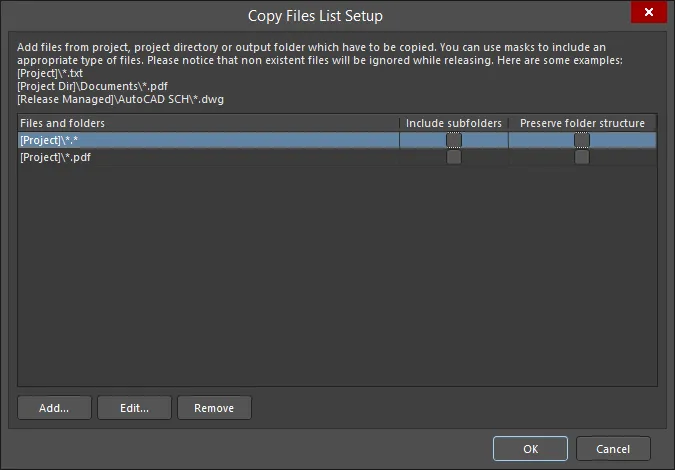
Диалог Copy Files List Setup
Options and Controls of the Copy Files List Setup Dialog
- Files and folders — отображает файлы и папки, которые будут скопированы.
- Include subfolders — включите, чтобы добавлять подпапки указанного файла или папки. Этот параметр доступен только после добавления файла или папки с помощью кнопки Add.
- Preserve folder structure — включите, чтобы при запуске генератора выходных данных сохранялась структура исходных папок. Этот параметр доступен только после добавления файла или папки с помощью кнопки Add.
- Add — нажмите, чтобы открыть диалог Build Macro Path dialog и найти/добавить путь к нужным файлам/папкам с использованием собранной макростроки.
- Edit — нажмите, чтобы открыть диалог Build Macro Path dialog, в котором можно отредактировать путь выбранных файлов/папок с использованием собранной макростроки.
- Remove — нажмите, чтобы удалить выбранные файлы.
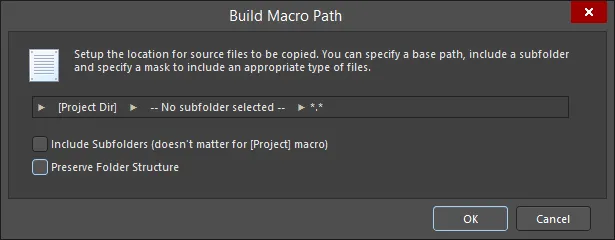
Диалог Build Macro Path
Options and Controls of the Build Macro Path Dialog
-
[Project] (первое поле) — нажмите, чтобы открыть подменю и сформировать нужный путь:
- [Project] — выберите, чтобы указать сам Project; при этом будут включены только документы, добавленные в проект Altium Designer.
- [Project Dir] — выберите, чтобы указать локальный каталог, содержащий проект.
- [Release Managed] — выберите, чтобы указать, что источник файла будет динамически определён последующим процессом project release.
-
Subfolder (центральное поле) — нажмите, чтобы открыть подменю и сформировать нужный путь:
- Use base path – путь к файлу — это исходное расположение, заданное в начальном параметре выше.
-
Choose subfolder – путь к файлу — это указанная поддиректория внутри пути Source. Введите путь к подпапке напрямую или перейдите к ней и выберите её с помощью кнопки
 .
.
- Filter (правое поле) — нажмите, чтобы открыть раскрывающийся список, где можно выбрать нужное расширение типа файла, либо вручную ввести требуемое расширение.
- Include Subfolders (doesn't matter for [Project] macro) — включите, чтобы фильтр маски применялся (и, следовательно, включал) файлы во всех подпапках.
- Preserve Folder Structure — включите, чтобы при запуске генератора выходных данных сохранялась структура исходных папок.
 Локализовано с помощью ИИ