
場所へ移動
Updated: 8月 07, 2018
その他の関連リソース
Parent page: PCBダイアログ
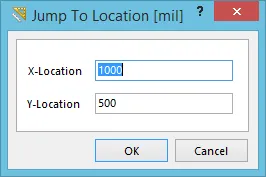 Jump To Locationダイアログ。
概要
このダイアログでは、必要な座標を指定することで、設計ワークスペース内の任意の位置へ素早くジャンプできます。
アクセス
このダイアログは、PCB Editor と PCB Library Editor の両方からアクセスできます。
-
PCB Editor - メインメニューから Home | Grids and Units |
 » New Location をクリックします。
-
PCB Library Editor - メインメニューから Home | Grids and Units |
 » New Location をクリックします。

オプション/コントロール
- X-Location - このフィールドを使用して、ジャンプしたい目的の位置の X 座標を指定します。
- Y-Location - このフィールドを使用して、ジャンプしたい目的の位置の Y 座標を指定します。
 AI で翻訳