
CR-5000에서 디자인 가져오기
Altium Designer에는 Import Wizard를 통해 Zuken® CR-5000™ 파일을 가져오는 기능이 포함되어 있습니다. 이 Wizard는 CR-5000 설계 파일을 Altium Designer 파일로 빠르고 간단하게 변환하는 방법입니다. Wizard는 가져오기 과정을 단계별로 안내하며, 프로젝트의 회로도와 PCB 부분을 모두 처리하고, 두 요소 간의 연관 관계도 관리합니다.
Zuken 바이너리 파일을 가져오기용으로 준비하기
Zuken CR-5000 Importer는 ASCII 파일이 필요하므로, 기본 Zuken CR-5000 바이너리 파일은 Import Wizard를 사용하기 전에 ASCII 형식으로 변환해야 합니다.
다음 단계에 따라 Zuken CR-5000 바이너리 PCB 데이터베이스 파일을 ASCII 파일로 변환하십시오:
-
바이너리 파일 <basename>.ftp을(를) ASCII 파일로 변환:
cdb디렉터리에서 DOS(또는 명령 스크립트) 명령 ftout.exe<basename>를 사용하여 <basename>.ftf을(를) 추출합니다. 예: C:\cr5000\bin\ftout.exe basename. -
바이너리 파일 <jobname>.pcb을(를) ASCII 파일로 변환:
pcb디렉터리에서 DOS(또는 명령 스크립트) 명령 pcout.exe<jobname>을 사용하여<jobname>.pcf을(를) 추출합니다. 예: C:\cr5000\bin\pcout.exe jobname.
Zuken CR-5000 회로도 바이너리 파일(*.sht)을 ASCII 형식(*.eds)으로 변환하려면 Zuken edifWriter.exe 유틸리티를 실행하십시오. 그러면 ASCII 형식 파일을 생성하기 위한 GUI가 열립니다.
Zuken CR-5000 Importer는 Zuken CR-5000 PCB 설계를 가져오기 위해 두 개의 ASCII 파일이 필요하며, 회로도를 가져오기 위해서는 ASCII 회로도 파일이 필요합니다.
- 배치 및 레이어 심볼, 레이어 수, 단위 등의 정보를 포함하는 ASCII 레이아웃 파일 (*.pcf)
- 설계에 사용된 풋프린트(라이브러리)의 ASCII 표현 (*.ftf)
- 회로도의 ASCII 표현 (*.eds, *.edf)
- 심볼의 ASCII 표현 (*.laf)
- 심볼의 ASCII 표현 (*.smb)
CR-5000 Importer 사용하기
Zuken CR-5000 설계 파일 가져오기 도구는 Altium Designer의 Import Wizard (File » Import Wizard)에서 Wizard의 Select Type of Files to Import 페이지에 있는 Zuken CR-5000 Design Files 옵션을 선택하여 사용할 수 있습니다. Wizard는 설계 파일(회로도 및 PCB)과 라이브러리 파일을 지정하는 옵션을 제공하며, 풋프린트와 PCB 레이아웃 모두에 대해 CR-5000에서 Altium Designer로의 레이어 매핑 옵션도 제공합니다.

Import Wizard - Zuken CR5000 Design Files
Zuken CR5000 Design Files

Zuken CR-5000 Importer는 ASCII 파일이 필요하므로 Import Wizard를 사용하기 전에 Zuken CR-5000 바이너리 파일을 ASCII로 변환해야 합니다.
다음 단계에 따라 Zuken CR-5000 바이너리 PCB 데이터베이스 파일을 ASCII 파일로 변환하십시오:
-
바이너리 파일
<basename>.ftp을(를) ASCII 파일로 변환: cdb 디렉터리에서 DOS(또는 명령 스크립트) 명령ftout.exe<basename>를 사용하여<basename>.ftf를 추출합니다. 예:C:\cr5000\bin\ftout.exe basename. -
바이너리 파일
<jobname>.pcb을(를) ASCII 파일로 변환: pcb 디렉터리에서 DOS(또는 명령 스크립트) 명령pcout.exe<jobname>을 사용하여<jobname>.pcf를 추출합니다. 예:C:\cr5000\bin\pcout.exe jobname.
Zuken CR-5000 회로도 바이너리 파일(*.sht)을 ASCII 형식(*.eds)으로 변환하려면 Zuken editWriter.exe 유틸리티를 실행하십시오. 그러면 ASCII 형식 파일을 생성하기 위한 GUI가 열립니다.
Zuken CR-5000 Importer는 Zuken CR-5000 PCB 설계를 가져오기 위해 두 개의 ASCII 파일이 필요하며, 회로도를 가져오기 위해서는 ASCII 회로도 파일이 필요합니다:
-
배치 및 레이어 심볼, 레이어 수, 단위 등의 정보를 포함하는 ASCII 레이아웃 파일 (
*.pcf) -
설계에 사용된 풋프린트(라이브러리)의 ASCII 표현 (
*.ftf) -
회로도의 ASCII 표현 (
*.eds, *.edf) -
심볼의 ASCII 표현 (
*.laf,*.smb)
-
심볼의 ASCII 표현 (
*.prf) -
컴포넌트 라이브러리의 ASCII 표현 (
*.cdf)
Select the Zuken CR-5000 Files to Import

Add를 클릭하여 프로세스에 포함할 Zuken 설계 파일을 선택하십시오. Remove를 클릭하면 선택한 파일을 삭제할 수 있습니다.
Select Footprint Libraries to Import

Add를 클릭하여 프로세스에 포함할 Zuken 라이브러리 파일(*.FTF)을 선택하십시오. Remove를 클릭하면 선택한 파일을 삭제할 수 있습니다.
Setting the General Options

General Options 페이지에서 일반 로그 보고 옵션을 설정하십시오.
General Settings에서 원하는 옵션(Log All Errors, Log All Warnings, Log All Events)을 활성화하십시오.
Log of Analyzing

Log of Analyzing 페이지에는 가져오는 Zuken 파일을 스캔하는 동안 발견된 오류/경고가 나열됩니다.
General Import Options

Wizard의 이 페이지에서 출력 프로젝트 구조를 검토하고 파일을 가져올 Output Directory을(를) 지정합니다. Browse Folder 아이콘을 사용하여 Output Directory을(를) 검색하고 선택하십시오.
Setting the Schematic Import Options

Wizard의 이 페이지는 회로도 가져오기 옵션을 설정하는 데 사용됩니다. 원하는 옵션을 활성화하십시오.
Power Ports names 및 Probes names 텍스트 상자를 편집할 수 있으며, 각 항목이 세미콜론으로 구분되도록 하십시오.
Setting the PCB Import Options

Wizard의 이 페이지에서 PCB 가져오기 옵션을 설정하십시오.
텍스트 상자에서 Testpoint names을(를) 편집할 수 있으며, 각 항목이 세미콜론으로 구분되도록 하십시오. Font 드롭다운을 사용하여 원하는 글꼴을 선택하십시오.
Current Board Layer Mapping

Wizard의 이 페이지에는 보드 레이어 매핑이 표시됩니다. 표시되는 정보에는 Sort Key, Zuken Layer 및 이에 연결된 Altium Designer Layer이(가) 포함됩니다. Altium Designer Layer에서 분홍색으로 강조 표시된 항목은 해당 Zuken Layer이(가) 가져와지지 않음을 의미합니다.
원하는 경우 일부 또는 모든 레이어에 대해 레이어 매핑을 편집할 수 있습니다. 열 머리글을 원하는 위치로 드래그하여 열을 재배치할 수 있습니다. 어떤 열이든 머리글을 클릭하여  또는
또는  에 접근한 다음, 각각 클릭하여 해당 열을 오름차순 또는 내림차순으로 정렬하십시오.
열 머리글 위에 마우스를 올리면 필터 아이콘( )이 나타납니다. 클릭하면 드롭다운이 열리며, 해당 열에 대한 필터 선택 항목을 고를 수 있습니다. 선택 항목은 다음과 같습니다:
- (All) – 클릭하여 해당 열의 모든 항목을 표시합니다.
-
(Custom) – 클릭하여 Custom AutoFilter 대화상자를 열고 해당 열에 대한 사용자 지정 필터를 지정합니다.

- (Blanks) – 클릭하여 해당 열에서 비어 있는 항목만 표시합니다.
- (Non blanks) – 클릭하여 해당 열에서 비어 있지 않은 항목만 표시합니다.
Current Footprints Layer Mapping

Wizard의 이 페이지에는 풋프린트 레이어 매핑이 표시됩니다. 표시되는 정보에는 Sort Key, Zuken Layer 및 이에 연결된 Altium Designer Layer이(가) 포함됩니다. Altium Designer Layer에서 분홍색으로 강조 표시된 항목은 해당 Zuken Layer이(가) 가져와지지 않음을 의미합니다.
원하는 경우 일부 또는 모든 레이어에 대해 레이어 매핑을 편집할 수 있습니다. 열 머리글을 원하는 위치로 드래그하여 열을 재배치할 수 있습니다. 어떤 열이든 머리글을 클릭하여 또는 에 접근한 다음, 각각 클릭하여 해당 열을 오름차순 또는 내림차순으로 정렬하십시오.
열 머리글 위에 마우스를 올리면 필터 아이콘()이 나타납니다. 클릭하면 드롭다운이 열리며, 해당 열에 대한 필터 선택 항목을 고를 수 있습니다. 선택 항목은 다음과 같습니다:
- (All) – 클릭하여 해당 열의 모든 항목을 표시합니다.
-
(Custom) – 클릭하여 Custom AutoFilter 대화상자를 열고 해당 열에 대한 사용자 지정 필터를 지정합니다.
- (Blanks) – 클릭하여 해당 열에서 비어 있는 항목만 표시합니다.
- (Non blanks) – 클릭하여 해당 열에서 비어 있지 않은 항목만 표시합니다.
Importing Progress
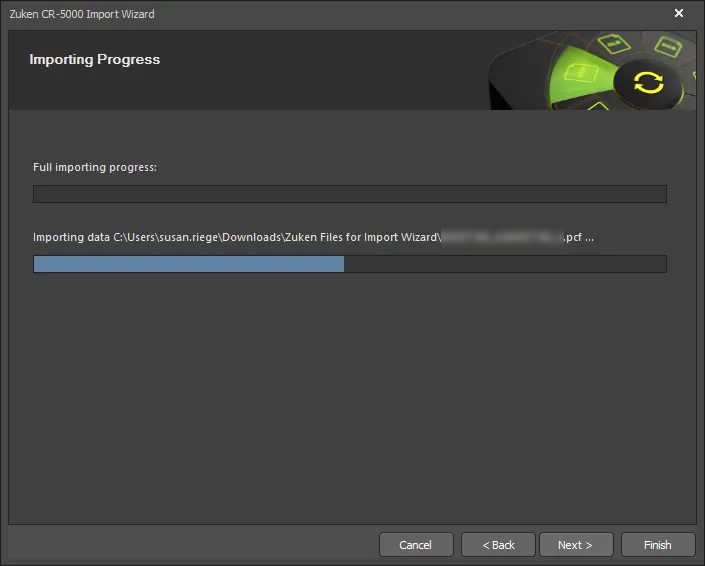
Wizard의 이 페이지에서는 녹색 진행률 표시줄이 가져오기 프로세스의 진행 상황을 보여주며, 프로세스가 계속되는 동안 각 파일도 나열합니다.
Closing the Wizard

Zuken CR5000 Import Wizard가 완료되었습니다. 관련 메시지와 함께 Messages 패널이 표시됩니다. Finish를 클릭하여 Wizard를 닫으십시오.
파일은 자동으로 생성되며 Projects 패널에서 사용할 수 있는 Altium Designer PCB 프로젝트(*.PrjPcb)로 그룹화됩니다.
Zuken CR5000 파일은 다음과 같이 변환됩니다:
-
Zuken CR5000 ASCII PCB Layout (
*.pcf) 파일은 Altium Designer PCB 파일(*.PcbDoc)로 변환됩니다. -
Zuken CR5000 ASCII 형식의 풋프린트 파일(
*.ftf)은 Altium Designer PCB 라이브러리 파일(*.PcbLib)로 변환됩니다. -
Zuken CR5000 ASCII 형식의 회로도 파일(
*.eds) 은 Altium Designer 회로도 파일(*.SchDoc) 및 회로도 라이브러리 파일(*.SchLib)로 변환됩니다. -
Zuken CR5000 ASCII 형식의 심볼 파일(
*.prf)은 회로도 라이브러리 파일(*.SchLib)로 변환됩니다. -
Zuken CR5000 ASCII 형식의 컴포넌트 라이브러리 파일(
*.cdf) 은 회로도 라이브러리 파일(*.SchLib)로 변환됩니다. -
가져오기 과정에서 경고가 생성된 경우, 경고를 표시하는
*.LOG파일이 생성됩니다.
Zuken CR5000 파일은 다음과 같이 변환됩니다:
-
Zuken CR5000 ASCII PCB Layout (*.pcf) 파일은 Altium Designer PCB 파일(*.PcbDoc)로 변환됩니다.
-
Zuken CR5000 ASCII 형식의 풋프린트 파일(*.ftf, *.laf)은 Altium Designer PCB 라이브러리 파일(*.PcbLib)로 변환됩니다.
-
Zuken CR5000 ASCII 형식의 회로도 파일(*.eds, *.edf, *.smb) 은 Altium Designer 회로도 파일(*.SchDoc) 및 회로도 라이브러리 파일(*.SchLib)로 변환됩니다.
 AI로 번역됨