
Xpedition에서 디자인 가져오기
Altium Designer는 Siemens EDA® Xpedition™(이전 명칭: Expedition®) 소프트웨어에서 설계된 바이너리 형식의 PCB 및 PCB 라이브러리를 가져올 수 있습니다.
Altium Designer의 Import Wizard(File » Import Wizard)를 통해 Importer를 실행합니다.
Xpedition 파일 Importer는 Altium Designer의 Import Wizard(File » Import Wizard)에서 Wizard의 Select Type of Files to Import 페이지에 있는 Mentor Expedition Designs and Libraries 옵션을 선택하여 사용할 수 있습니다.

Import Wizard에서 Mentor Expedition Designs and Libraries를 선택하여 Xpedition 파일을 가져옵니다.
Import Wizard - Mentor Expedition Designs and Libraries
Mentor Expedition Designs and Libraries

Importing Mentor Expedition Design Files

Add을(를) 클릭하여 프로세스에 포함할 Xpedition 설계 파일을 선택합니다. Remove을(를) 클릭하면 선택한 파일을 삭제할 수 있습니다.
Importing Mentor Expedition Library Files

Add을(를) 클릭하여 프로세스에 포함할 Xpedition 라이브러리 파일(*.lmc)을 선택합니다. Remove을(를) 클릭하면 선택한 파일을 삭제할 수 있습니다.
Current User Layer Mappings

원하는 경우, Wizard의 이 페이지에서 일부 또는 모든 Xpedition PCB 설계/라이브러리 파일에 대해 레이어 매핑을 편집할 수 있습니다. 열 기준으로 그룹화하려면 열 머리글을 표 상단에 지정된 영역으로 드래그하십시오.
그리드 영역에서 마우스 오른쪽 버튼을 클릭하면 다음 하위 메뉴를 사용할 수 있습니다.
-
Load Layer Mapping – Load Configuration 대화상자를 열어 원하는 매핑 파일을 로드하도록 선택합니다.
- Save Layer Mapping – Choose File to Save Layer Mapping 대화상자를 열고 레이어 매핑을 저장할 경로를 선택합니다.
-
Toggle selected – 가져오기에 포함/제외하도록 선택된 레이어를 전환하도록 선택합니다.
Create extruded body from 드롭다운을 사용하여 돌출 바디(extruded body)에 사용할 원하는 레이어를 선택합니다.
Import Pad/Via Template names 옵션을 사용하여 패드/비아 템플릿 이름 가져오기를 제어합니다:
-
옵션이 비활성화되면, 패드/비아 속성에 기반한 기본 자동 이름이 IPC-7251/7351 Padstack naming conventions (여기에 설명됨)에 따라 사용됩니다.
-
옵션이 활성화되면, Xpedition의 원래 padstack 이름이 사용됩니다.
Output Projects
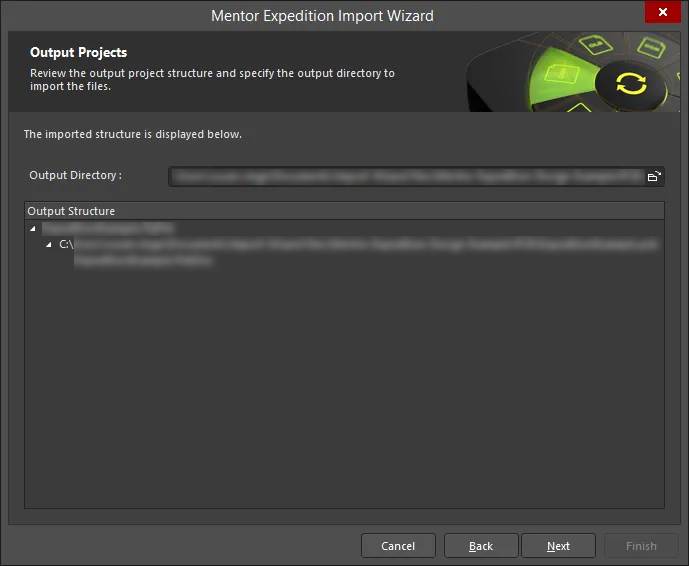
Wizard의 이 페이지에서 출력 프로젝트 구조를 검토하고 파일을 가져올 출력 디렉터리를 지정합니다. Browse Folder 아이콘을 사용하여 Output Directory을(를) 검색하고 선택합니다.
Executing Import Process
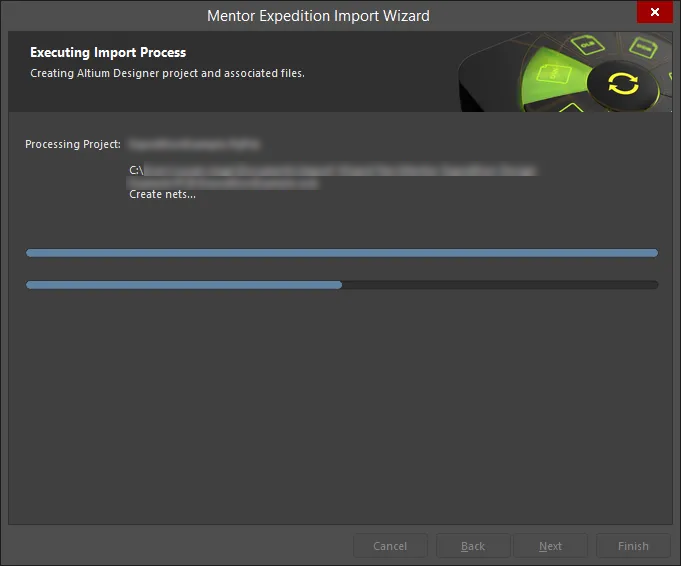
Wizard의 이 페이지에서는 녹색 진행률 표시줄이 가져오기 프로세스의 진행 상황을 표시하며, 프로세스가 계속되는 동안 각 파일도 함께 나열됩니다.
Closing the Wizard

Mentor Expedition Import Wizard가 완료되었습니다. Finish을(를) 클릭하여 Wizard를 닫습니다.
Importer 사용 시 참고 사항
다음 참고 사항은 Importer의 기능을 요약합니다:
-
Xpedition에서 PCB 설계 또는 라이브러리는 단일 파일로 존재하지 않고, 상호 의존적인 폴더와 파일 구조로 존재합니다. Altium Designer의 Importer가 PCB 또는 라이브러리를 성공적으로 가져오려면 전체 폴더/파일 구조가 온전하게 유지되어야 합니다.
-
PCB 설계 파일을 가져오려면, 설계 구조에서
*.prj또는*.pcb파일을 선택합니다. 다음 사항에 유의하십시오:-
*.prj파일을 선택하면.xml제약(Constraint) 파일도 함께 인식되며, Xpedition 제약 조건이 가져온 PCB 파일에서 Altium Designer 규칙으로 변환됩니다. -
*.pcb파일을 선택하면 Xpedition 제약 조건이 변환되지 않습니다. Xpedition 규칙 정의는*.log파일의 한 섹션에 모두 열거되므로, 이 목록을 검토한 뒤 Altium Designer에서 적절한 규칙을 생성할 수 있습니다.
-
-
라이브러리 파일을 가져오려면, 라이브러리의 최상위 폴더에 있는
*.lmc파일을 선택합니다. -
가져오기 중 발생한 문제는
*.log파일 보고서에 자세히 기록됩니다. -
Import Wizard 은(는) 사용자 정의 패드 형상을 지원합니다. 이러한 패드를 Altium Designer로 가져오면 사용자 정의 형상 유형의 패드로 가져와집니다. Altium Designer에서 Customizing a Pad Stack에 대해 더 알아보십시오.
-
Import Wizard 은(는) Xpedition 보드 설계에 정의된 사용자 정의 써멀 릴리프(thermal relief)를 지원합니다. 또한 Xpedition에서 미리 정의된 ‘8-leg’(8-spoke) 써멀 릴리프가 정의된 경우, 이것도 사용자 정의 써멀 릴리프로 가져와집니다. 단, Xpedition에서 지원하는 스파이크(spike)의 사용자 정의 회전은 Altium Designer로 가져올 때 지원되지 않습니다. Altium Designer에서 Defining Custom Thermal Reliefs에 대해 더 알아보십시오.
-
Import Wizard 은(는) Xpedition에서 패드 모서리 반경/모따기(radius/chamfer)가 절대값으로 정의된 둥근/모따기 처리된 직사각형 패드를 지원합니다. 이러한 패드를 Altium Designer로 가져오면 Corner Radius 속성이 절대값으로 정의됩니다. Altium Designer에서 Working with Pads & Vias에 대해 더 알아보십시오.
-
Import Wizard 은(는) Xpedition 설계/라이브러리를 가져올 때 'Round Donut' 패드 형상을 지원합니다.
-
정의된 패드 홀 공차는 Xpedition 라이브러리를 가져올 때 포함됩니다.
-
풋프린트에서 복제된 텍스트 문자열(예: 장착 홀의 'A')은 Xpedition 라이브러리를 가져올 때 지원됩니다. 원본 문자열, 복제본 및 관련 파라미터가 가져와집니다.
-
Placement Outline 레이어에서 풋프린트에 대해 정의된 폭 0(Zero-width) 라인은 Xpedition 라이브러리를 가져올 때 지원됩니다.
 AI로 번역됨
